Skip to Main Content
Sam's Club
Sam's Club
All Departments
All Services
Customer reviews for SAMSUNG 43" Class U8000F Series 4K Crystal UHD Smart TV for
SAMSUNG 43" Class U8000F Series 4K Crystal UHD Smart TV
4.5 out of 5 stars
stars
3,746 ratings3,647 reviews
  1. 5 stars71% (2,668)
  2. 4 stars15% (575)
  3. 3 stars6% (240)
  4. 2 stars3% (126)
  5. 1 star4% (137)

Member photos

  • +1153 images
Sort by |
Showing 1,011-1,020 of 3,647 reviews
Jun 10, 2026
Reviewer name: Melody
4 out of 5 stars
4 out of 5 stars review

Smart TV U8000F - Nice picture, terrible remote

[This review was collected as part of a promotion.] No complaints about the TV itself - It's slim and light. The picture is very clear and bright; the sound is acceptable.  What annoys me is having to set up an account in order to add apps. Also, the remote is awful. The buttons are simply too small and there's no microphone on it. Really? I ordered a new remote and already returned it. Same as the one that came with the TV but it had the microphone icon. Same small buttons and ridiculous way to control the sound. I found the microphone to be pretty useless. It opens a browser on the TV. It doesn't take you to the shows you want to watch like the ROKU stick does. I downloaded the SmartThings app to my Samsung phone so I can use it as the TV remote.However, trying to "share" it to another phone is a nightmare. WHY does Samsung make user interface so difficult? This TV might be the last Samsung product I purchase.

Review from Samsung US
Helpful?22SEGSGR5O6Z15524966302
Jun 5, 2026
Reviewer name: All Samsung
4 out of 5 stars
4 out of 5 stars review

TV is GREAT. Remote is HORRIBLE
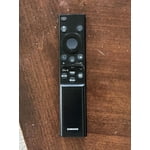
[This review was collected as part of a promotion.] This is my 6th or 7th Samsung TV and we have been happy with them all. But the remote on this newest one is terrible, hard to use and doesn't always respond. Nor does it seem to have a speak function.

Review from Samsung US
Helpful?22SEGSGR5O6Z15524966302
Jun 1, 2026
Reviewer name: I love Maddie
5 out of 5 stars
5 out of 5 stars review

Great Television that won't break bank

[This review was collected as part of a promotion.] The television is a great middle of the road option for people who want a big television with good resolution and still maintain a slick design that pairs well with any aesthetic. The televisions brightness is clear even in well lit rooms and its sound is vibrant and clear. And if you care about your digital security; dont be. Like other Sony products, their security is top notch when it comes to keeping your data private.

Review from Samsung US
Helpful?22SEGSGR5O6Z15524966302
Apr 7, 2026
Reviewer name: Love grands
4 out of 5 stars
4 out of 5 stars review

Great, except...

[This review was collected as part of a promotion.] Really enjoy the TV. Great picture and features. Only negative is that it seems to default to Samsung TV plus when you turn it on. I haven't figured out how to set it to default to the last input source used. The vast majority of the time we are using our Verizon FIOS cable box on HDMI. It's a pain to have to use two different remotes - cable and TV to get to our preferred input source.

Review from Samsung US
Helpful?22SEGSGR5O6Z15524966302
Apr 20, 2026
Reviewer name: Alan
3 out of 5 stars
3 out of 5 stars review

it's just OK

[This review was collected as part of a promotion.] No matter what settings we try, in dark scenes in movies you can't see well at all. Gamma is turned all the way up etc. Also, after a recent software update now when I turn on the TV it goes to the last station and starts to play, and then it freezes. To get it to work I have to go out of the menu and back in to get the channel I'm trying to watch to work. This is a very new TV and I've had several Sumsung TVs before, this is the only one with these problems. Otherwise it's a good TV, I really like Samsung TV overall.

Review from Samsung US
Helpful?22SEGSGR5O6Z15524966302
reply from Samsung Advisor

Hi Alan, Thank you for your feedback. Please ensure your TV is running the latest Firmware, version 1132.0. Go to Settings> Support> Software Update. If this firmware version is not yet available on your TV, you can download the update on a USB drive and manually update your TV: 1. On Samsung's website (upper right corner), go to: Support > Manual & Software > Find your TV model, and click on the Firmware – Upgrade File. 2. When the file has finished downloading, locate it and then unzip it. There is normally one folder inside but there may be multiple files. 3. Copy or move all of the files that were included in the zip file to a USB flash drive, but do not place them inside any other folders. If you place the software folders inside a folder on the USB flash drive, the TV or monitor will not find them. 4. Connect the USB drive containing the software upgrade into a USB port on your device. 5. Using your device's remote, navigate to and select Settings, then select All Settings, and then select Support. Select Software Update, select Update Now, and then select Yes if prompted. Your device will search the USB drive for update files. Follow the on-screen instructions to install the updated software. Updates usually take a few minutes; please do not turn off the TV until the update is complete. When the update is finished, it will restart automatically. If you need additional support, Samsung is here to help. Please call us at 1-800-SAMSUNG, available 8AM – 9PM EST Mon – Fri, 8AM – 6PM Sat – Sun. You can also chat with a LiveChat agent by clicking the ‘Support’ link on our website. ~ Samsung Advisor

Jun 20, 2026
Reviewer name: stoelman
3 out of 5 stars
3 out of 5 stars review

OK picture

[This review was collected as part of a promotion.] some trouble to spectrum box and TV to work together . On and Off do not work with the Spectrum box No Controls on TV body It would be great to have a ON/OFF switch Picture not good enough for your Main TV

Review from Samsung US
Helpful?22SEGSGR5O6Z15524966302
reply from Samsung Advisor

Hi stoelman, Thank you for your review. You can use the TV's remote control to control external devices that are connected to the TV by an HDMI cable and that support Anynet+ (HDMI-CEC). If you’d like your externally connected devices to turn on/off when you turn your TV on/off, please make sure Anynet+ is enabled. To turn on Anynet+ (HDMI-CEC), go to: Settings > All Settings > Connection > External Device Manager > Anynet+ (HDMI-CEC) = ON. Finally, please know that there is an on/off button on your TV below the Samsung logo at the bottom of your TV. If you need additional support, Samsung is here to help. Please call us at 1-800-SAMSUNG (8AM – 9PM EST Mon – Fri, 8AM – 6 PM Sat – Sun), or reach us via text 24/7. You can also visit ‘Support’ on our website for: • Live Chat • Manuals, Software, & Warranty Info ~ Samsung Advisor

Jul 5, 2026
Reviewer name: JC5162
4 out of 5 stars
4 out of 5 stars review

Solid TV

[This review was collected as part of a promotion.] Great picture, although I noticed a few pixels were damaged, but they're hardly noticed. Was excited about Samsung TV but it has maturing to do. Good foundation but not as easily used as the other streaming apps.

Review from Samsung US
Helpful?22SEGSGR5O6Z15524966302
May 11, 2026
Reviewer name: Fr8Train
4 out of 5 stars
4 out of 5 stars review

Cool features

[This review was collected as part of a promotion.] I like alot of the new upgrades with the smart services being able to play Xbox games etc. But I don't like the smart remote very much. I liked the older style also why can't I watch antenna TV anymore? Make the older style remote for easier navigation for all the TV upgrades

Review from Samsung US
Helpful?22SEGSGR5O6Z15524966302
Jul 27, 2026
Reviewer name: kingk
5 out of 5 stars
5 out of 5 stars review

Great all round tv!
[This review was collected as part of a promotion.] The brightness of the product is amazing, the responsiveness is perfect, there is beautiful contrast within the images that I have on the screen, and it's an amazing product I recommend this to everybody.

Review from Samsung US
Helpful?22SEGSGR5O6Z15524966302
Aug 20, 2025
Reviewer name: Davidpuddy
1 out of 5 stars
1 out of 5 stars review

Most complicated TV to use.

[This review was collected as part of a promotion.] Always had Samsung TVs. Got this one home and it was a nightmare from the time I turned it on. The remote is a little black stick with only a few buttons and symbols and you can't tell what any are for. The set-up was complex, and it took forever to get through the confusing registration process. Then the remote would bounce around the apps from left to right and back again and not stop. I finally boxed it up and took it back.

Review from Samsung US
Helpful?22SEGSGR5O6Z15524966302
reply from Samsung Advisor

Hi Davidpuppy, Thank you for your feedback. We hope you’ll consider Samsung again in the future. If you do, we’re always here to help with setup and support. Reach us at 1-800-SAMSUNG (8AM – 12AM EST, 7 days a week), or visit our website to chat live and access manuals or software. ~ Samsung Advisor