Skip to Main Content
Sam's Club
Sam's Club
All Departments
All Services
Customer reviews for SAMSUNG 43" Class U8000F Series 4K Crystal UHD Smart TV for
SAMSUNG 43" Class U8000F Series 4K Crystal UHD Smart TV
4.5 out of 5 stars
stars
3,388 ratings3,289 reviews
  1. 5 stars72% (2,429)
  2. 4 stars15% (520)
  3. 3 stars6% (219)
  4. 2 stars3% (101)
  5. 1 star4% (119)

Member photos

  • +1024 images
Sort by |
Showing 991-1,000 of 3,289 reviews
May 11, 2026
Reviewer name: LizzeteA
4 out of 5 stars
4 out of 5 stars review

​Great 4K TV

[This review was collected as part of a promotion.] Good picture, easy to use, and looks nice. I was worried it wouldn't be bright enough for my living room since I have big windows, but it's been perfectly fine. The remote is a little small and takes a second to learn, but once you get it, it's fine. For a 2025 model, it feels very modern and fast. No complaints so far.

Review from Samsung US
Helpful?22SEGSGR5O6Z15524966302
Mar 24, 2026
Reviewer name: Josh1977
5 out of 5 stars
5 out of 5 stars review

Awesome Samsung TV

[This review was collected as part of a promotion.] I absolutely love my Samsung TV. The picture is clear and crisp. The colors are vibrant. The sound is out of this world! Plus you get the Samsung channels for free! Highly recomend the Samsung TV. Two thumbs up!

Review from Samsung US
Helpful?22SEGSGR5O6Z15524966302
Mar 23, 2026
Reviewer name: Roi C
5 out of 5 stars
5 out of 5 stars review

Crystal Clear Picture and Incredible Value – Love

[This review was collected as part of a promotion.] I'm really impressed with this TV. The 75” screen makes a huge difference when watching movies, sports, or just regular TV. The picture is super clear with great color and sharp detail, especially when watching 4K content. Setup was pretty straightforward and didn't take long at all. The smart features are easy to use and all the main streaming apps work smoothly. Everything loads quickly and the interface is simple to navigate. For the size and price, I honestly think it's a great value. If you're looking for a big TV with a clean, crisp picture and easy setup, this one is definitely worth it. Very happy with the purchase.

Review from Samsung US
Helpful?22SEGSGR5O6Z15524966302
Feb 22, 2026
Reviewer name: jlsteelers1122
5 out of 5 stars
5 out of 5 stars review

Best features on television I've ever seen

[This review was collected as part of a promotion.] I love this television pollution is excellent it automatically changes the brightness for the lights in the room contrast but for the movies Home Videos the viewing is wonderful . the resolution on this television even the cheesiest movies look great the refresh rate it's a slow with the remote but it does everything well and better than the previous versions of the televisions I own . I have five Samsung televisions and this is the best of purchased so far .

Review from Samsung US
Helpful?22SEGSGR5O6Z15524966302
Nov 16, 2025
Reviewer name: Anonymous
4 out of 5 stars
4 out of 5 stars review

I think the television has great features, however

[This review was collected as part of a promotion.] It's a great television it's really awesome it just takes time to get used to using the different functions on the remote. It is nice in a way not to have very many buttons all over the remote that are cumbersome and getting away however you have to drill down so to speak on some of your items in order to get to what you're looking for. The first two weeks that I had the television I was extremely frustrated with it because I couldn't get to the antenna programs until I learned I was doing something wrong. I'm running with low or budget internet so sometimes I don't get a very solid picture, but I've made some changes to my internet which now I get great pictures all the time. I would tell you if you could add a couple more buttons to the controller the remote control so that it could be used a little bit easier it would be more user friendly if you will someone who is a little older like myself who is 61 years old. That would be my only suggestion.

Review from Samsung US
Helpful?22SEGSGR5O6Z15524966302
May 20, 2026
Reviewer name: CDH53
5 out of 5 stars
5 out of 5 stars review

Great resolution

[This review was collected as part of a promotion.] My Samsung 55 inch smart TV is the absolute best TV I have owned. It has a user friendly remote, the picture is always clear with great resolution and brightness. I enjoy the smart TV for streaming movies, I can also use it for internet when necessary. It is a U55U8000F TV. This is my 3rd Samsung TV. I would not buy any other brand. Thank you.

Review from Samsung US
Helpful?22SEGSGR5O6Z15524966302
May 20, 2026
Reviewer name: Evie
3 out of 5 stars
3 out of 5 stars review

Some issues I've found

[This review was collected as part of a promotion.] I like the tv, however it is difficult to set the tv's start up channel. I finally got it so I don't have to use 2 remotes to get to regular stations. I have Comcast remote & tv remote. Another issue is that every once in a 5, when I turn the tv on, there is no sound. It's a pain to get the tv remote and toggle through the options to get the sound back on. Outside of those flaws, the tv is ok.

Review from Samsung US
Helpful?22SEGSGR5O6Z15524966302
reply from Samsung Advisor

Hi Evie, Thank you for your review and for sharing your experience with your U8000F TV. If you’re not hearing any sound, whether using TV speakers or an external audio device, here are several steps that can help get things working again. 1. Start with Basic Checks • Make sure the TV isn’t muted and the volume is turned up. • If using an external audio device, ensure it’s powered on, set to the correct source, and the volume is turned up there as well. • Unplug your TV for 30 seconds, then plug it back in and power it on. 2. HDMI ARC / eARC Connection • Use a certified High-Speed HDMI cable with Ethernet. Connect it to the HDMI eARC ports on both the TV and the soundbar/receiver. • Enable these settings: o Settings > All Settings > Sound > Expert Settings > HDMI eARC Mode = Auto o Settings > All Settings > General & Privacy > External Device Manager > Anynet+ (HDMI-CEC) = On • Check the digital audio format: Settings > All Settings > Sound > Expert Settings > Digital Output Audio Format o If you're not sure what your connected device supports, set it to Auto. 4. Bluetooth Audio Connection • Pair your Bluetooth device: Settings > All Settings > Sound > Sound Output > Bluetooth Speaker List • If your Bluetooth device doesn’t appear or won’t connect, move it closer to the TV, ensure it’s in pairing mode, and select Scan. • If paired but no sound, unpair the device and try reconnecting. 5. Wi-Fi / Wireless Speakers • Confirm the speakers and the TV are on the same Wi-Fi network. Use: Settings > All Settings > Sound > Sound Output > Wi-Fi Speaker Surround Setup • Reboot both the TV and the Wi-Fi speakers, and check your router for connection strength. 6. Other Helpful Tips • Run a Sound Test: Settings > Support > Device Care > Self Diagnosis > Sound Test • Update TV firmware to rule out compatibility issues: Settings > Support > Software Update > Update Now • If using a cable box or external streaming device, double-check that the device’s audio output settings are set to HDMI or the appropriate output. If you still don’t hear sound after following these steps, please don’t hesitate to reach out so we can assist further. You can call Samsung Support at 1-800-SAMSUNG, 8AM – 9PM EST Mon – Fri, 8AM – 6PM Sat – Sun. Our LiveChat agents are also available by clicking the ‘Support’ link at Samsung.com. ~ Samsung Advisor

Apr 20, 2026
Reviewer name: JayByrd
5 out of 5 stars
5 out of 5 stars review

Great TV

[This review was collected as part of a promotion.] I love this TV it is awesome as such great features and such a wonderful sharp picture . I love the resolution on this thing it is phen omen al . the brightness levels on this TV is just out of this world the contrast is spot on refresh rate on this TV is so awesome I love viewing any movie on this TV .

Review from Samsung US
Helpful?22SEGSGR5O6Z15524966302
May 5, 2026
Reviewer name: MARTYWADD
5 out of 5 stars
5 out of 5 stars review

Amazing TV for the price!
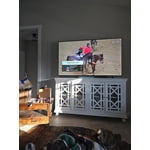
[This review was collected as part of a promotion.] Such an easy setup! I only own Samsung products.. and being able to use the Smart Things app helps immensely! The clarity of the screen.. vivid colors.. and sound are impeccable! I highly recommend!

Review from Samsung US
Helpful?22SEGSGR5O6Z15524966302
May 21, 2026
Reviewer name: Rivbass
5 out of 5 stars
5 out of 5 stars review

I love it

[This review was collected as part of a promotion.] Great resolution, I've been playing ps5 for a while and I missed a lot of good stuff I didn't see before. Right now I'm playing every game again cause if it. I love this tv, great value and super graphics.

Review from Samsung US
Helpful?22SEGSGR5O6Z15524966302