Skip to Main Content
Sam's Club
Sam's Club
Member ratings & reviews for
Epson WorkForce ET-3750 Special Edition EcoTank All-in-One Printer with Bonus Black Ink
4.2 out of 5 stars
stars1,155 ratings1,126 reviews
  1. 5 stars57% (657)
  2. 4 stars21% (244)
  3. 3 stars11% (122)
  4. 2 stars5% (60)
  5. 1 star6% (72)

Member photos

  • +12 images
Sort by |
Showing 411-420 of 1,125 reviews
Nov 14, 2017
TexCT
5 out of 5 stars review

Pleasantly Surprised

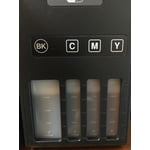
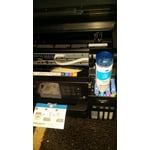
To be honest I was hesitant about trying the Epson printer, for I haven't had good luck with them in the past. But I was pleasantly surprised with Epson ET-3750. Epson has always been known for there outstanding color performance and this model is no exception. The color quality is crisp and clean and when used on photo paper the images are truly picture perfect. The speed at which it prints is great and there is no bleeding of ink when it comes to font. Right out of the box it makes a great impression with its sleek and professional appearance. You are guided through its easy setup with simple to follow directions, from loading the ink tanks to connecting it wirelessly or wired. Finding a place to put the printer is made easier with a control panel that can be angled. And lets not forget the fillable ink tanks that DO NOT need removing to be filled. What a fantastic idea! All around the Epson ET-3750 is a great machine that outperforms my expectations. It shows that it can get the job done quickly and in style and give you many pages of fine quality. “This is a review for the Epson WorkForce ET-3750 EcoTank All-in-One Printer that I received free of charge to do a beta test and review.”

Review from epson.com
Helpful?5HORJINKF4CN15315553577
Nov 13, 2017
AMOmomOF3
4 out of 5 stars review

Nice crisp pictures

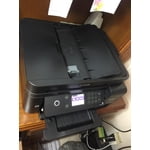
I was on the fence about this printer as we took it out of the box to set it up. It's very small, which is great if you don't have the space. It was pretty easy to get set up, but we did have one little issue. For some reason, after filling the tray with paper, it kept giving an error that there was no paper. We finally got it working after about 20 minutes of the same error. Still not sure exactly what happened. I thought for sure this printer was going to use massive amounts of ink to print photos. I was wrong. It really is eco-friendly. The only things I would change are the tiny screen and that it isn't a touch screen. It was a little frustrating trying to input the WiFi password and accidentally hitting the wrong button and having to start completely over. (user error, of course. But that is a great reason to update to a touch screen!) After having used this printer to print out full color photos as well as just text, I have decided this is in my top 3 favorite printers I have ever owned. It used hardly any ink to print multiple full color pages of photos. Even on regular paper, as opposed to photo paper, the pictures looked great! I have to say, my opinion changed drastically after we started printing things. It's true....sometimes big things come in small packages. This is a review for the Epson WorkForce ET-3750 EcoTank All-in-One Printer that I received free of charge to do a beta test and review.

Review from epson.com
Helpful?5HORJINKF4CN15315553577
Apr 9, 2018
CFHVancouver
5 out of 5 stars review

Very easy set up

I've only had the printer for a couple of days. This replaces the ET-2650. Big step up. The printer installed flawlessly on wireless network and Apple AirPrint. If it performs as well as its predecessor, I'll love it. Printers are always the worst, but Epson seems to have made a breakthrough with the ET series. Really liked the new ink loading process. I also like the relatively small footprint for a home office.

Review from epson.com
Helpful?5HORJINKF4CN15315553577
Mar 27, 2019
Shellyl
4 out of 5 stars review

Very easy to set up although lenghty

I have had 4 different brands of printers in 2 years we seem to have trouble printing wirelessly from more than 1 device. We are a mixed network of windows, android, and mac. So far I am impressed with the ease of use from more than one device. Also the print speed is great. A lot faster than my last 2 printers that were HP and Cannon.

Review from epson.com
Helpful?5HORJINKF4CN15315553577
Jan 11, 2020
Jere bear
5 out of 5 stars review

Its great!

It's great, everything you'd want in a home printer. Small and compact but still copies and scans.Hooks up to your WiFi easy. The bottles were easy to use. the driver was Easy to download from the internet. It was really easy to print right from my iPhone. The print quality isn't supper stellar so if you need something a little better pay another $100 to get higher res on your prints. All in all it great.

Review from epson.com
Helpful?5HORJINKF4CN15315553577
Apr 6, 2019
M Murphy
5 out of 5 stars review

Ink Cost

I have used a Hewlett Packard printer for years, the cost of the ink cartridges became outrageous. After careful research, I found this Epson model with refillable ink wells, this innovation has cut our home business printing cost by 3/4, Well done Epson!! Outstanding performance!

Review from epson.com
Helpful?5HORJINKF4CN15315553577
Jun 25, 2019
GerryP55
5 out of 5 stars review

Love it

Bought this printer about a month ago. It is working great. I'm a senior and not tech savvy so I tried to install the epson software . That was the hardest part. I have an apple computer so I called my friend that always helps me with computer things. I didn't download the software properly, so he removed it and said there was no need to downland any of the epson software. It works perfectly. Not sure if you have a windows computer if that would be the same. Printed lots of photos and very happy with the quality. Also had a little problem connecting to the internet but the epson customer service walked me through that.

Review from epson.com
Helpful?5HORJINKF4CN15315553577
Oct 24, 2020
alvarexo
5 out of 5 stars review

I LOVE this printer.

I've had this printer for a year and I am soooooo glad I bought it. I thought it was kind of pricey but it's so worth it. I have had two other printers before this one and they gave me problems every single time. They ran out of ink, they got paper jams, they always gave me issues. I literally wanted to toss those out the window. This one consistently works well and I don't get frustrated anymore when I need to print. It's super reliable so even if I have to print something last minute I know it'll work. Also, I haven't had to change the ink once since I bought it. It came with ink though, so it's cool if I have to eventually. I cannot say enough good things about this printer. I love it so much and would totally recommend. I'm a teacher by the way. So I use it for teaching purposes.

Review from epson.com
Helpful?5HORJINKF4CN15315553577
May 20, 2018
Kolb
5 out of 5 stars review

Easy to setup

Just finished setup and have not used the printer except to print the test page, check network connection page and Epson connect page - so far everything had gone nicely with no difficulties. Thanks for making it so easy. One suggestion, put serial number on back of printer rather than the bottom of printer. It makes it easier to access when it is needed. Ken

Review from epson.com
Helpful?5HORJINKF4CN15315553577
Nov 13, 2019
4EpsonUser2
5 out of 5 stars review

Replacement for an aging Printer

I just bought this a few days ago. It was an easy set-up, everything is on paper as well as on the screen instruction. Epson made sure that it's foolproof even in my laptop when I downloaded the Event Manager, application went through and searched the printer. I previously added the printer into my network before I downloaded the Event Manager, it only took a few minutes including auto install of a new firmware.

Review from epson.com
Helpful?5HORJINKF4CN15315553577