Skip to Main Content
Sam's Club
Sam's Club
Member ratings & reviews for
Epson WorkForce ET-3750 Special Edition EcoTank All-in-One Printer with Bonus Black Ink
4.2 out of 5 stars
stars1,155 ratings1,126 reviews
  1. 5 stars57% (657)
  2. 4 stars21% (244)
  3. 3 stars11% (122)
  4. 2 stars5% (60)
  5. 1 star6% (72)

Member photos

  • +12 images
Sort by |
Showing 421-430 of 1,125 reviews
May 11, 2019
HBPaulman
5 out of 5 stars review

Fast and easy setup and get rid of expensive ink cartridges.

Needed a good, reliable color printer for several users, for personal and light business use. Wifi connectivity makes it easy to print from any electronic device. Warm up and shut down time is quick, so no waiting around. My family is so happy with this printer! The compact all-in-one design is a great space saver. And I am happy to say goodbye to the expensive ink cartridges that the printer companies hold you hostage to. Make the investment once, and you are set for years of hassle-free and cost-effective printing. Thank you Epson! You solved the problem!

Review from epson.com
Helpful?5HORJINKF4CN15315553577
Mar 4, 2019
Labhunt
5 out of 5 stars review

Great Home Office Printer

I bought the Epson to replace my HP Photosmart printed. I was so tired of paying such high cost for ink. With the Epson, the ink is much less expensive; the printer is faster and actually has a smaller foot print. I don't use the print for photo prints or anything high quality, but it does a terrific job with all my business printing needs.

Review from epson.com
Helpful?5HORJINKF4CN15315553577
Jul 22, 2019
RandyB
5 out of 5 stars review

Economy cost printer

I've been in IT for many years and have seen many printers. Inkjets are notoriously costly per page cost for ink. This is an excellent printer output, with minimal ink costs per page. An easy way to install to refill the ink, non-messy way. It has very good speed per page output. Only thing I wish it had was a page input access on the back to handle pre-cut label pages like Avery labels. Otherwise the label may peel off using the normal tray and get stuck inside.

Review from epson.com
Helpful?5HORJINKF4CN15315553577
Nov 19, 2019
ranalot
4 out of 5 stars review

Easy setup, decent print quality, easy controls.

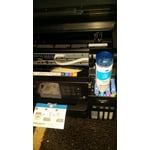
I just set this up so I don't have any long term experience; however it was easy to set up, found serial number automatically, ink takes a little bit of time but high capacity refillable feature is more than worth 15 minutes of inserting bottles and waiting for machine to load the ink. Comprehensive series of steps to set up print quality which may have dealt with some issues others have complained about. Look forward to writing another review in a few months. Hope it will be as positive as this one.

Review from epson.com
Helpful?5HORJINKF4CN15315553577
Nov 15, 2017
earlbert
5 out of 5 stars review

Great Multifuntion Printer

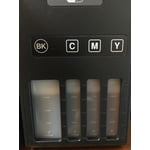
Setting this printer up was easy as with all printers. The cartridge- free ink is the main feature that interested our family with this printer. If you follow the directions the filling of the ink tanks was a painless task. My biggest fear was spilling the ink all over our office. The printer manufacture claims to include up to two years' worth of ink in the box. I can't tell you how much money in the past I have spent on ink cartridges. Sometimes I wonder if it is cheaper to just purchase a new printer when I need to replace all the cartridges. I liked that you could see the ink levels without having to open the printer door. The print quality was good for a typical home office. I liked the 150-page paper tray was adequate for us as we do not print many prints each month. I liked the ability to print on two sides of the paper which will also help reduce our monthly paper costs. You have the option to connect to the printer through Wi-Fi or a direct connection with a USB cord (not included in the box). This printer has all the features I use on a regular basis. The automatic document feeder (ADF) holds enough pages for my normal scanning project or I can use it as a flatbed scanner for larger pages. I really like the ability to give your printer an email address, so my family can send me documents or photos that I can easily printout. In summary, this printer is a good all in one printer with good print quality and all the features that a more expensive printer would have. The real value is the not having to replace the ink cartridges on a regular basis. These ink tanks should last me 2 to 3 years before I need to refill them. This is a review for the Epson WorkForce

Review from epson.com
Helpful?5HORJINKF4CN15315553577
May 15, 2019
ConnieO
4 out of 5 stars review

Can't get some features to work on iMac

Even though I love this printer -- it saves so much on ink and the blasted cartridges -- I am having trouble with two-sided printing from my Apple products (OS 10.14.4 Mojave). It will print two sided but the back page is upside down for both long edge and short edge binding. To add to the confusion, the menu for printer features has two places to turn on two-sided printing, both of which need to be turned on. None of this is mentioned in the on-line user manual, which appears to address an older version of Mojave. The copier works find both single and double sided. You just need to watch the ADF for jams. Scanner software works well.

Review from epson.com
Helpful?5HORJINKF4CN15315553577
Nov 16, 2017
TampaToni
5 out of 5 stars review

Very Innovative

Very easy to set up. I am a Mac user and don't have a CD drive. Followed the link on the installation page and it was very easy to set up. The initial set up took awhile and was quite loud. I also noticed the menu screen from which you can select a variety of options is a little small and not touch screen. Feel like with the price this technology should be included. Connected to my wifi fast and easy and wireless printing was available right away. The automatic loading tray and the cartridge less ink tanks hold an abundance of paper and ink. You do notice how much paper and ink you do waste though, especially with the ink, because you can see the how much ink you have in the tank. Wirelessly printing and scanning was very easy to set up and use. If you a familiar with using these services on other printers this process is pretty much protocol. Allows you to create an email address on your printer to receive and send documents. Tried a variety of printing options and all worked pretty well with great quality. This is a review for the Epson WorkForce ET-3750 EcoTank All-in-One Printer that I received free of charge to do a beta test and review.

Review from epson.com
Helpful?5HORJINKF4CN15315553577
Feb 5, 2020
Abzman
5 out of 5 stars review

Great device so far with easy set up and reliable operation

So far I love it. It is compact in size yet delivering almost all the features we need while not robbing us of money through wasting ink unnecessarily as in our previous Brother printer. Set up was super easy. WiFi was very easy to set up and is reliable. I emailed the printer jobs and that worked very well. Copy feature worked well and on both sides but the menu navigation could have been made a bit easier. I can manage it but family members struggle. Copying is not super fast as it scans but printing is super fast which is amazing. It does do full duplex printing (both sides) and that's very useful. I tried scanning and loved the wireless scanning but struggled determining lining up the scanned items on the bed. Loading ink was amazing with detailed instructions to follow. They really took their time to get that right.

Review from epson.com
Helpful?5HORJINKF4CN15315553577
Feb 11, 2019
Whisjey75
5 out of 5 stars review

Solid Printer

Overall pretty darn good printer. Took a little getting used to the initial setup. The software was a little troublesome to install from computer but worked seamlessly from my iPhone. Color is really good. Not as fast as laser but still fast and efficient. I mostly bought for the cheaper ink and that was worth it. I would buy again.

Review from epson.com
Helpful?5HORJINKF4CN15315553577
Oct 7, 2018
May17
4 out of 5 stars review

Easy Installation just purchased

I read many reviews before purchasing this printer. I saw both good and bad reviews regarding the difficulty of installation. For me, installation was really easy, it just takes some minutes to communicate with the wireless network and get set up. I have not printed anything other that test pages but so far the quality is good. After I use it longer I can provide another review.

Review from epson.com
Helpful?5HORJINKF4CN15315553577