Skip to Main Content
Sam's Club
Sam's Club
All Departments
All Services
Customer reviews for SAMSUNG 65" Class CU7000-Series Crystal UHD 4K Smart TV with HDR - UN65CU7000DXZA for
SAMSUNG 65" Class CU7000-Series Crystal UHD 4K Smart TV with HDR - UN65CU7000DXZA
4.6 out of 5 stars
stars
1,823 ratings1,415 reviews
  1. 5 stars74% (1,340)
  2. 4 stars17% (310)
  3. 3 stars4% (77)
  4. 2 stars2% (29)
  5. 1 star4% (67)

Member photos

  • +319 images
Sort by |
Showing 471-480 of 1,415 reviews
May 31, 2023
Reviewer name: Crabbage
4 out of 5 stars
4 out of 5 stars review

Happy with TV, but have to keep signing in to app

[This review was collected as part of a promotion.] We have internet TV, with main app being Direct Stream TV. Every few days I have to sign in to app, only on this new Samsung…none of my other TV's. Coincidentally I saw that issue in the reviews before I made the purchase. My biggest issue was that wall bracket mounting screws are not included with TV and the screws with bracket were a different size. Oddly, the screws are included for the stand. Why not standardize the screw size to be used with stand or wall bracket? Did I just blow your mind?

Review from Samsung US
Helpful?6RZZK6GIRBUS13960862018
reply from Samsung Brand Ambassador

Hi Crabbage, Thank you for your feedback on the CU7000D TV. I have a few troubleshooting tips that may resolve the issues you are experiencing. First, let's ensure you are running the latest Firmware. Go to Settings> Support> Software Update. Next, let's ensure your DirecTV app is also up to date. Apps” on your Smart TV and select “Settings” from the top right corner. Next, select the YouTube app and select "Update," if available. If the issue persists or if there is no Update available, we will try deleting and reinstalling the YouTube app. To do so, navigate to “Apps” on your Smart TV and select “Settings” from the top right corner. Next, select the app. Finally, select Delete, and select Delete again to confirm. Then we will reinstall the app by returning to “Apps” on your Smart TV and selecting “Settings” from the top right corner. Click on “Youtube” and then select “Reinstall.” Regarding the accessories needed to wall mount your TV, please know that we do not include wall mount screws because not every wall will require the same type of screw. Each customer’s mounting situation can be very different, requiring specific screws to ensure the best, most secure fit. A generic screw type included in the box might be inappropriate for a customer’s wall; the result could be the customer inadvertently mounting his TV insecurely. If you need more help, Samsung is here for you. Please call us at 1-800-SAMSUNG, 8 AM - 12 AM EST, seven days a week. Our LiveChat agents are also available by clicking on the ‘Support’ link on our website. ~ Samsung Advisor

Jun 30, 2023
Reviewer name: Mina
3 out of 5 stars
3 out of 5 stars review

Not what I expected

Bought this about a month ago and the pictures OK I had to buy sound bar for better volume and the set up was not all that easy. Every time I turn the TV on it says no signal so I have to use that little remote to move up to Samsung plus watch that for a second and then go to HDMI switch to that and then my TV comes on. What a pain.

Review from Samsung US
Helpful?6RZZK6GIRBUS13960862018
reply from Samsung Brand Ambassador

Hi Mina, We appreciate your feedback on the CU7000 TV. Please know we are here to help you. To better assist you, please give us a call at 1-800-SAMSUNG, 8 AM - 12 AM EST, seven days a week. Or visit us on the Samsung website and click on the ‘Support’ link for: 1) LiveChat 2) Manuals, Software, & Warranty Info ~ Samsung Advisor

Dec 23, 2023
Reviewer name: Bill
4 out of 5 stars
4 out of 5 stars review

Very good TV

Very, very good TV. I have several Samsung TV's and they haven't failed me. I will continue to purchase Samsung products. However, the remote to this TV is abysmal and cheap. I've requested they send me the older version remote (great remote...good buttons and great size), but I've had difficulty reaching a department that can help. Please do contact me as I would really appreciate the older remote shipped to me. I feel its a small request for the big purchases I've made. Other than that, I'm extremely pleased with Samsung...and I've had a very nice experience with an online support customer care specialist.

Review from Samsung US
Helpful?6RZZK6GIRBUS13960862018
Sep 11, 2023
Reviewer name: Anonymous
5 out of 5 stars
5 out of 5 stars review

Amazing television set

[This review was collected as part of a promotion.] The picture and clarity are super brilliant and unmatched by any other brand. I love Samsung television sets and will only buy this brand. Great products all the way around. I have all Samsung products in my home.

Review from Samsung US
Helpful?6RZZK6GIRBUS13960862018
May 31, 2023
Reviewer name: Willie123
5 out of 5 stars
5 out of 5 stars review

We love our 65 inch Samsung TV
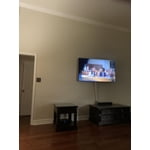
[This review was collected as part of a promotion.] We watch all movies, sports channels and even cooking shows. It is easy to operate and my wife can operate it also, lol. It is the best purchase we have made. Samsung products all the way number 1 in our book!!

Review from Samsung US
Helpful?6RZZK6GIRBUS13960862018
Aug 12, 2023
Reviewer name: ArleneUjiiye
5 out of 5 stars
5 out of 5 stars review

I'm loving my Samsung Crystal UHD TV

[This review was collected as part of a promotion.] We use our Samsung Tv to stream YouTube tv, Disney plus, and other streaming channels. My husband loves the sports channels. Once I figured out how to adjust the picture quality to our it's awesome.

Review from Samsung US
Helpful?6RZZK6GIRBUS13960862018
reply from Samsung Brand Ambassador

Hi ArleneUjiiye, I'm happy to hear you are enjoying your new CU7000D TV! To adjust your picture quality please follow the below instructions: Go to Home > Settings > All Settings > Picture > Picture Mode and select the mode that best fits your usage: 1) Standard: Default mode suitable for general viewing environments. 2) Natural: Reduces eye strain for a comfortable viewing experience. 3) Movie: Most suitable for watching TV or movies in a dark room. 4) Dynamic: Makes the picture brighter and clearer in bright viewing environments. 5) Filmmaker Mode: You can watch the source content (e.g., movie) as it is. If the image is defined as Filmmaker Mode, it will automatically switch to Filmmaker Mode while watching. You can also go to Settings > All Settings> Picture > Expert Settings > to manually fine-tune your image. If you ever have questions or need help, Samsung is here for you! Give us a call at 1-800-SAMSUNG, 8 AM - 12 AM EST, seven days a week. Our LiveChat agents are also available by clicking on the ‘Support’ link on our website. Thanks for being a part of the Samsung family! ~ Samsung Advisor

Sep 14, 2023
Reviewer name: Punisher1
5 out of 5 stars
5 out of 5 stars review

One of the best TVs on the market

[This review was collected as part of a promotion.] This tv seamlessly transitions from my cable, to gaming system, to streaming services. The ability to move so quickly allows me to quickly enjoy my different options. I would recommend this TV to anyone, even if they don't need the transitions to other platforms.

Review from Samsung US
Helpful?6RZZK6GIRBUS13960862018
May 23, 2023
Reviewer name: patclem
4 out of 5 stars
4 out of 5 stars review

nice tv

this is a very nice tv, i have 2 beefs 1 configuring an antenna. no info in the manual. i ended up going to youtube and there was a video showing how to do it. 2 when installing the feet left and right are from looking at the back. thought that was strange. over all really like the tv manual could be better

Review from Samsung US
Helpful?6RZZK6GIRBUS13960862018
reply from Samsung Brand Ambassador

Hi patclem, We appreciate your purchase and feedback on the CU7000D TV. Please know your feedback will be shared with our internal teams. If you ever have any questions or need help, please know we are here for you! You can call us at 1-800-SAMSUNG, 8 AM - 12 AM EST, seven days a week. Our LiveChat agents are also available by clicking on the ‘Support’ link on our website. ~ Samsung Advisor

Jun 1, 2023
Reviewer name: Alexa825
4 out of 5 stars
4 out of 5 stars review

Good product

[This review was collected as part of a promotion.] I love that you can already watch TV without having to connect a cable. Also love that it has some international channels so I can watch some south korean dramas. I can also connect a Bluetooth speaker if I want the volume louder.

Review from Samsung US
Helpful?6RZZK6GIRBUS13960862018
Aug 8, 2023
Reviewer name: MrMojo
5 out of 5 stars
5 out of 5 stars review

This tv is amazing
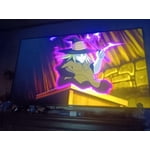
[This review was collected as part of a promotion.] I use my Samsung tv to stream movies mostly. It comes with about 500 free tv channels and the best part is they're free! It also has all the best streaming apps already downloaded so no need to connect a device. remember if you do need to connect one, you can do it wirelessly so no need for any tangled cables. I found my tv on the side of the road! It sat there for three days and was rained on, but that didn't make any difference. It's definitely the best tv I have ever had!

Review from Samsung US
Helpful?6RZZK6GIRBUS13960862018