Skip to Main Content
Sam's Club
Sam's Club
All Departments
All Services
Customer reviews for SAMSUNG 85” Class DU7200 Series 4K Smart TV for
SAMSUNG 85” Class DU7200 Series 4K Smart TV
4.3 out of 5 stars
stars
1,178 ratings1,031 reviews
  1. 5 stars63% (745)
  2. 4 stars18% (208)
  3. 3 stars8% (98)
  4. 2 stars5% (58)
  5. 1 star6% (69)

Member photos

  • +175 images
Sort by |
Showing 321-330 of 1,031 reviews
Apr 19, 2025
Reviewer name: BEHONEST2
3 out of 5 stars
3 out of 5 stars review

getting harder to understand.

Picture is fine. that's all. Remote control is a toy that does not agree with any cable provider. Useless, worthless. Volume is to be 40 and higher to be heard. Don't know how to adjust.

Review from Samsung US
Helpful?1RMTE3JL1NV513893753801
reply from Samsung Advisor

Hi BEHONEST2, Thank you for sharing your experience with low volume. There are several volume features you can adjust, which may improve your audio experience. 1) Auto Volume automatically adjusts the sound to a certain level when changing channels or switching to another external input. Go to Settings > All Settings> Sound > Expert Settings > Auto Volume. 2) Adaptive Sound automatically adjusts to a specific volume level while watching TV. The TV analyzes your volume usage history by time period to automatically adjust the volume when you use an app or switch to an external input source. Go to Settings> All Settings> Sound> Sound Mode> Adaptive Sound. 3) Several Sound Modes are likewise available to meet your personal preferences: Home > Settings > All Settings> Sound > Sound Mode. Also, some sources have their own volume control, which might need to be set higher. Please check the volume control of the external device (cable box or satellite box, DVD, Blu-ray, etc.) connected to your TV. Also, check the cable connection between an external device and the TV and then try the cable connection again. If you need more help, Samsung is here for you! Please call us at 1-800-SAMSUNG, 8 AM - 12 AM EST, seven days a week. Our LiveChat agents are also available by clicking on the ‘Support’ link on our website. ~ Samsung Advisor

Feb 21, 2025
Reviewer name: Linda T
5 out of 5 stars
5 out of 5 stars review

Beautiful

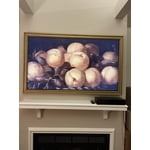
I absolutely love my frame tv - looks like beautiful piece of art - a friend visiting this week didn’t believe it was a tv until I switched over from art to tv. I bought a very pretty gold wooden frame for it. TV has great picture & sound !

Review from Samsung US
Helpful?1RMTE3JL1NV513893753801
May 20, 2025
Reviewer name: Cat28
4 out of 5 stars
4 out of 5 stars review

Sound and the color was so clear very impressed

I was so excited about this tv but after about a month or so ago, the screen keeps turning dark, then returns normal and keeps doing this all day/night

Review from Samsung US
Helpful?1RMTE3JL1NV513893753801
Jun 5, 2025
Reviewer name: Vivian
3 out of 5 stars
3 out of 5 stars review

Poor Volume

The picture is excellent but the volume is not. At 100 the volume is like when you have a regular TV at 30. That is the only fault I found on this TV.

Review from Samsung US
Helpful?1RMTE3JL1NV513893753801
reply from Samsung Advisor

Hi Vivian, Thank you for sharing your experience with low volume. There are several volume features you can adjust, which may improve your audio experience. 1) Auto Volume automatically adjusts the sound to a certain level when changing channels or switching to another external input. Go to Settings > All Settings> Sound > Expert Settings > Auto Volume. 2) Adaptive Sound automatically adjusts to a specific volume level while watching TV. The TV analyzes your volume usage history by time period to automatically adjust the volume when you use an app or switch to an external input source. Go to Settings> All Settings> Sound> Sound Mode> Adaptive Sound. 3) Several Sound Modes are likewise available to meet your personal preferences: Home > Settings > All Settings> Sound > Sound Mode. Also, some sources have their own volume control, which might need to be set higher. Please check the volume control of the external device (cable box or satellite box, DVD, Blu-ray, etc.) connected to your TV. Also, check the cable connection between an external device and the TV and then try the cable connection again. If you need more help, Samsung is here for you! Please call us at 1-800-SAMSUNG, 8 AM - 12 AM EST, seven days a week. Our LiveChat agents are also available by clicking on the ‘Support’ link on our website. ~Samsung Advisor

Oct 24, 2024
Reviewer name: Teresa233
5 out of 5 stars
5 out of 5 stars review

Awesome tv

[This review was collected as part of a promotion.] Love our new 85 inch tv. The picture is so clear. My husband says it’s like being in the movie theater. We love the Samsung tv’s. We had a 75 inch previously. Wouldn’t have any other brand tv.

Review from Samsung US
Helpful?1RMTE3JL1NV513893753801
Dec 5, 2024
Reviewer name: MMB123
5 out of 5 stars
5 out of 5 stars review

Clear tv, good sound, easy to use
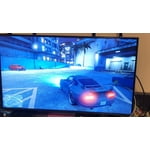
[This review was collected as part of a promotion.] I use my tv to watch shows and moves and play video games, it works great for all of that. I highly recommend for the price.

Review from Samsung US
Helpful?1RMTE3JL1NV513893753801
Apr 16, 2025
Reviewer name: Will
4 out of 5 stars
4 out of 5 stars review

Almost prefect

I love the size, picture quality, price. I only gave it 4 instead of 5 stars because of the inputs. My old bose sound system hooks up by optical cable. No way to attach it to new TV. Had to buy new sound system. Oh well. Technology moves forward...

Review from Samsung US
Helpful?1RMTE3JL1NV513893753801
Mar 5, 2025
Reviewer name: Anthony
1 out of 5 stars
1 out of 5 stars review

Bad experience

No quality control. Pretty bad. Tried to hook up my Sonos sound bar for a month on a brand new 85 inch Samsung TV. Come to find out the motherboard to the TV was bad. What happened to your QC?????

Review from Samsung US
Helpful?1RMTE3JL1NV513893753801
reply from Samsung Advisor

Hi Anthony, Please know that we back this Samsung TV with a 1-year limited manufacturer's warranty, including authorized repair for manufacturer defect, if purchased brand-new directly from an authorized seller. To schedule a warranty appointment, please contact us at 1-800-SAMSUNG, 8 AM - 12 AM EST, seven days a week. Our LiveChat agents are also available by clicking on the ‘Support’ link on our website. ~ Samsung Advisor

Mar 13, 2025
Reviewer name: Oldman
5 out of 5 stars
5 out of 5 stars review

Love the ease of going from TV to you tube or any.

I bought my 55" Samsung TV and I love it. 1000 percent over the Vizio I owned previously and their communist policy as to who owns the TV. I paid for it. So, why change or delete feature it came with just because you can.

Review from Samsung US
Helpful?1RMTE3JL1NV513893753801
Dec 31, 2024
Reviewer name: Sachet
5 out of 5 stars
5 out of 5 stars review

Overall great television

[This review was collected as part of a promotion.] My samsung t v has great features. I use my t v to stream music and watch the shows occasionally. I love the quality of its sound.

Review from Samsung US
Helpful?1RMTE3JL1NV513893753801