Skip to Main Content
Sam's Club
Sam's Club
All Departments
All Services
Customer reviews for SAMSUNG 60" Class DU7200 Series 4K Smart TV for
SAMSUNG 60" Class DU7200 Series 4K Smart TV
4.2 out of 5 stars
stars
1,028 ratings965 reviews
  1. 5 stars61% (626)
  2. 4 stars20% (201)
  3. 3 stars9% (92)
  4. 2 stars5% (49)
  5. 1 star6% (60)

Member photos

  • +150 images
Sort by |
Showing 751-760 of 965 reviews
Apr 19, 2025
Reviewer name: movielover
5 out of 5 stars
5 out of 5 stars review

Great TV

This has a great picture. So far I have had no issues.

Review from Samsung US
Helpful?39HMRPI2C1I113892053645
Feb 5, 2025
Reviewer name: Mary
2 out of 5 stars
2 out of 5 stars review

Samsung 50 inch tv

I bought this Christmas. The remote doesn’t work. My prime doesn’t work half the time.

Review from Samsung US
Helpful?39HMRPI2C1I113892053645
reply from Samsung Advisor

Hi Mary, Thank you for reaching out and letting us know about the issues you are experiencing with your remote. Please try the following troubleshooting steps: First, please remove the batteries from your remote, and then hold the Power button for eight seconds to reset the remote. Then, reinsert the batteries and try to use the remote again. Next, Check if the remote is sending an IR signal. Take either a digital camera or use the camera on your phone or tablet. Point the remote at the camera, and then press and hold the Power button on the remote. As you hold the button down, look at the camera's screen. If the remote is sending an IR signal, you will see a colored light coming from the remote control. If you do not see the IR light, replace the batteries with fresh ones and try again. If you still do not see the IR light, then replace the remote. If you need more help, Samsung is here for you! Please call us at 1-800-SAMSUNG, 8 AM - 12 AM EST, seven days a week. Our LiveChat agents are also available by clicking on the ‘Support’ link on our website. ~ Samsung Advisor

Apr 20, 2025
Reviewer name: Nathetta
5 out of 5 stars
5 out of 5 stars review

Great

So far I have had a great experience. I am still getting use to the AI part of it.

Review from Samsung US
Helpful?39HMRPI2C1I113892053645
Feb 22, 2025
Reviewer name: Done
5 out of 5 stars
5 out of 5 stars review

Picture quality ease of operation superior quality

Bought for the downloaded app’s also picture quality is great

Review from Samsung US
Helpful?39HMRPI2C1I113892053645
Feb 20, 2025
Reviewer name: LoiC79
5 out of 5 stars
5 out of 5 stars review

Superb technology at a decent price.
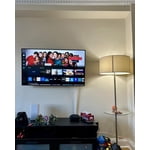
Great quality product as usual. My family and I are extremely satisfied with our new tv.

Review from Samsung US
Helpful?39HMRPI2C1I113892053645
Apr 19, 2025
Reviewer name: alley
2 out of 5 stars
2 out of 5 stars review

TV

Not too happy with the Sound very low . Have to turn all the way up .

Review from Samsung US
Helpful?39HMRPI2C1I113892053645
reply from Samsung Advisor

Hi, Thank you for sharing your experience with low volume. There are several volume features you can adjust, which may improve your audio experience. 1) Auto Volume automatically adjusts the sound to a certain level when changing channels or switching to another external input. Go to Settings > All Settings> Sound > Expert Settings > Auto Volume. 2) Adaptive Sound automatically adjusts to a specific volume level while watching TV. The TV analyzes your volume usage history by time period to automatically adjust the volume when you use an app or switch to an external input source. Go to Settings> All Settings> Sound> Sound Mode> Adaptive Sound. 3) Several Sound Modes are likewise available to meet your personal preferences: Home > Settings > All Settings> Sound > Sound Mode. Also, some sources have their own volume control, which might need to be set higher. Please check the volume control of the external device (cable box or satellite box, DVD, Blu-ray, etc.) connected to your TV. Also, check the cable connection between an external device and the TV and then try the cable connection again. If you need more help, Samsung is here for you! Please call us at 1-800-SAMSUNG, 8 AM - 12 AM EST, seven days a week. Our LiveChat agents are also available by clicking on the ‘Support’ link on our website. ~ Samsung Advisor

Mar 5, 2025
Reviewer name: Olga
5 out of 5 stars
5 out of 5 stars review

Great features

A little complicated for this 66 year old lady 👵😂😂😂Great TV. I love ❤️ it 😁

Review from Samsung US
Helpful?39HMRPI2C1I113892053645
Apr 19, 2025
Reviewer name: Jvbk
2 out of 5 stars
2 out of 5 stars review

No recommend

I bought this but I really don’t see the difference between Mathias band my old tv

Review from Samsung US
Helpful?39HMRPI2C1I113892053645
reply from Samsung Advisor

Hi Jvbk, Thanks for sharing your thoughts. If there's anything we can do to improve your experience, please reach Samsung Support at 1-800-SAMSUNG, 8AM - 12AM EST, 7 days a week. Or visit us on the Samsung website and click on the ‘Support’ link for: • LiveChat • Manuals, Software, & Warranty Info ~ Samsung Advisor

Apr 19, 2025
Reviewer name: Who1
5 out of 5 stars
5 out of 5 stars review

Amazing!

This TV is amazing. Great color, clarity and price.

Review from Samsung US
Helpful?39HMRPI2C1I113892053645
Feb 5, 2025
Reviewer name: Zukko
5 out of 5 stars
5 out of 5 stars review

Nice tv

I bought this a couple weeks ago and I love it so far. Great picture and good sound.

Review from Samsung US
Helpful?39HMRPI2C1I113892053645