Skip to Main Content
Sam's Club
Sam's Club
All Departments
All Services
Customer reviews for SAMSUNG 60" Class DU7200 Series 4K Smart TV for
SAMSUNG 60" Class DU7200 Series 4K Smart TV
4.2 out of 5 stars
stars
1,028 ratings965 reviews
  1. 5 stars61% (626)
  2. 4 stars20% (201)
  3. 3 stars9% (92)
  4. 2 stars5% (49)
  5. 1 star6% (60)

Member photos

  • +150 images
Sort by |
Showing 281-290 of 965 reviews
Feb 20, 2025
Reviewer name: RhonOhio
5 out of 5 stars
5 out of 5 stars review

Only Samsung! For TV and cell.

Love our tvs. We have purchased several. Love how the app keeps track of last movie viewed and easy casting. Remote took us awhile but grandkids 😄 figured it out for us haha

Review from Samsung US
Helpful?39HMRPI2C1I113892053645
Mar 5, 2025
Reviewer name: Happyshopper
5 out of 5 stars
5 out of 5 stars review

Happy so far.

It’s been 10 years since I bought a new tv and boy, things have changed! This is a smart tv that comes on instantly and has a very sharp picture. So far I am very pleased with my purchase.

Review from Samsung US
Helpful?39HMRPI2C1I113892053645
Mar 5, 2025
Reviewer name: SummerLisa
2 out of 5 stars
2 out of 5 stars review

Remote control needs to be redesigned!!

Remote control is very difficult to operate. Even something as basic as muting Volume is not 100%. It works only half of the time. . Samsung! you need to put in more buttons that work and design the remote for ease of use for viewers.

Review from Samsung US
Helpful?39HMRPI2C1I113892053645
reply from Samsung Advisor

Hi SummerLisa, We appreciate your review of the DU7200 TV. Please know that you can control the volume of your TV by pressing the +/- button up to increase the volume and down to decrease the volume. To mute the sound, press the button. You can learn how to use your Samsung Remote by going to Home> (left directional button) Settings> Support> Remote Control Guide. If you need more help, Samsung is here for you. Please call us at 1-800-SAMSUNG, 8 AM - 12 AM EST, seven days a week. Our LiveChat agents are also available by clicking on the ‘Support’ link on our website. ~Samsung Advisor

Feb 5, 2025
Reviewer name: ArmsteadHI
5 out of 5 stars
5 out of 5 stars review

Thank you Samsung!
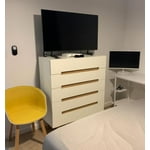
We bought 2 units for a new house, this 43 for the bedroom and a 55 for the living room. We are very happy with the features, quality, App and synch across all platforms.

Review from Samsung US
Helpful?39HMRPI2C1I113892053645
Feb 6, 2025
Reviewer name: Kathy
5 out of 5 stars
5 out of 5 stars review

Great Smart TV

My first Smart TV, to boot “Samsung”. I am a Samsung customer for many years. I am enjoying the TV, soooo much content to watch, thanks Samsung! Kathy

Review from Samsung US
Helpful?39HMRPI2C1I113892053645
Apr 19, 2025
Reviewer name: nick
4 out of 5 stars
4 out of 5 stars review

can't handle plex

it seems to work pretty good. the only thing is it can't handle large streaming videos from plex. every other app works fine. ps. I'm running 1gb fiber

Review from Samsung US
Helpful?39HMRPI2C1I113892053645
Feb 10, 2025
Reviewer name: Mike
3 out of 5 stars
3 out of 5 stars review

Hard to use remote

TV is good however Remote is too small and not easy to use.. 3 Stares because of the remote.. would have been 5 stares if better and easier friendly remote..

Review from Samsung US
Helpful?39HMRPI2C1I113892053645
reply from Samsung Advisor

Hi Mike, Thank you for sharing your opinion on the DU7200 TV remote. We understand there can be a learning curve when you get a new TV! This is why we have built a guide built into the TV that teaches you how to use your remote. You can learn how to use your Samsung Remote by going to Home> (left directional button) Settings> Support> Remote Control Guide. If you need more help, Samsung is here for you. Please call us at 1-800-SAMSUNG, 8 AM - 12 AM EST, seven days a week. Our LiveChat agents are also available by clicking on the ‘Support’ link on our website. ~Samsung Advisor

Apr 20, 2025
Reviewer name: Billy P
3 out of 5 stars
3 out of 5 stars review

Will not play EWTN App content! Very Disappointe.

Bought TV about a month ago for my mother in law, and for some odd reason it will download but not play the content of the EWTN App. Very odd. But that’s one of the main reasons we bought it. She loves EWTN! Very disappointing!

Review from Samsung US
Helpful?39HMRPI2C1I113892053645
reply from Samsung Advisor

Hi Billy P, If apps are not working correctly, we recommend first checking for firmware updates on your TV. Go to Home > Settings > Support > Software Update. If you do have the latest firmware, then you can next try a cold boot. There are two ways to cold boot your TV: 1) Using the Remote: For most people, the easiest way is to hold down the Power button on the Samsung TV remote until the TV turns off and then on again. This should take about 5 seconds. 2) Using the Plug: If you do not have the remote, unplug your TV from the wall outlet or surge protector, leave it unplugged for 30 seconds, and then plug it back in. For more help, please contact Samsung TV Support at 1-800-SAMSUNG, available 8 AM – 12 AM EST, seven days a week. For more contact options, click here: https://www.samsung.com/us/support/contact/ We look forward to hearing from you. ~Samsung Advisor

Mar 3, 2025
Reviewer name: Noel
5 out of 5 stars
5 out of 5 stars review

Christmas Purchase to Remember

As they say size really matters... What a beautiful picture. What beautiful sound. What a great PRICE. "IT'S BEEN A GREAT SAVINGS OVER CABLE" AGAIN THANK YOU RLP

Review from Samsung US
Helpful?39HMRPI2C1I113892053645
Mar 5, 2025
Reviewer name: Gary
5 out of 5 stars
5 out of 5 stars review

Picture quality

I have 5 Samsung TVs ranging in size from 32 to 65. My only disappointment is the software difference in each unit. I also dislike the new remote. Otherwise the units are my favorite.

Review from Samsung US
Helpful?39HMRPI2C1I113892053645