Skip to Main Content
Sam's Club
Sam's Club
All Departments
All Services
Customer reviews for SAMSUNG 50" Class DU7200 Series 4K Smart TV for
SAMSUNG 50" Class DU7200 Series 4K Smart TV
4.3 out of 5 stars
stars
1,145 ratings1,023 reviews
  1. 5 stars62% (710)
  2. 4 stars19% (223)
  3. 3 stars9% (98)
  4. 2 stars5% (54)
  5. 1 star5% (60)

Member photos

  • +160 images
Sort by |
Showing 421-430 of 1,023 reviews
Apr 6, 2025
Reviewer name: Deep pockets
4 out of 5 stars
4 out of 5 stars review

Samsung Plus is great limited connectivity

6th Samsung purchased in the last 3 years, love Samsung Plus TV and the many selections Not happy with the limited choices to connect sound bars; didnt realize that is where the saving was, with bluetooth being only viable option limits integration

Review from Samsung US
Helpful?6FFFIGX8UWW613884652301
Apr 20, 2025
Reviewer name: Caster
5 out of 5 stars
5 out of 5 stars review

Love it

Love Samsung TVs, its all we will buy. We cast from our Samsung phones and it is seemless. Love the extra broadcast channels when we hooked it to wifi. Could not be happier.

Review from Samsung US
Helpful?6FFFIGX8UWW613884652301
Feb 20, 2025
Reviewer name: RJoc19
4 out of 5 stars
4 out of 5 stars review

Great Picture

Love the TV but hate the remote!! Still trying to figure out how to customize the Home Screen but the TV has a great picture and wall mounted it’s the perfect size for my family room!

Review from Samsung US
Helpful?6FFFIGX8UWW613884652301
Dec 27, 2024
Reviewer name: Roxyroo6
5 out of 5 stars
5 out of 5 stars review

So far this t.v. is awesome

[This review was collected as part of a promotion.] We use it for entertainment only. The remote needs to have some lights or something, we lose it all the time.

Review from Samsung US
Helpful?6FFFIGX8UWW613884652301
May 6, 2025
Reviewer name: guhima
5 out of 5 stars
5 out of 5 stars review

Very good quality
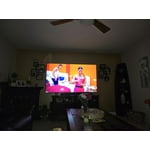
Excellent TV, picture quality, dark or light on, looks great. I also really like the integrity with the samsung soundbar. All streaming does so without any problem, and a variety of applications.

Review from Samsung US
Helpful?6FFFIGX8UWW613884652301
Feb 5, 2025
Reviewer name: Kuset
2 out of 5 stars
2 out of 5 stars review

It’s okay

I wish I had known when I bought this TV that I couldn’t hook my Samsung soundbar or my DVD player up to the TV because you can only hook up with HDMI cables

Review from Samsung US
Helpful?6FFFIGX8UWW613884652301
reply from Samsung Advisor

Hi, Thank you for choosing the Samsung DU7200 TV and for taking the time to provide us with detailed feedback on your experience. Your opinion is important to us and will be shared with our internal product teams. The DU72000F TV offers 3 HDMI ports and is Bluetooth and Wi-Fi capable, allowing a seamless connection across multiple devices at a time. If your external device requires an Optical port, we recommend utilizing an HDMI to Optical Converter. These can be found at your local electronics store. Please also keep in mind that an Optical port can be found on our DU8000F Series and above. If you have any questions or would like any support with your audio experience or choosing a Samsung Soundbar to complement your viewing enjoyment, please reach out to us at 1-800-SAMSUNG, 8 AM - 12 AM EST, seven days a week. Or visit us on the Samsung website and click on the ‘Support’ link for: 1) LiveChat 2) Manuals, Software, & Warranty Info ~ Samsung Advisor

Feb 20, 2025
Reviewer name: Polly
3 out of 5 stars
3 out of 5 stars review

Disappointed with Smart TV

I am disappointed with the TV and the remote. Miss features I used to have. Our TV headset doesn't work with the TV. No "Mute" on the remote or other features we had on our previous TV remote. The remote is difficult to open to replace batteries

Review from Samsung US
Helpful?6FFFIGX8UWW613884652301
reply from Samsung Advisor

Hi Polly, We appreciate your review of the DU7200 TV. Please know that you can control the volume of your TV by pressing the +/- button up to increase the volume and down to decrease the volume. To mute the sound, press the button. You can also learn how to use your remote directly from your TV. Just go to Home> (left directional button) Settings> Support> Remote Control Guide. If you need more help, Samsung is here for you. Please call us at 1-800-SAMSUNG, 8 AM - 12 AM EST, seven days a week. Our LiveChat agents are also available by clicking on the ‘Support’ link on our website. ~Samsung Advisor

Mar 5, 2025
Reviewer name: Anthony
1 out of 5 stars
1 out of 5 stars review

Bad experience

No quality control. Pretty bad. Tried to hook up my Sonos sound bar for a month on a brand new 85 inch Samsung TV. Come to find out the motherboard to the TV was bad. What happened to your QC?????

Review from Samsung US
Helpful?6FFFIGX8UWW613884652301
reply from Samsung Advisor

Hi Anthony, Please know that we back this Samsung TV with a 1-year limited manufacturer's warranty, including authorized repair for manufacturer defect, if purchased brand-new directly from an authorized seller. To schedule a warranty appointment, please contact us at 1-800-SAMSUNG, 8 AM - 12 AM EST, seven days a week. Our LiveChat agents are also available by clicking on the ‘Support’ link on our website. ~ Samsung Advisor

Feb 21, 2025
Reviewer name: Linda T
5 out of 5 stars
5 out of 5 stars review

Beautiful

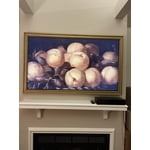
I absolutely love my frame tv - looks like beautiful piece of art - a friend visiting this week didn’t believe it was a tv until I switched over from art to tv. I bought a very pretty gold wooden frame for it. TV has great picture & sound !

Review from Samsung US
Helpful?6FFFIGX8UWW613884652301
Apr 24, 2025
Reviewer name: Junior
2 out of 5 stars
2 out of 5 stars review

Very good equipment

The name you have in my account is wrong my name is Efrain Perez nothing relative with Ana . So please change the name or I have to delete the all account

Review from Samsung US
Helpful?6FFFIGX8UWW613884652301
reply from Samsung Advisor

Hi Junior, To best assist you, please call us at 1-800-SAMSUNG, 8 AM - 12 AM EST, seven days a week. Our LiveChat agents are also available by clicking on the ‘Support’ link on our website. ~Samsung Advisor