Skip to Main Content
Sams Club
Sams Club
Customer reviews for SAMSUNG 50" Class DU7200 Series 4K Smart TV for
SAMSUNG 50" Class DU7200 Series 4K Smart TV
4.3 out of 5 stars
stars1,144 ratings1,022 reviews
  1. 5 stars62% (709)
  2. 4 stars19% (223)
  3. 3 stars9% (98)
  4. 2 stars5% (54)
  5. 1 star5% (60)
Write a review

Customer photos

  • +159 images
Sort by |
Showing 241-250 of 1,022 reviews
May 20, 2025
Luck lou
4 out of 5 stars review

Tastes Great, Less Filling

Nice picture. Sound is a bit distant no matter the volume used. We would buy again but use a sound bar.

Review from Samsung US
Helpful?6FFFIGX8UWW613884652301
Jun 7, 2025
BranBran
5 out of 5 stars review

Good price

The picture is great. The sound is good too. The best part was the price point. I got a great TV for a great price.

Review from Samsung US
Helpful?6FFFIGX8UWW613884652301
May 20, 2025
Ms T
5 out of 5 stars review

Loving it

I love the picture. I love my Samsung television. I wouldn’t get any other brand. I’m a Samsung Girl.

Review from Samsung US
Helpful?6FFFIGX8UWW613884652301
May 20, 2025
AndyM
5 out of 5 stars review

Great view!

I love the picture quality and clarity. My wife and I are enjoying seeing our shows on a big screen.

Review from Samsung US
Helpful?6FFFIGX8UWW613884652301
May 20, 2025
Wtuck
4 out of 5 stars review

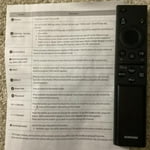
Love TV Hate Remote

Love TV but this is the worst remote I have ever used. If I had known about the remote I would have bought another TV

Review from Samsung US
Helpful?6FFFIGX8UWW613884652301
Jun 5, 2025
Not worh the money
1 out of 5 stars review

Done

This is the second model we've purchased in the last year because it's crap. Done with Samsung all together.

Review from Samsung US
Helpful?6FFFIGX8UWW613884652301
reply from Samsung Advisor

Hi Not worh the money, We appreciate you taking the time to let us know about your experience with your TV. So that we can better troubleshoot this issue and provide steps towards a solution, please contact Samsung Support at 1-800-SAMSUNG, 8AM - 12AM EST, 7 days a week. Or visit us on the Samsung website and click on the ‘Support’ link for: •  LiveChat •  Manuals, Software, & Warranty Info ~ Samsung Advisor

May 20, 2025
bren
5 out of 5 stars review

Wonderful

I love this TV! Everything about it. The size is perfect . All the features are great. This is my first Samsung. Thanks

Review from Samsung US
Helpful?6FFFIGX8UWW613884652301
May 20, 2025
NADA
4 out of 5 stars review

Reasonable person

I love my Samsung television, but the silly thing comes back on about 30 seconds every night after I shut it off?? Why is that?

Review from Samsung US
Helpful?6FFFIGX8UWW613884652301
May 20, 2025
Anonymous
4 out of 5 stars review

almost perfect

I only purchase Samsung TV's. I am disappointed with the remote. not as user friendly as other models.

Review from Samsung US
Helpful?6FFFIGX8UWW613884652301
Jun 8, 2025
Frustrated
3 out of 5 stars review

Tv shows are dark

The view is very dark on certain movies and tv shows. I have done all of the recommended fixes to no avail. Will not purchase this brand again.

Review from Samsung US
Helpful?6FFFIGX8UWW613884652301
reply from Samsung Advisor

Hi Frustrated, I’m sorry to hear you’re not fully satisfied with the DU7200 TV’s picture quality. You mentioned already trying adjusting some settings, however I am going to put a few suggestions below, in case you have not tried these specific ones. First, let’s ensure you are running the latest Firmware Update. Go to Settings> Support> Software Update. Next, If the colors on your TV are correct but just a little too dark or bright, you can try adjusting Picture Modes, Contrast, Brightness, or Sharpness settings. For darker scenes, I recommend Dynamic Picture Mode, which makes pictures brighter and clearer in bright viewing environments. Go to Settings > All Settings> Picture > Picture Mode > Dynamic. Or you can manually adjust the Brightness by pressing the HOME button on your remote, then navigating to Settings > All Settings> Picture > Expert Settings. You may also want to disable Power Saving Mode, which automatically adjusts the brightness to reduce the TV’s power consumption. Go to Settings > All Settings> General > Eco Solution> Power Saving Mode. I hope this helps to improve your picture. Should you need further assistance, please contact us at 1-800-SAMSUNG, 8 AM - 12 AM EST, seven days a week. Our LiveChat agents are also available by clicking on the ‘Support’ link on our website. ~Samsung Advisor