Skip to Main Content
Sam's Club
Sam's Club
All Departments
All Services
Customer reviews for SAMSUNG 75" Class TU700D-Series Crystal Ultra HD 4K Smart TV UN75TU700DFXZA for
SAMSUNG 75" Class TU700D-Series Crystal Ultra HD 4K Smart TV UN75TU700DFXZA
4.4 out of 5 stars
stars
10.4K ratings10K reviews
  1. 5 stars69% (7,261)
  2. 4 stars18% (1,887)
  3. 3 stars5% (566)
  4. 2 stars3% (265)
  5. 1 star5% (499)

Member photos

  • +1529 images
Sort by |
Showing 7,431-7,440 of 10,069 reviews
Oct 25, 2022
Reviewer name: Nickname
5 out of 5 stars
5 out of 5 stars review

This product is great

[This review was collected as part of a promotion.] It is a great TV for streaming and gaming. I use it for Netflix, HBO Max, and Disney+. I also play my Nintendo Switch with this Tv.0

Review from Samsung US
Helpful?3STAXRT0NDXF13883163940
Oct 26, 2022
Reviewer name: Namastay
5 out of 5 stars
5 out of 5 stars review

This is a wonderful tv!

[This review was collected as part of a promotion.] We use our tv to stream on Peacock, Netflix & Hulu and pretty much anything else. It has a beautiful picture and great sound quality. We love our Samsung!

Review from Samsung US
Helpful?3STAXRT0NDXF13883163940
Aug 23, 2022
Reviewer name: SamsungMan77
5 out of 5 stars
5 out of 5 stars review

Love My Samsung Smart TV
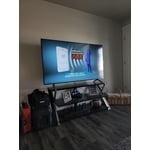
[This review was collected as part of a promotion.] I love everything so far, I'm still learning all the features. It's amazing and such a beautiful picture. What an awesome TV for the price.

Review from Samsung US
Helpful?3STAXRT0NDXF13883163940
Aug 22, 2022
Reviewer name: Carrico
3 out of 5 stars
3 out of 5 stars review

This TV has is good and bad
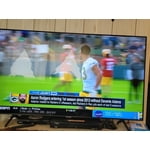
[This review was collected as part of a promotion.] This TV is Great for watching TV and Movies, However you need a sound bar or surround sound bc the sound is not Great at all!!!!

Review from Samsung US
Helpful?3STAXRT0NDXF13883163940
reply from Samsung Brand Ambassador

HI Carrico, Thank you for your feedback on the Samsung TU7000 TV's sound quality. Samsung prides itself on high-quality products and a great customer experience. Please know we are here to help you. There are several sound settings you can adjust to suit your personal sound preferences. Change the Sound Mode by going to Settings > Sound > Sound Mode. You can customize the sound with Expert Settings by going to Settings > Sound > Expert Settings. I hope this helps you enjoy your experience. If you’d like more help with settings, please know we’re here to help! Call us at 1-800-SAMSUNG, 8 AM - 12 AM EST, seven days a week. Or visit us on the Samsung website and click on the ‘Support’ link for: 1) LiveChat 2) Manuals, Software, & Warranty Info ~ Samsung Advisor

Nov 18, 2020
Reviewer name: Robbie
5 out of 5 stars
5 out of 5 stars review

Impressed

[This review was collected as part of a promotion.] Very high quality TV especially for the price a lot of very helpful features and all apps load fast and work well

Review from Samsung US
Helpful?3STAXRT0NDXF13883163940
Oct 26, 2020
Reviewer name: N8gilbert
5 out of 5 stars
5 out of 5 stars review

Love this TV

[This review was collected as part of a promotion.] There are some speed functions on the smart TV side that lag, but in all... this is a fanatic buy for the price and features.

Review from Samsung US
Helpful?3STAXRT0NDXF13883163940
Oct 26, 2022
Reviewer name: JoDG43
5 out of 5 stars
5 out of 5 stars review

Love the Smart Tv
[This review was collected as part of a promotion.] Love my Samsung Smart TV!! Very easy to manage through my apps or just watch Samsung tv live!! Beautiful picture great quality!!

Review from Samsung US
Helpful?3STAXRT0NDXF13883163940
Feb 19, 2021
Reviewer name: Unknown
1 out of 5 stars
1 out of 5 stars review

PRODUCT SUCKS

never been a fan of samsung but this tv was a gift. its trash. sound sucks & picture is horrible. not impressed, wouldnt recommend & definitely wouldnt dare buy.

Review from Samsung US
Helpful?3STAXRT0NDXF13883163940
reply from Samsung Brand Ambassador

Unknown: Thank you for purchasing the Samsung TU7000 TV and for your review. I am sorry to hear of your disappointment. You can adjust the settings for picture and sound according to your preferences. Choose a Picture Mode by going to Settings > Picture > Picture Mode and choose from Dynamic, Standard, Natural, Movie, or Filmmaker Mode. You can further adjust your brightness, contrast, color, and more by going to Settings > Picture > Expert Settings To adjust your sound preferences, go to Settings > Sound > Sound Mode and Settings > Sound > Expert Settings Please also give us the opportunity to assist you with quality adjustments tailored to your preferred viewing and listening experience. You can reach us via any of the following options: 1-800-SAMSUNG (ask for TVs), available 8AM -12AM EST, 7 days a week Or visit us on the Samsung website and click on the ‘Support’ link in the upper right corner of the homepage for: 1) Contact Us Options (LiveChat, Remote Support, Facebook, Twitter) 2) Product Support 3) Manuals and Downloads 4) Warranty Info 5) Product Registration: Registering your product gives you access to easy warranty support, convenient opt-in to special promos and offers, faster troubleshooting and service, and quick notification of system updates 6) Samsung Community: A great resource for getting help from Samsung moderators and customers and more 7) …and more product, repair, order, and care options ~ Samsung Solutions

Sep 16, 2021
Reviewer name: Jaytv1989
5 out of 5 stars
5 out of 5 stars review

This product is awesome

[This review was collected as part of a promotion.] This is tv is the best. I used this tv for sports like basketball and football. Tv quality is good..

Review from Samsung US
Helpful?3STAXRT0NDXF13883163940
Sep 16, 2020
Reviewer name: RAT6417
5 out of 5 stars
5 out of 5 stars review

Clear picture

[This review was collected as part of a promotion.] This tv provide beautiful color and great sound. Researched this tv and it seem the Best Buy for the money. Looks great in my new home.

Review from Samsung US
Helpful?3STAXRT0NDXF13883163940