
Skip to Main Content
Sam's Club
Sam's Club
All Departments
All Services
Customer reviews for SAMSUNG 75" Class TU700D-Series Crystal Ultra HD 4K Smart TV UN75TU700DFXZA for
SAMSUNG 75" Class TU700D-Series Crystal Ultra HD 4K Smart TV UN75TU700DFXZA
4.4 out of 5 stars
stars
10.4K ratings10K reviews
  1. 5 stars69% (7,257)
  2. 4 stars18% (1,886)
  3. 3 stars5% (566)
  4. 2 stars3% (265)
  5. 1 star5% (499)

Member photos

  • +1523 images
Sort by |
Showing 4,341-4,350 of 10,064 reviews
Nov 30, 2021
Reviewer name: Clay
3 out of 5 stars
3 out of 5 stars review

Nice TV, but not a very bright picture

everything works on the tv, but the picture is dimmer than my last samsung. i even turned the brightness all the way up, and it still has a dim look. if you are going to buy make sure you see how it looks in the store first. that was my mistake. wont make it next time

Review from Samsung US
Helpful?3STAXRT0NDXF13883163940
reply from Samsung Brand Ambassador

Hi Clay, Thank you for purchasing the TU7000 TV and for your review. I am sorry to hear that you are not happy with the brightness levels of your picture. If the colors on your TV are correct but just a little too dark or bright you can try the different Picture Modes or manually adjust the Brightness settings to your liking. Dynamic Picture Mode will make pictures brighter and clearer in bright viewing environments. Go to: Settings > Picture > Picture Mode > Dynamic Or manually adjust the Brightness and other settings to your liking. Press the HOME button on your remote, then navigate to: Settings > Picture > Expert Settings You may also want to disable Power Saving Mode which automatically adjusts the brightness to reduce the TV’s power consumption. Go to Settings> General> Eco Solution> Power Saving Mode. Ambient Light Detection will also automatically adjust the brightness level of the TV, according to the ambient light level, to reduce power consumption. If Ambient Light Detection has adjusted the screen brightness to a too bright or dark level, you can select Minimum Brightness to manually adjust the minimum screen brightness. Go to Settings> General> Eco Solution> Ambient Light Detection Please also be sure you are running the latest firmware. You can check to see what software version your TV is using and if there is an available update through the settings on your TV. Go to: Settings>Support>Software Update. I hope this helps to improve your picture. Should you need further assistance, please contact Samsung Customer Support at 1-800-SAMSUNG (ask for TVs), available 8AM - 12AM EST, 7 days a week. For additional support resources, visit us on the Samsung website and click on the ‘Support’ link in the upper right corner of the homepage for: 1) Chat with Us/Product Help: To begin a chat or find solutions, choose ‘TVs & Home Theater’ and select your model & topic. 2) Register a Product: For access to easy warranty support, convenient opt-in to special promos and offers, faster troubleshooting and service, and quick notification of system updates. 3) Manuals & Software 4) Warranty Info 5) Contact Us ~ Samsung Solutions

Sep 11, 2020
Reviewer name: Thedoublebs
4 out of 5 stars
4 out of 5 stars review

Fatantastic tv
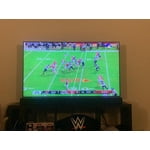
i got my tv yesterday and hooked it up today and i have to say i love this tv. with the super thing bezels the screen really pops in my living room. colors really pop when watching movies when the lights are out. even though i have this connected to my samsung sound bar the tv speakers were really good if i didn't have the soundbar i would still be happy with it. what really sets this tv apart from the others and something i was shocked about was the picture quality. its really bright and sharp and with the automatic game mode that kicks in when i play my ps4 and xbox i am thoroughly impressed by the picture. i only wish that it had more then 2 hdmi ports but beyond that this tv is fantastic!!!!

Review from Samsung US
Helpful?3STAXRT0NDXF13883163940
Oct 23, 2020
Reviewer name: Sam412
5 out of 5 stars
5 out of 5 stars review

Amazing!

[This review was collected as part of a promotion.] This TV is wonderful! The picture on it is so crisp and crystal clear. You can see every little detail of the things on the screen. It's also super bright and the colors are amazing! There are also a lot of third party apps such as airplay and Netflix and google and there's a bunch more I can't remember off the top of my head. I absolutely love this television!!

Review from Samsung US
Helpful?3STAXRT0NDXF13883163940
Apr 9, 2021
Reviewer name: Chantel
5 out of 5 stars
5 out of 5 stars review

This product is a must have.

[This review was collected as part of a promotion.] There's nothing better than coming home from a long day at work or school to a home cooked meal & a good ol' movie playing on my 82" Samsung 4K smart TV. I just love to lay back on the sofa & kick my feet up while enjoying the big screen with the clearest picture I've ever seen & the most amazing sound. It's like being at the movie theater but in the comfort of your own home. ❤

Review from Samsung US
Helpful?3STAXRT0NDXF13883163940
Jul 30, 2022
Reviewer name: mammoth1234
5 out of 5 stars
5 out of 5 stars review

Best TV I've ever had.

[This review was collected as part of a promotion.] This is the bestest most phenomenal tv I've ever had. I received it as a graduation present and I knew right away it was the perfect one. I use it for everything it can be used for. The apps are perfect, the sound is amazing and it's so clear.

Review from Samsung US
Helpful?3STAXRT0NDXF13883163940
Jul 27, 2022
Reviewer name: Chefboyarg
4 out of 5 stars
4 out of 5 stars review

Great, inexpensive tv!

[This review was collected as part of a promotion.] To start this off, I usually gravitate towards Samsung products. Samsung tvs are pretty good and are not expensive. This tv is awesome, my main use for it is playing video games and they always look amazing. The TU7000 is lightweight and very easy to move around if needed. The sound from the speakers is decent, but definitely not the best. Keep in mind this is considered a budget tv, not the top of the line. My only real complaint I have about it is the placement of the holes for mounting the tv. The reason behind this is, is the fact that the tv is slightly curved so the usual equipment you'd use to mount is basically useless.

Review from Samsung US
Helpful?3STAXRT0NDXF13883163940
Apr 17, 2021
Reviewer name: Islndgrl
5 out of 5 stars
5 out of 5 stars review

Excellent Picture Quality

[This review was collected as part of a promotion.] I purchased this TV initially for use in the family room, however, when I received it, I loved the crystal clear picture quality soo much, I decided to use it in my master bedroom. I use my TV for both streaming movies and listening to music streamed from my phone. The ease of use is also a plus. Simple directions make it super easy to connect devices through Wi-Fi. The voice quality and sound quality are also excellent features. This TV is a must buy. I am saving up to purchase another. I definitely recommend this television.

Review from Samsung US
Helpful?3STAXRT0NDXF13883163940
Oct 26, 2020
Reviewer name: Mike
2 out of 5 stars
2 out of 5 stars review

Decent

the tv is beautiful and the picture quailty is amazing. the operating system is absolute trash. its extremely slow and glitchy. im getting logged out of streaming services and accidentally double clicking things. im also having an issue gaming with this tv because i am locked at 30fps with this so called “game-mode” on. ive tried everything i know to do with no result. tv is only decent.

Review from Samsung US
Helpful?3STAXRT0NDXF13883163940
reply from OBA

Mike: Thank you for sharing your experience with the TU7000 TV. I am sorry that you are experiencing some issues with slowness and glitching. To optimize the smart TV performance, please try Device Care option under the Support Menu. Go to Settings > Support> Device Care > Start Device Care This service checks memory and frees up unused cached memory and closes background apps. I hope this helps to solve your concerns. Should you need further assistance, please contact Samsung Customer Support. 1-800-SAMSUNG (available 8AM -12AM EST, 7 days a week) Or visit us on the Samsung website and click on the ‘Support’ link in the upper right corner of the homepage for: 1) Contact Us Options (LiveChat, Remote Support, Facebook, Twitter) 2) Product Support 3) Manuals and Downloads 4) Warranty Info 5) Product Registration: Registering your product gives you access to easy warranty support, convenient opt-in to special promos and offers, faster troubleshooting and service, and quick notification of system updates 6) Samsung Community: A great resource for getting help from Samsung moderators and customers and more 7) …and more product, repair, order, and care options ~ Samsung Solutions

Jul 26, 2022
Reviewer name: ItalianIce
4 out of 5 stars
4 out of 5 stars review

Great for value!
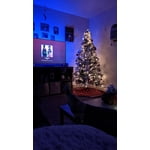
[This review was collected as part of a promotion.] For a budget this tv is amazing, it's inexpensive. Offers dobly Atmos with compatible speakers, hd 4k, game mode, and on screen apps. This tv has been with me for about 3yrs and I love it. Looking to upgrade to something cheaper and better looking? This is the right way to go, right in the middle of Cost, and quality!

Review from Samsung US
Helpful?3STAXRT0NDXF13883163940
Aug 23, 2022
Reviewer name: Baseball
5 out of 5 stars
5 out of 5 stars review

MLB package !!!!!
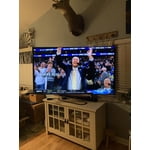
[This review was collected as part of a promotion.] I bought this TV for the MLB app that is on the TV. This is the best TV I have ever owned plus it also has the best picture I have seen. I Love this TV I am still learning all the apps and channels this TV actually has. It's been over six months.

Review from Samsung US
Helpful?3STAXRT0NDXF13883163940






