Customer reviews for SAMSUNG 75" Class TU700D-Series Crystal Ultra HD 4K Smart TV UN75TU700DFXZA forMember photos


+1513 images
Glitching
we bought this about 2 weeks ago and it was working great but for no apparent reason, the TV volume is going crazy, the volume goes all the way up to 100 and stays there. When we try to turn it down and release the volume button it automatically goes up to 100. We troubleshooted it by unplugging it, and reseting it to factory settings and we made sure it was in fact not the remotes by removing the batteries. This is really upsetting.
Linda, I apologize for the disappointment you have had with the volume issue. So that we can better troubleshoot this issue and provide steps towards a solution, I invite you to please contact Samsung TV Support via any of the below options: 1) Phone: 1-800-SAMSUNG (ask for TVs) Available 8AM - 9PM EST (Mon-Fri) 2) LiveChat or Email: https://www.samsung.com/us/support/#contact_us_for_support 3) Facebook Messenger: https://www.facebook.com/samsungsupport 4) Twitter: https://twitter.com/SamsungSupport If you have not already done so, we invite you to register your new Samsung TV at: https://www.samsung.com/us/support/register/. Registering your product gives you access to easy warranty support, convenient opt-in to special promos & offers, faster troubleshooting & service, and quick notification of system updates. Again, I am very sorry for the inconveniences you have had, and hope that we will hear from you soon. -Samsung Ambassador
I thought it was going to be great...
i wanted a smart tv that no longer needed a 3rd party device to watch youtube and such. boy were we disappointed. the tizen user interface is as slow as aol dialup internet. just try to do anything in the menus and it takes 10-30 seconds for the tv to respond to your remote input. the only positive is the picture quality is amazing! however the hdmi to soundbar control is buggy and doesn't always work right, when using the optical cable the volume control randomly stops working and randomly starts working again. i can't wait to get a different brand tv
CANNOT CHANGE APPS
so disappointed! bought this tv because it had apple tv and other apps. they didn't say the tv apps could not be changed. there is no room on the 1 gig of memory to add anything and you cannot remove the stock apps! literally the reason i bought the tv... i would choose anything else.
ROB108: Thank you for sharing your experience with your new TU7000 TV. Here are some things you can try: 1) Go to Settings > Support> Device Care > Start Device Care This service checks memory and frees up unused cached memory and closes background apps. 2) Remove apps you no longer need. From the Home screen, go to Apps > Settings > delete your apps from here 3) Turn automatic updates on. Select Settings > Support > Software Update, then select Auto Update. I hope these tips help. If you need further assistance or have any questions, please contact Samsung Customer Support. Available at 1-800-SAMSUNG (8AM -12AM EST, 7 days a week) Or visit us on the Samsung website and click on the SUPPORT link in the upper right corner for: 1) Contact Us Options (LiveChat, Remote Support, Facebook, Twitter) 2) Product Support 3) Manuals and Downloads 4) Warranty Info 5) Product Registration: Registering your product gives you access to easy warranty support, convenient opt-in to special promos and offers, faster troubleshooting and service, and quick notification of system updates 6) Samsung Community: A great resource for getting help from Samsung moderators and customers and more 7) …and more product, repair, order, and care options Again, thank you for taking the time to share your thoughts on this product. Your feedback helps us continuously deliver best-in-class products and service. ~ Samsung Solutions
Beautiful Picture, Terrible Interface
i got this tv to replace a 10 year old television that stopped working. it seems liked a great option, and it has really good reviews. i understand with any newer tv model there's a learning curve to adjust to menu layouts and quirky brand features. however, the awkwardness and confusing design of the app menu layout; the incredibly slow, lagged and often over compensated menu scroll speed; and "smart" features like the one to reopen the last app didn't work. i gave this tv over 15 days to convince me it was for me, but i eventually decided that i couldn't handle the laggy menu and traded it in for a different brand of tv.
MatS: Thank you for sharing your review of the Samsung TU7000 TV. I am very sorry that you were not completely happy with interface, experienced some lag, and have decided to return it. Should you ever decide to give Samsung TVs another try and have questions or need assistance with settings, setup, or features, please know we are always here to help. Again, my sincerest apologies. We hope to regain you as a customer in the future. 1-800-SAMSUNG (ask for TVs), available 8AM -12AM EST, 7 days a week Or visit us on the Samsung website and click on the ‘Support’ link in the upper right corner of the homepage for: 1) Contact Us Options (LiveChat, Remote Support, Facebook, Twitter) 2) Product Support 3) Manuals and Downloads 4) Warranty Info 5) Product Registration: Registering your product gives you access to easy warranty support, convenient opt-in to special promos and offers, faster troubleshooting and service, and quick notification of system updates 6) Samsung Community: A great resource for getting help from Samsung moderators and customers and more 7) …and more product, repair, order, and care options ~ Samsung Solutions
Returning
We have given it a try, but we will return it. The apps do not work properly, videos keep freezing. We have checked for updates and done everything possible to make this work. Not very impressed with image quality, the smaller Toshiba that we had for a while works better than this one. Not worth keeping.
Hi Just Me, I'm very sorry that your TU7000 TV is not working properly. Please know your feedback will be shared with our internal teams. Please know we back this TV with a 1-year limited manufacturer's warranty, including authorized repair for manufacturer defect, if purchased brand-new directly from an authorized seller. You can call us at 1-800-SAMSUNG, 8 AM - 12 AM EST, seven days a week. Or visit us on the Samsung website and click on the ‘Support’ link for: 1) LiveChat 2) Manuals, Software, & Warranty Info ~ Samsung Advisor
Was great, lines kept appearing on the screen
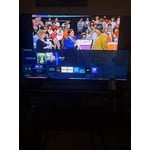
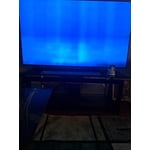
I bought this TV in 2020 and it was a good bit at first. I use my TV for watching shows, YouTube, and a lot of gaming. After a while, I noticed a horizontal line forming in the middle of the screen. Fast forward and there are now 4 horizonal lines across the entire width of the TV. I ended up putting it in my office because I could NOT have those lines on my main TV. (As I went to take pictures for this review, 2 more faint lines have appeared)
All I will buy from now on are Samsung TV s
[This review was collected as part of a promotion.] I bought this tv becasue I heard you could side load andriod and being PC and Galaxy phone guy this was appealing. I had no idea how much more this tv could do and the features WOW. I use my pc for everything and keep very current with software, hardware and OS and lost interest in TVs years back. If you've never Samsung's HUB then you are in for a treat. Well Done Samsung!
Wireless Connection Problems
had the tv for a week without issue and was relatively happy until i started experiencing a wireless connection issue ("mac address is invalid."). my wifi connection was fine (strong on all other devices), but the tv was completely unable to detect my (or any other) wireless router as it had during setup. i tried all the troubleshooting i could find online, but it seems to be a known defect with certain units that may or may not ever go away for the life of the tv. after trying to connect again for another hour it eventually detected my router again for about two minutes before the error quickly returned, at which point i made the easy call to return it for a different brand that won't require a lucky dice roll any time i want to watch tv. obviously a very frustrating outcome.
Great TV, terrible remote!
this is a great tv! it is our first smart tv and we're pleasantly surprised at how easy it was to set up and use. even our children are able to use it with ease. especially simple when switching back and forth between cable and streaming apps. we are very happy with the tv but i have to say that we strongly dislike the remote. buttons need to be different sizes/ shapes or even different a orientation. we're constantly hitting the wrong buttons even after having for a few weeks. this is the only downside to this tv.
Never again - Korean junk made in Mexico
Lasted 18 months of very limited use in guest room. Then the "two fast red blinks, pause, two fast red blinks, pause, one long red blink and and one short red blink" started and was told that it was out of warranty (which I knew, but this seems like manufacturer defect) and then tried sell me new Samsung TV as the repair costs will likely be more than a new one.