Skip to Main Content
Sam's Club
Sam's Club
All Departments
All Services
Customer reviews for SAMSUNG 75" Class TU700D-Series Crystal Ultra HD 4K Smart TV UN75TU700DFXZA for
SAMSUNG 75" Class TU700D-Series Crystal Ultra HD 4K Smart TV UN75TU700DFXZA
4.4 out of 5 stars
stars
10.4K ratings10K reviews
  1. 5 stars69% (7,257)
  2. 4 stars18% (1,886)
  3. 3 stars5% (566)
  4. 2 stars3% (265)
  5. 1 star5% (498)

Member photos

  • +1523 images
Sort by |
Showing 1,141-1,150 of 10,063 reviews
Dec 14, 2022
Reviewer name: Chino
5 out of 5 stars
5 out of 5 stars review

Outstanding TV with No complaints

For the size of my TV, it performs like a big screen. picture, sound and clarity is spectacular. I have been a Samsung TVs for more than 20 years and every time I change a TV in my house, it is better and technology used on them it is the utmost. Best part it is a minimum of 10 years that i keep my TVs. Thank you Samsung for such a quality and performance

Review from Samsung US
Helpful?3STAXRT0NDXF13883163940
Jun 16, 2022
Reviewer name: Lemony
1 out of 5 stars
1 out of 5 stars review

Samsung tv not smart

[This review was collected as part of a promotion.] We were very excited to get the new Samsung smart tv! The picture is so bright you can watch it in the afternoon with the the shades open! But as time went by we discovered the sound is not smart. The sound gets loud during a movie, changing channels, ads, I have to hold the remote to control the sound. It also has a problem with a streaming channel, it comes in but won't show any free movies, I called the channel to ask them why don't I get free movies? They replied that Samsung was to blame, no free movies on that channel. Ok , I do get a local channel, but I still have to hold the remote to control the sound. The conclusion for this review is that I would love to return the Samsung and get a new Samsung to see if this one is just a lemon. The picture is beautiful.

Review from Samsung US
Helpful?3STAXRT0NDXF13883163940
reply from Samsung Brand Ambassador

Hi Lemony, I apologize for the inconvenience you have had with the inconsistent sound volume. The Auto Volume function automatically adjusts the sound to a certain level when changing channels or switching to another external input. Go to: Settings > Sound > Expert Settings > Auto Volume = On You may also want to perform a Sound Test under Support > Self Diagnosis > Start Sound Test. If the issue persists, please reach out to us so that we can provide further troubleshooting. Should you ever have questions or need help, Samsung is here for you! Just give us a call at 1-800-SAMSUNG, 8 AM - 12 AM EST, 7 days a week. Our LiveChat agents are also available by clicking on the ‘Support’ link on our website. ~ Samsung Advisor

Oct 25, 2022
Reviewer name: Anonymous
5 out of 5 stars
5 out of 5 stars review

Excellent quality at an excellent price.
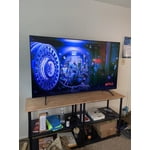
[This review was collected as part of a promotion.] I feel that, for the price, that this TV is far better quality than other brands I am familiar with. It looks good and it sounds good. The software is easy enough to navigate and select the programming that I want to see. I know that it is not the most expensive model available in its size, but since I am one of millions of Americans that are on the lower end of income, it is good that I was able to find a good quality television that I can afford. I really am impressed with the sound quality of my television!

Review from Samsung US
Helpful?3STAXRT0NDXF13883163940
May 25, 2022
Reviewer name: MSE917
5 out of 5 stars
5 out of 5 stars review

Best TV in the house

[This review was collected as part of a promotion.] The picture quality of this tv is excellent, the size is perfect and the sound is great. I purchased a Samsung sound bar to enhance the tv sound but the tv sound alone is just fine. My daughter purchased the 50 inch and I plan to get one for the guest bedroom.

Review from Samsung US
Helpful?3STAXRT0NDXF13883163940
Oct 25, 2022
Reviewer name: DisneyDivaDeb
5 out of 5 stars
5 out of 5 stars review

We Love It

[This review was collected as part of a promotion.] We are very pleased. We love it. The color and clarity is amazing. It's like the tv and movie characters are in the room. Watching sports events makes us feel like we're there. We have dark drapes behind the tv and it's like being in a movie theater. We'd highly recommend this television.

Review from Samsung US
Helpful?3STAXRT0NDXF13883163940
Sep 17, 2020
Reviewer name: Samuel
5 out of 5 stars
5 out of 5 stars review

Best Samsung TV I've ever owned

[This review was collected as part of a promotion.] Very nice tv. The picture is amazing. Game mode is a plus and you get better color while playing video games. Awsome menu with easy controls. I love this tv and with deffinently stay with Samsung from now on.

Review from Samsung US
Helpful?3STAXRT0NDXF13883163940
Oct 25, 2022
Reviewer name: cabdillo1
2 out of 5 stars
2 out of 5 stars review

Great while it lasted

[This review was collected as part of a promotion.] We watched TV. Streaming and watching cable TV. Also used for you tube. The picture and sound was good. Therein lies the problem the TV lasted just past a year. The factory warranty expired before the screen went black...

Review from Samsung US
Helpful?3STAXRT0NDXF13883163940
reply from Samsung Brand Ambassador

Hi cabdillo1, We are sorry to hear about your experience with the TU700D TV having a black screen. Please know that your TV is backed by a 3-year limited manufacturer's warranty, including authorized repair for manufacturer defect, if purchased brand-new directly from an authorized seller. If you've switched on your TV and the sound comes through fine, but you do not see any picture, there are three potential issues. 1) A connection issue; is the most common problem when there is a bad connection, faulty cables, or improper installation. 2) An issue with the device connected to the TV. There may be a video output setting on the device that you must set properly before it outputs to the TV. 3) There is something wrong with the TV, requiring a technician to assess the TV and find a solution. Please give us the opportunity to assist you by contacting Samsung Customer Support at 1-800-SAMSUNG, 8 AM - 12 AM EST, seven days a week. LiveChat with an agent, as well as manuals, software, and warranty info, can be found at the ‘Support’ link on our Samsung website. ~ Samsung Advisor

Jan 7, 2023
Reviewer name: Magnolia
2 out of 5 stars
2 out of 5 stars review

Price was good, but that's all

slow to connect to apps. disconnects from internet for no reason. freezes during streaming. there also seems to be an issue between this model tv and pandora with constant skipping during songs. this issue has been heavily discussed on pandora's forums. all the issues i mentioned could be related to my internet provider, however, i've had no changes with my provider, so i'm not going to blame them. to me, this is solely related to this television. i usually buy sony but was encouraged by a friend to get a samsung. i should have stayed with what i know. i won't buy samsung again.

Review from Samsung US
Helpful?3STAXRT0NDXF13883163940
reply from Samsung Brand Ambassador

Hi there, Thank you for sharing details of your experience with the Pandora app. This may be related to your network connection and quality. We suggest you try the following: 1. Use 5G Wi-Fi if possible 2. Try wired LAN if available 3. Try repositioning the router so there are no obstacles between your TV and the router Please also be sure you are running the latest firmware. You can check to see what software version your TV is using and if there is an available update through the settings on your TV. Go to: Settings > Support > Software Update. You may want to enable automatic updates for convenience. Go to Settings > Support > Software Update, then select Auto Update. Additionally, to optimize the TV’s performance, try running Device Care, which improves your apps performance by freeing up unused cached memory and closing background apps. Go to: Settings > Support > Open e-Manual, then select Device Care. I hope these tips help improve your streaming experience. If you need further help, please call us at 1-800-SAMSUNG, 8 AM - 12 AM EST, seven days a week. Our LiveChat agents are also available by clicking on the ‘Support’ link on our website. ~ Samsung Advisor

Oct 12, 2021
Reviewer name: Smartthings
5 out of 5 stars
5 out of 5 stars review

Up and running, fantastic smart pairing

[This review was collected as part of a promotion.] I watch streaming shows through the tv and play Nintendo switch content as my primary use of the tv. The smart integration of pairing with both the smartthings app and Alexa mean that I don't have to find the remote to change volume, turn on the tv, or change channels/input. Way better quality than an LG tv I had purchased a couple years ago, and the Samsung TV was at a fantastic price! If I'm in the market for a tv again or offering a recommendation, this would be it.

Review from Samsung US
Helpful?3STAXRT0NDXF13883163940
Jun 16, 2022
Reviewer name: lmceTV
5 out of 5 stars
5 out of 5 stars review

Great purchase

[This review was collected as part of a promotion.] Great purchase, I have it hanging in a wall, it's lightweight, it was easy to set up, smart hub easy to use with access to all current apps, quick response, all in one. I have also used it as PC monitor.

Review from Samsung US
Helpful?3STAXRT0NDXF13883163940