
Skip to Main Content
Sam's Club
Sam's Club
All Departments
All Services
Customer reviews for SAMSUNG 65" Class TU700D-Series Crystal Ultra HD 4K Smart TV UN65TU700DFXZA for
SAMSUNG 65" Class TU700D-Series Crystal Ultra HD 4K Smart TV UN65TU700DFXZA
4.5 out of 5 stars
stars
11.3K ratings10.3K reviews
  1. 5 stars70% (7,942)
  2. 4 stars18% (1,994)
  3. 3 stars5% (589)
  4. 2 stars3% (284)
  5. 1 star5% (523)

Member photos

  • +1564 images
Sort by |
Showing 3,411-3,420 of 10,373 reviews
Oct 6, 2020
Reviewer name: AtlantaGal
5 out of 5 stars
5 out of 5 stars review

Plug and play!! Simple setup!!

[This review was collected as part of a promotion.] Best TV I have ever owned!! Right out of the box, plugged it in, hooked up the cables and we were off. The TV walks you through it's very simple set up!! The picture is crisp and clean. So, so pleased!!!

Review from Samsung US
Helpful?3V8BU16WBLTL13878902648
Jan 19, 2023
Reviewer name: tsonic45
4 out of 5 stars
4 out of 5 stars review

Ok for the price

Had the TV for about 3 weeks, love the picture, and sound. Wish I could edit the apps in the menu, appears you can only add apps, not delete them. The processor is a bit slow to react, and the remote is geared more toward the default samsung TV, than to using the other video apps.

Review from Samsung US
Helpful?3V8BU16WBLTL13878902648
Aug 8, 2022
Reviewer name: JDawgBklyn
5 out of 5 stars
5 out of 5 stars review

Great smart TV, good picture quality & value
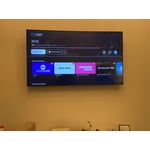
[This review was collected as part of a promotion.] Got this Samsung UHD TV for our living room and it's been great so far. The following features have been really nice: - Smart TV with apps / downloadable apps for all the common streaming services. - Samsung TV Plus: free streaming channels, from news, to free movies, to common free-to-air channels. Which in addition to the Smart TV streaming apps provides tons of content. - Easy to setup - Slim form factor and mounts nicely on a wall for a slim, flush look. - Picture quality has been good for movies, streaming services, connecting a laptop to TV, etc.

Review from Samsung US
Helpful?3V8BU16WBLTL13878902648
Jul 11, 2022
Reviewer name: neelindc
4 out of 5 stars
4 out of 5 stars review

Our new 50 inch TV Samsung.

When we went looking for a new TV there was only one name brand we trusted. Our appliances, our phones and tablets are all Samsung,a name we have learned to trust for great service and durability. We grabbed the 50 inch TU700 smart 4 k with a great picture and sound

Review from Samsung Canada
Helpful?3V8BU16WBLTL13878902648
reply from Operations

Thank you, needlindc! We love to hear positive feedback and we’re delighted you’re enjoying your new Samsung TV. 

Oct 13, 2022
Reviewer name: Harris
5 out of 5 stars
5 out of 5 stars review

Ease of use

[This review was collected as part of a promotion.] For an economical TV or lower priced TV it is a steal, alot if TV for a very resonable price. The features are easy to navigate the pre installed apps are great and finding new apps is a breeze. If one is looking for a good TV on a budget then this would be just what your looking for.

Review from Samsung US
Helpful?3V8BU16WBLTL13878902648
Jun 16, 2022
Reviewer name: Samsunghousehold
5 out of 5 stars
5 out of 5 stars review

Love this tv

[This review was collected as part of a promotion.] This is my first Samsung tv and I love it. The picture is great! The Samsung channels are wonderful and such a bonus feature. I'm buying my dad the same one for Father's Day now since he needs an upgrade.

Review from Samsung US
Helpful?3V8BU16WBLTL13878902648
Jul 27, 2022
Reviewer name: Fenrir
5 out of 5 stars
5 out of 5 stars review

Great starter 4k tv
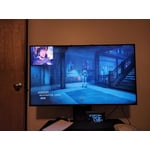
[This review was collected as part of a promotion.] As far as gaming and streaming iv had no complaints. Great picture and sound still to this day. Set up was easy as far as physical and system and being able to link all my devices to it is the cherry on top.

Review from Samsung US
Helpful?3V8BU16WBLTL13878902648
Sep 16, 2020
Reviewer name: Joshy56
5 out of 5 stars
5 out of 5 stars review

A great vivid picture

[This review was collected as part of a promotion.] As soon as we plugged in our Samsung Crystal UHD it had an amazing picture and one of the easiest set up voice instructions of any TV we have ever had. Now we have 2 Samsung's and looking forward to our next which will hopefully be a 65 inch. Thanks for everything

Review from Samsung US
Helpful?3V8BU16WBLTL13878902648
Oct 21, 2020
Reviewer name: KoryIAHawk
5 out of 5 stars
5 out of 5 stars review

Samsung doesn't disappoint again!

[This review was collected as part of a promotion.] I recently purchased the Samsung 7 Series Crystal UHD 75” TV. This was an easy purchase considering it was at my desired price point and that it was a Samsung which is the only TV we purchase. I was first impressed by the packing and ease of getting to the actual TV from the box. Set-up was even easier.I was very impressed with the picture quality! Our satisfaction with Samsung continues.....

Review from Samsung US
Helpful?3V8BU16WBLTL13878902648
Sep 24, 2022
Reviewer name: LovelyT
3 out of 5 stars
3 out of 5 stars review

The product great
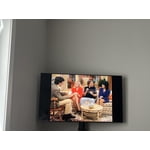
[This review was collected as part of a promotion.] The TV is okay but it's not as crystal clear as I thought it would be and the remote is not easy to work with all!!! Very difficult especially if you're operating the remote in the dark, I have to turn the lights on to see because the pad does not light up which is very annoying . I wish I had a newer version.

Review from Samsung US
Helpful?3V8BU16WBLTL13878902648
reply from Samsung Brand Ambassador

Hi LovelyT, Thank you for your review of the TU7000 TV's picture and remote quality. Please know we are here to help you! If the picture you’re seeing is not to your liking, there are several settings you may want to try adjusting. First, let's ensure your firmware is up to date. Please go to Settings> Support > Software Update. You can easily update your firmware from here. Next, go to Home > Settings > Picture > Picture Mode and select the mode that best fits your usage: 1) Standard: Default mode suitable for general viewing environments. 2) Natural: Reduces eye strain for a comfortable viewing experience. 3) Movie: Suitable for watching TV or movies in a dark room. 4) Dynamic: Makes the picture brighter and clearer in bright viewing environments. 5) Filmmaker Mode: You can watch the source content (e.g., movie) as it is. If the image is defined as Filmmaker Mode, it will automatically switch to Filmmaker Mode while watching. You can also go to Settings > Picture > Expert Settings > to manually fine-tune your image. If you need more help, Samsung is here for you. Call us at 1-800-SAMSUNG, 8 AM - 12 AM EST, seven days a week. Or visit us on the Samsung website and click on the ‘Support’ link for: 1) LiveChat with an agent 2) Manuals, Software, & Warranty Info ~ Samsung Advisor




