
Skip to Main Content
Sam's Club
Sam's Club
All Departments
All Services
Customer reviews for SAMSUNG 65" Class TU700D-Series Crystal Ultra HD 4K Smart TV UN65TU700DFXZA for
SAMSUNG 65" Class TU700D-Series Crystal Ultra HD 4K Smart TV UN65TU700DFXZA
4.5 out of 5 stars
stars
11.3K ratings10.3K reviews
  1. 5 stars70% (7,942)
  2. 4 stars18% (1,994)
  3. 3 stars5% (589)
  4. 2 stars3% (284)
  5. 1 star5% (523)

Member photos

  • +1564 images
Sort by |
Showing 3,351-3,360 of 10,373 reviews
May 22, 2020
Reviewer name: Twangled
4 out of 5 stars
4 out of 5 stars review

Ok TV.

Have had this for two weeks. It's nice and picture is good. One issue. There's only two HDMI ports on back. Can hook up sound system and one other device but that's it. Also having issues with soundtrack not matching video. Doesn't matter if it's TV, blue ray it streaming... Just happens off and on all the time. Kind of annoying.

Review from Samsung US
Helpful?3V8BU16WBLTL13878902648
Jul 9, 2023
Reviewer name: Disappointed
2 out of 5 stars
2 out of 5 stars review

Terrible sound quality

Like all Samsung t.v.'s, the sound (or lack there of) is beyond disappointing. Figured a newer model would have fixed or improved upon this issue but no. No matter what sound setting this is on, the volume has to be on 24 to even hear it, which is ridiculous and annoying. Samsung needs to do better with the sound/speaker issue, no one should have to buy an ugly sound bar just to get decent quality sound, and from the reviews I've read, the soundbars barely work, too. Would definitely not buy another Samsung t.v. again, just bought 3 of these and they're mot worth it.

Review from Samsung US
Helpful?3V8BU16WBLTL13878902648
Oct 25, 2022
Reviewer name: HappyCustomer
5 out of 5 stars
5 out of 5 stars review

The best Tv I've had in a long time

[This review was collected as part of a promotion.] Since I bought this tv I fell in love with it. The smooth transitions from app to app. Browsing through your tv has never felt this good. I love watching my favorite shows on this because it feels like I'm at the movies.

Review from Samsung US
Helpful?3V8BU16WBLTL13878902648
Jun 16, 2022
Reviewer name: Blue90
3 out of 5 stars
3 out of 5 stars review

Decent low-end 4K TV

[This review was collected as part of a promotion.] First off I use my TV for mostly gaming and multimedia streaming. 4K resolution at 60htz is solid for the most part but the HDR is barely noticeable if there are all. It's an LED the blacks are pretty bad at times during 4k movies and games also. The sound quality was surprisingly nice, crisp and can get pretty loud on the right setting. UI is pretty slow once you connect it to the internet so I highly advise against that and just use a gaming console or streaming device of choice. My last critique of this TV is how inconsistent it is with game mode for the PS5. Auto game mode just doesn't work. You have to switch back and fourth if you want to leave game mode while streaming anything, and you'd definitely want to do that with how bad the sound quality because when in game mode. This TV just gets the job done if you want to watch and play things at 4K with little latency. There are many annoyances that keep me from recommending this to other people.

Review from Samsung US
Helpful?3V8BU16WBLTL13878902648
reply from Samsung Brand Ambassador

Hi Blue90, We are sorry to hear about your internet and gaming issues with your TU7000 TV. Optimize performance and address your issue with gaming response time with the self-diagnostic tool. This service checks memory and frees up unused cached memory and closes background apps. Go to: Settings > Support > Device Care > Start Device Care If you are having issues with game mode, Game Mode is turned on automatically when the selected source is identified as a game console, like Xbox One X / S or Xbox Series X, but it must be turned on manually if the selected source is identified as PC. We recommend enabling Anynet+ as well as Input Signal Plus (HDMI UHD Color) on your TV. To enable Anynet+, go to: Settings > General > External Device Manager > Anynet+ (HDMI-CEC) = On. Next, connect your gaming console using an HDMI cable, and then turn it on - it will automatically connect to the TV. To enable Input Signal Plus, go to: Settings > General > External Device Manager > Input Signal Plus. From there, select the HDMI port that is connected to your gaming console. Also please be sure your TV is up to date with firmware version 2201.0, as this includes various performance updates. You can check this by going to: Settings > Support > Software Update. Should you ever have questions or need help, Samsung is here for you! Just give us a call at 1-800-SAMSUNG, 8 AM - 12 AM EST, 7 days a week. Our LiveChat agents are also available by clicking on the ‘Support’ link on our website. ~ Samsung Advisor

Jun 16, 2022
Reviewer name: Iluvit31
5 out of 5 stars
5 out of 5 stars review

Great features!
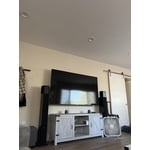
[This review was collected as part of a promotion.] We love our TV it has great colors, great sounds, great dimensions overall very satisfied,. We love watching our scary movies in the weekends the colors really stand out LOL, we also enjoy listening to our music while we clean or cook it really gets us pumped up with how great the music sounds on our TV.

Review from Samsung US
Helpful?3V8BU16WBLTL13878902648
Oct 8, 2022
Reviewer name: Great4me
5 out of 5 stars
5 out of 5 stars review

Beautiful picture quality

[This review was collected as part of a promotion.] Whether it's streaming movies or gaming I enjoy the experience I get from the large 70" ultra high definition display display. I've had it for a few years and I've never had any issues I would definitely recommend this product

Review from Samsung US
Helpful?3V8BU16WBLTL13878902648
Aug 23, 2022
Reviewer name: idd123
5 out of 5 stars
5 out of 5 stars review

Amazing for gaming!

[This review was collected as part of a promotion.] It works really well with my Xbox series S in 4K HDR, the game mode makes games super beautiful and immersive. It also has pretty good sound quality! I like the phone tap feature with the TV as well as using the remote on my phone. It comes in handy and feels super futuristic. It's rather large for my bedroom, but it makes games more immersive.

Review from Samsung US
Helpful?3V8BU16WBLTL13878902648
Jun 13, 2022
Reviewer name: JAWs41493
4 out of 5 stars
4 out of 5 stars review

Audio Setbacks

[This review was collected as part of a promotion.] I love all the auto settings, but the one thing I wish my TV had in the optiona was an equalizer software setting that doesn't require an attached speaker, so that I can manually adjust my sound output frequencies.

Review from Samsung US
Helpful?3V8BU16WBLTL13878902648
Sep 15, 2020
Reviewer name: itsedeeen
4 out of 5 stars
4 out of 5 stars review

Great quality and features

[This review was collected as part of a promotion.] I was in search of a 4k smart TV and after some thorough research I finally settled for my Samsung Crystal UHD TV. It had all the features for streaming and the picture imagine is quite nice. It has definitely surpassed my expectations and am happy to have picked this one. The design is quite elegant and the full screen ratio is an elegant look.

Review from Samsung US
Helpful?3V8BU16WBLTL13878902648
Jun 21, 2021
Reviewer name: Sjackson
5 out of 5 stars
5 out of 5 stars review

Excellent Product

first tv this large. amazed at the quality of such a large screen. legs that came with were too far apart for the tv base we had so we purchased an aftermarket center stand that works well. not the tv's fault that ive had this stand for thirty years. took some getting use to to set up since we had to go to the website rather than just do everything right on the tv. went smooth and ive had no issues with quality or use. great picture and value. two hdmi ports and optical audio was all we needed. please offer a center stand rather than the wide legs.

Review from Samsung US
Helpful?3V8BU16WBLTL13878902648




