
Skip to Main Content
Sam's Club
Sam's Club
All Departments
All Services
Customer reviews for SAMSUNG 65" Class TU700D-Series Crystal Ultra HD 4K Smart TV UN65TU700DFXZA for
SAMSUNG 65" Class TU700D-Series Crystal Ultra HD 4K Smart TV UN65TU700DFXZA
4.5 out of 5 stars
stars
11.3K ratings10.3K reviews
  1. 5 stars70% (7,942)
  2. 4 stars18% (1,994)
  3. 3 stars5% (589)
  4. 2 stars3% (284)
  5. 1 star5% (523)

Member photos

  • +1563 images
Sort by |
Showing 3,161-3,170 of 10,373 reviews
Jan 12, 2021
Reviewer name: Josh W
5 out of 5 stars
5 out of 5 stars review

Great value

you can always count on samsung to deliver the most punch that can possibly be packed into a product for the price. this tv is no exception. clearly superior design from every angle. wonderful no hassle delivery included in the price. it just looks nicer than other products.

Review from Samsung US
Helpful?3V8BU16WBLTL13878902648
May 25, 2022
Reviewer name: robinga2
4 out of 5 stars
4 out of 5 stars review

Awesome picture, great sound

[This review was collected as part of a promotion.] For antenna and streaming viewing, this is a great TV. Picture is excellent, sound is excellent as well. About the only thing I don't like is that the CC option requires multiple steps, instead of a single button to toggle CC on/off.

Review from Samsung US
Helpful?3V8BU16WBLTL13878902648
Apr 9, 2021
Reviewer name: Marty
4 out of 5 stars
4 out of 5 stars review

Samsung TU7000 a great and exceptional TV.

[This review was collected as part of a promotion.] As a purchaser of many different model tv in my lifetime the Samsung TU7000 Crystal UHD is by far the best TV on the market. With its superior 4K image and color superiority competitors will have a hard time matching not only the image aspects but also the features within this set. Pros Video: The Samsung TU7000 has all the technology that delivers an out of this world quality image: 4K processor (2160p versus the HD1080), Crystal colors displayed and a motion rate 120 for your high-speed programs or movies make for an easier view with no image distortion when viewing your favorite action movie. The colors and dark black that some tv can't handle this TV does. Setup: connecting all your devises to the TV via the HDMI ports is simple and once you turn on the Samsung TU7000 it automatically does its internal setup and configuration making things simple. Simple for me, makes it simple for my 80 year old dad. Getting him one on his birthday. Wireless lan or connect via 5E/6E you choose for the apps you decide to download. Bluetooth and streaming from your Android or IOS devices. I love being able to directly project onto my Samsung TU7000 any app from my phone, or just pictures stored in my other android devices Cons: Like in most flat TV in the market the speakers are not delivering the most powerful sound possible. Purchase a soundbar or connect to your home stereo system. You will be disappointed if you expect a great sound quality from it's own internal speaker system

Review from Samsung US
Helpful?3V8BU16WBLTL13878902648
Dec 12, 2022
Reviewer name: chels9
1 out of 5 stars
1 out of 5 stars review

Save your money, breaks after a year
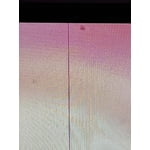
I bought this TV a year ago, and it is kept in a pristinely clean and safe area. Today, it developed a black line down the entire screen after the warranty just ended. I tried all the diagnostics and have several Samsung products. I'm extremely disappointed and hope the problem can be addressed by Samsung.

Review from Samsung US
Helpful?3V8BU16WBLTL13878902648
reply from Samsung Brand Ambassador

Hi chels9, Thank you for letting us know about the issue you are experiencing with your Samsung TU7000 TV. I have a few troubleshooting steps for you to try, which may resolve your problem. 1. If any external devices are connected, check all input cable connections 2. If the issue persists, define precisely what is wrong with the display. For example, mosaics and blocks, multiple lines or white dots, and fixed horizontal or vertical lines. 3. Try changing channels using the remote control. Is the issue the same on all channels? 4. Press the Home button (looks like a house), select Source, and choose another input source. Is the issue the same on all sources? 5. If the same problem persists, run a diagnostic test. (Home > Settings > Support > Device Care > Self Diagnosis > Picture Test) 6. If the problem disappears during the test, check your TV signal (Home > Settings > Support > Device Care > Self Diagnosis > Signal Information) to check the signal strength. The signal strength must be more than 20 dB (more than 4 bars on the icon) for stable signal reception Should your issue persist, please contact Samsung Customer Support at 1-800-SAMSUNG, 8 AM - 12 AM EST, seven days a week. Our LiveChat agents are also available by clicking on the ‘Support’ link on our website. ~ Samsung Advisor

May 23, 2022
Reviewer name: JoshLebron
5 out of 5 stars
5 out of 5 stars review

Simple, Excellent

[This review was collected as part of a promotion.] It is simply excellent, colors are clear enough, bright is just perfect, my eyes never get tired by it. I can sit down and watch for hours without feeling the brightness hazard that sometimes can be a problem. It's incredible that this thing big screen can give you such amazing experience. Just love my new tv

Review from Samsung US
Helpful?3V8BU16WBLTL13878902648
Aug 7, 2021
Reviewer name: Jeff
3 out of 5 stars
3 out of 5 stars review

Not as smart as you'd think...

first let me say that i love the picture quality which i expect from a samsung tv. what let me way down is the smart operating system. when i turn the tv on there's an annoying menu that pops up and it won't go away unless you hit the back button. it only has 2 hdmi ports which i didn't think much of until i had to plug in my xbox, sound bar, and an unexpected chromecast. way too many buttons on the remote, difficulty navigating options and setting menus... the list goes on. bottom line: it's my fault i didn't look more into the features before purchasing but there are certain things i've come to assume about modern tech, ease of use being one of them.

Review from Samsung US
Helpful?3V8BU16WBLTL13878902648
Jul 20, 2022
Reviewer name: dmilly
3 out of 5 stars
3 out of 5 stars review

Good picture, not great smart TV
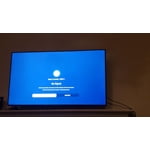
[This review was collected as part of a promotion.] The picture and sound quality are good. What I expected for this kind of TV. However, the software and smart TV features are frustrating. The UI is very slow to respond to input, and the home menu pops up at inconvenient times. Also, this TV does not have component input, and adapters do not work with it. So for example, you cannot connect a Wii to this TV.

Review from Samsung US
Helpful?3V8BU16WBLTL13878902648
reply from Samsung Brand Ambassador

Hi dmilly, Thank you for your review of the Samsung TU7000 TV. We appreciate your feedback. Samsung prides itself on high-quality products and a great customer experience; please know we are here to help you. Please try these troubleshooting tips, which should help with the issues you are experiencing. First, let's ensure your TV’s firmware is up to date with the latest version, which includes updates to improve lag. You can check this by going to Settings > Support > Software Update and then easily update from there if needed. You may also want to further optimize performance with the self-diagnostic tool, which checks memory, frees up unused cached memory, and closes background apps. Go to Settings > Support > Device Care > Start Device Care. If your Wii does not have HDMI, to connect your Wii to the Samsung TU7000, you will need a Component to HDMI Converter. When connecting, please make sure you enable Input Signal Plus and Anynet+ (HDMI-CEC) on your TV. Anynet+ will control external devices that are connected to your TV with HDMI. Please keep in mind you will not be able to use Anynet+ if this feature is not supported on your receiver. If you need more help with this, please reach out to us, and we can assist you. Please call us at 1-800-SAMSUNG, 8 AM - 12 AM EST, seven days a week. LiveChat with an agent, as well as manuals, software, and warranty info, can be found at the ‘Support’ link on our Samsung website. ~ Samsung Advisor

Sep 16, 2020
Reviewer name: AceMan
4 out of 5 stars
4 out of 5 stars review

Great TV for the price

[This review was collected as part of a promotion.] This is a GREAT TV for the Price. Very Clear 4K, and the Apps work great, except for a few apps that crash occasionally. The Samsung TV App is Awesome. The only Issue I have is that there is a shadow that completely covers 1/3 of an inch all the way around. The Bezel may be the cause, or the way the back light is set, not sure.

Review from Samsung US
Helpful?3V8BU16WBLTL13878902648
Jul 27, 2022
Reviewer name: GreatTV
5 out of 5 stars
5 out of 5 stars review

Great Television

[This review was collected as part of a promotion.] This TV is great. This TV easily handles all my needs and more. Fantastic picture, lifelike color and fine detail. I can't say enough to say how satisfied I am with this television. Thanks Samsung.

Review from Samsung US
Helpful?3V8BU16WBLTL13878902648
May 27, 2022
Reviewer name: Duke
5 out of 5 stars
5 out of 5 stars review

Surpassed expectations

Had it for over a month now and keep finding new stuff. I am sure our service provider has a lot to do with it but they are only as good as the tv you are viewing them on. Love the free wi if channels that came with the tv. Awesome picture quality and sound. Could not be happier

Review from Samsung Canada
Helpful?3V8BU16WBLTL13878902648
reply from Operations

Thank you, Duke! We love to hear positive feedback and we’re delighted you’re enjoying your new Samsung TV.




