Skip to Main Content
Sam's Club
Sam's Club
Customer reviews for SAMSUNG 75" Class DU7200 Series 4K Smart TV for
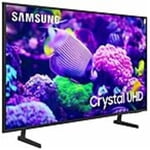
SAMSUNG 75" Class DU7200 Series 4K Smart TV
4.3 out of 5 stars
stars1,119 ratings1,016 reviews
  1. 5 stars62% (692)
  2. 4 stars19% (214)
  3. 3 stars9% (97)
  4. 2 stars5% (54)
  5. 1 star6% (62)

Member photos

  • +169 images
Sort by |
Showing 241-250 of 1,016 reviews
Dec 30, 2024
ShoppingMama
5 out of 5 stars review

Great picture, great sound. Best tv i own

[This review was collected as part of a promotion.] I absolutely love this tv! It's for our living room, best picture we could've got! And for the price at the time, it was a steal. By far the best TV I've own. I've definitely fallen asleep in my living room a few times too much, just can't seem to leave it.

Review from Samsung US
Helpful?5FRN1844BKE813872250918
Dec 27, 2024
Joseph
3 out of 5 stars review

Great looking TV with drawbacks

[This review was collected as part of a promotion.] I realize that obtaining people’s personal information is a major plus for your organization, but for the customer, it is completely unnecessary and should never be a part of the purchase of a television. You cannot get full functionality without submitting this information and that’s disgusting. The opening screen with all the little windows is not useful and quite annoying. Just let the TV start with the most recent input and let the user make the change when they are ready. Trying to hook up a soundbar is not easy. There is basically nothing in the paperwork about it. Of course, there’s plenty of information about connecting a Samsung soundbar. Eliminating the digital optical input is absolutely ridiculous, and I almost repacked the TV and brought it back when I saw that. Changing the threads for the TV mount from models sold a few years ago was also a problem. As usual, you did this to encourage people to buy a Samsung TV mount. I have purchased 4 Samsung TVs over the last decade, but this most recent will be the last. The TVs have a beautiful picture, but you have gone too far with invading our privacy, and forcing additional products on us. Thank you the opportunity to submit feedback.

Review from Samsung US
Helpful?5FRN1844BKE813872250918
reply from Samsung Advisor

Hi Joseph, Thank you for taking the time to provide us with detailed feedback regarding the setup and connection of external devices on the DU7200 TV. Please know your opinion will be shared with our internal teams. We understand sometimes there is a learning curve when you get a new TV! This is why we created step-by-step guides, to make it easier for you. To learn about your TV go to https://www.samsung.com/us/support/answer/ANS00062199/. Please know, you can choose what your TV does when you turn it on by going to Settings > All Settings> General > Smart Features. When you set Autorun Smart Hub to be on, the TV displays the Home Screen automatically when you turn the TV on. If Autorun Last App is set to on, the last used app automatically runs when you turn on the TV. You can turn this function on or off. Regarding mounting your TV, please know your TV should work with most universal mounts. You may need to purchase new screws, which can be found at your local hardware store. For your DU7200, you will need 4 x M8 screws, 20-22mm length, and 1.25mm pitch. I hope these tips help. If you need more assistance, Samsung is here for you! Please call us at 1-800-SAMSUNG, 8 AM - 12 AM EST, seven days a week. Our LiveChat agents are also available by clicking on the ‘Support’ link on our website. ~ Samsung Advisor

Feb 20, 2025
Lefty
1 out of 5 stars review

Clarity

I truly believe this to be the most clarity I have seen from this than in any others I have purchased thru the years. The only feature I dislike is that the controller is too lightweight and makes it harder for those of us who are no longer in the young stages of our life to hold on to. Other than that I am greatly enjoying.

Review from Samsung US
Helpful?5FRN1844BKE813872250918
reply from Samsung Advisor

Hi Lefty, Samsung remotes are designed to be convenient and useful, but we understand if you’d prefer to use a third-party remote, whether it’s a universal remote, a game controller, or something else! Whether you are replacing a lost remote or using an alternative remote to help reduce clutter, a third-party remote is a great option to use to control your Samsung TV. If there’s anything we can ever help with, please call us at 1-800-SAMSUNG, 8 AM - 12 AM EST, seven days a week. Or visit us on the Samsung website and click on the ‘Support’ link for: 1) LiveChat 2) Manuals, Software, & Warranty Info ~ Samsung Advisor

Feb 6, 2025
Jasper
4 out of 5 stars review

Great but not user friendly.

I replaced my 8 year old Samsung flatscreen with this 43” smart flatscreen. TV viewing is great and I have adapted several streaming apps. I am replacing the Roku streaming service. The instructions with the new tv were lacking greatly, especially with regards to the features on the remote. Little instruction beyond the power button function. I still don’t understand the function of three buttons on the remote control.

Review from Samsung US
Helpful?5FRN1844BKE813872250918
reply from Samsung Advisor

Hi Jasper, We appreciate your review of the DU7200 TV. Please know that you can learn how to use your Samsung Remote by going to Home> (left directional button) Settings> Support> Remote Control Guide. I hope this helps! If you need more help, Samsung is here for you. Please call us at 1-800-SAMSUNG, 8 AM - 12 AM EST, seven days a week. Our LiveChat agents are also available by clicking on the ‘Support’ link on our website. ~Samsung Advisor

May 21, 2025
Happy Cat
5 out of 5 stars review

Fantastic Picture

I purchased my first 55” a couple of years ago as a gift to my niece. I was drawn to it because of the dozens of TV’s on display the clarity and definition really stood out. I purchased a 65 and another 55” recently for my home. The picture is simply astounding. It far outpaced the competitors QLED TV’s. I have recommended Samsung to friends and neighbors. They were all pleased with the quality and value.

Review from Samsung US
Helpful?5FRN1844BKE813872250918
Feb 20, 2025
Jollyranchess
4 out of 5 stars review

Great TV. Terrible remote.

I have been on the hunt for a new tv for quite some time to replace an older Samsung in my bedroom. This tv won me over as it has the ability for the legs to be installed for either a wide or narrow base. TV takes a little getting use to in terms of navigation, but once you get the hang of it, it’s smooth sailing. The tv quality is amazing and so is the sound The quality of the supplied remote is sub par at best. Honestly Samsung, I was disappointed that this was the best you could do for such a nice tv. I’m grateful that the SmartThings App is an option as I use it more the remote. The built in apps are great and it makes watching your streaming shows easy. Overall I’m a satisfied consumer.

Review from Samsung US
Helpful?5FRN1844BKE813872250918
Apr 20, 2025
Mimi
5 out of 5 stars review

Volume

I down sized from a 65" to a 55" I have never bought anything but Samsung. My 65" was 14 yrs old. The only problem I'm having is the sound, you need to put the volume to 55-60 to hear it. Then the commercials are loud and I need to turn it down. I have a firestick attached. Never had this problem with any of my tvs.

Review from Samsung US
Helpful?5FRN1844BKE813872250918
May 22, 2025
Jimini24
3 out of 5 stars review

Beautiful picture!

The unit has a beautiful picture, but as far as ease of use, that's another story. I have 4 Samsung TV's and this one for some reason is very difficult to navigate. I can't add apps that I view and always have to go to search to find them, which is annoying.

Review from Samsung US
Helpful?5FRN1844BKE813872250918
reply from Samsung Brand Ambassador

Jimini24: Thanks for sharing your thoughts. If there's anything we can do to improve your experience, please reach Samsung Support at 1-800-SAMSUNG, 8AM - 12AM EST, 7 days a week. Or visit us on the Samsung website and click on the ‘Support’ link for: • LiveChat • Manuals, Software, & Warranty Info ~ Samsung Ambassador

Oct 24, 2024
JMaxim
5 out of 5 stars review

Samsung Smart Tv

[This review was collected as part of a promotion.] This TV was very easy to setup and operate. I found it very easy to navigate the settings and move the icons around to get them to my preferred order. The picture is fantastic it almost looks 3D! I forgot that one of my old TV’s was a Samsung too and I haven’t had any issues with that one too! I will definitely look at Samsungs again when I need to replace one of my other TVs

Review from Samsung US
Helpful?5FRN1844BKE813872250918
Feb 5, 2025
Dbone
3 out of 5 stars review

Not a great purchase!

Bought this a few weeks ago for my mom. The remote is a joke. You can't control the volume other than mute it and there's not even an input button. I find this TV not very user friendly. Had to buy a Roku with a better remote for her to work it correctly. Picture quality seems decent.

Review from Samsung US
Helpful?5FRN1844BKE813872250918
reply from Samsung Advisor

Hi, We appreciate your feedback on the DU7200 TV remote. Please know that you can control the volume of your TV by pressing the +/- button up to increase the volume and down to decrease the volume. To mute the sound, press the button. You can also learn how to use your remote directly from your TV. Just go to Home> (left directional button) Settings> Support> Remote Control Guide. If you ever have questions or need help, Samsung is here for you! Give us a call at 1-800-SAMSUNG, 8 AM - 12 AM EST, seven days a week. Our LiveChat agents are also available by clicking on the ‘Support’ link on our website. Thanks for being a part of the Samsung family! ~ Samsung Advisor