Customer reviews for SAMSUNG 65" Class DU7200 Series 4K Smart TV for
Member photos
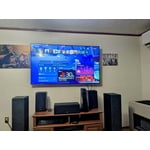


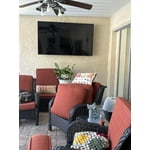


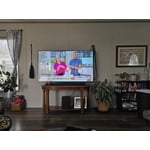
 +163 images
Great resolution
[This review was collected as part of a promotion.] This tv is great choice ,and one of the drawbacks in my opinion is the controler itself missing some of the command prompts when pressed. The other is connectivity issues with the Smart Things App.
Great looking TV with drawbacks
[This review was collected as part of a promotion.] I realize that obtaining people’s personal information is a major plus for your organization, but for the customer, it is completely unnecessary and should never be a part of the purchase of a television. You cannot get full functionality without submitting this information and that’s disgusting. The opening screen with all the little windows is not useful and quite annoying. Just let the TV start with the most recent input and let the user make the change when they are ready. Trying to hook up a soundbar is not easy. There is basically nothing in the paperwork about it. Of course, there’s plenty of information about connecting a Samsung soundbar. Eliminating the digital optical input is absolutely ridiculous, and I almost repacked the TV and brought it back when I saw that. Changing the threads for the TV mount from models sold a few years ago was also a problem. As usual, you did this to encourage people to buy a Samsung TV mount. I have purchased 4 Samsung TVs over the last decade, but this most recent will be the last. The TVs have a beautiful picture, but you have gone too far with invading our privacy, and forcing additional products on us. Thank you the opportunity to submit feedback.
Hi Joseph, Thank you for taking the time to provide us with detailed feedback regarding the setup and connection of external devices on the DU7200 TV. Please know your opinion will be shared with our internal teams. We understand sometimes there is a learning curve when you get a new TV! This is why we created step-by-step guides, to make it easier for you. To learn about your TV go to https://www.samsung.com/us/support/answer/ANS00062199/. Please know, you can choose what your TV does when you turn it on by going to Settings > All Settings> General > Smart Features. When you set Autorun Smart Hub to be on, the TV displays the Home Screen automatically when you turn the TV on. If Autorun Last App is set to on, the last used app automatically runs when you turn on the TV. You can turn this function on or off. Regarding mounting your TV, please know your TV should work with most universal mounts. You may need to purchase new screws, which can be found at your local hardware store. For your DU7200, you will need 4 x M8 screws, 20-22mm length, and 1.25mm pitch. I hope these tips help. If you need more assistance, Samsung is here for you! Please call us at 1-800-SAMSUNG, 8 AM - 12 AM EST, seven days a week. Our LiveChat agents are also available by clicking on the ‘Support’ link on our website. ~ Samsung Advisor
Nice TV. But has issues.
[This review was collected as part of a promotion.] TV is so-so. Got Samsung sound Bar also. So audio if fine. But Blue tooth system sucks. I have a very close to a top of the line router. That is only about 15 feet away from TV. And the Samsung free TV channels always lock up or freezes. VERY poor Blue tooth setup on this TV. Not impressed at all. Our older LG "non smart TV" was better.
Hi 88Scott, Thank you for reaching out and sharing the connection issues you are experiencing with your DU7200 TV. Please try the below troubleshooting steps to resolve these issues: First, let's ensure you are running the latest Firmware. Go to Settings> Support> Software Update. I recommend enabling auto-updates to ensure you do not miss any Firmware Updates. Go to Settings> Support> Software Update> then select Auto Update. Next, let's try running a cold boot on your TV. To do so, hold down the Power button on the Samsung TV remote until the TV turns off and then on again. This should take about 5 seconds. You may also want to further optimize performance with the self-diagnostic tool, which checks memory, frees up unused cached memory, and closes background apps. Go to: Home > Menu > Settings > Support > Device Care > Start Device Care. If you continue to have issues, please reach out to us at 1-800-SAMSUNG, 8 AM - 12 AM EST, seven days a week. Or visit us on the Samsung website and click on the ‘Support’ link for: 1) LiveChat 2) Manuals, Software, & Warranty Info ~ Samsung Advisor
Amazing clarity and color
[This review was collected as part of a promotion.] The Samsung Crystal UHD has amazing clarity and color. This TV has given us a whole new experience watching TV and streaming. We could not be happier with the sound, screen size, and plethora of features. Every watching experience feels like we are in our own home theatre.
Cannot connect soundbar no audio port
I recently purchased a tcl 55” tv. Had to return it because I could not get certain channels we really love to watch. Returned and purchases a Samsung Crystal UHD 7200D tv. We Cannot connect our soundbar. Why why why ???? On earth do you remove certain things people really use? So we have to spend more money?? This world is ridiculous and businesses just go along with it. Sorry. I needed to rant a little but really why?
Hi Upset, Thank you for choosing the Samsung DU7200 TV and for taking the time to provide us with detailed feedback on your experience. Your opinion is important to us and will be shared with our internal product teams. The DU72000F TV offers 3 HDMI ports and is Bluetooth and Wi-Fi capable, allowing a seamless connection across multiple devices at a time. If your external device requires an Optical port, we recommend utilizing an HDMI to Optical Converter. These can be found at your local electronics store. Please also keep in mind that an Optical port can be found on our DU8000F Series and above. We apologize for any confusion. If you ever have questions or need help, Samsung is here for you! Give us a call at 1-800-SAMSUNG, 8 AM - 12 AM EST, seven days a week. Our LiveChat agents are also available by clicking on the ‘Support’ link on our website. Thanks for being a part of the Samsung family! ~ Samsung Advisor
Great TV at great price
[This review was collected as part of a promotion.] Overall I am very happy with the quality of the TV at bargain price. Samsung live comes with many programs, I use mostly music related channels. The only issue I have is the speed of the Apps. For example, if I go back to an APP that I previously ran, it takes a while to response.
Don't buy
Crappy remote. Why no Mic? No access to mic. What was the reason? A basic feature that has been around for a very long time. Can be used with Alexa, oh goody. A device that gets things wrong a large percentage of the time and conversations end with yelling, so yay, put two lacking devices together so a company can save a few pennies. Also nothing intuitive about this interface, regret purchase is a challenge everyday.
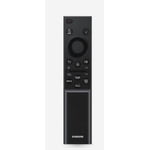
Hi Lynn, We appreciate your purchase and understand your frustration. We are sorry for any confusion regarding voice assistants. You are correct, the DU7200 does not have voice assistants built in. However, they do work with Alexa. You can connect them to your existing Alexa device to ask them to turn on your TV, change channels, control volume, and more. Our DU8000 TV Series and above offer voice command and built-in voice assistants. We also understand there can be a learning curve when you get a new TV! This is why we have built a guide built into the TV that teaches you how to use your remote. You can learn how to use your Samsung Remote by going to Home> (left directional button) Settings> Support> Remote Control Guide. If you need assistance connecting your external Alexa device or if there’s anything we can ever help with, please call us at 1-800-SAMSUNG, 8 AM - 12 AM EST, seven days a week. Or visit us on the Samsung website and click on the ‘Support’ link for: 1) LiveChat 2) Manuals, Software, & Warranty Info ~ Samsung Advisor
The most realistic screen.
[This review was collected as part of a promotion.] I use my Samsung TV to stream movies music videos on YouTube and also use it to monitor my whole house. I don't even have to have the remote no more looking for that because it's on my phone exactly the same as it is they came with the TV This is one of the best TVs I've ever had the most realistic pictures if you put the ocean scene on there yes it looks like an ocean and it's so big and it's right there bold in front of you number one TV I've ever had check it out you like it too.
Not user friendly
[This review was collected as part of a promotion.] The TV makes it difficult to select the connected devices properly , the Bose sound bar I connected was constantly reverting back to use the built in tv speakers instead after I set the sound bar as the primary sound device. The picture quality is fine, no where near as clear and bright as my lg oled but expected and acceptable for the price. There are also lots of features and options (too many) but they are not very user friendly.
Hi FirstSamsungTV, We appreciate your feedback on the DU7200 TV. Please try the below Settings adjustments to resolve any issues you are experiencing. First, please set the Sound Output to the TV Speaker by going to Settings > All Settings> Sound > Sound Output. Next, check whether Digital Output Audio Format is set to Pass-Through by going to Settings > All Settings> Sound > Expert Settings > Digital Output Audio Format > Auto. For optimal performance, please ensure you are running the latest Firmware. Go to Settings> Support> Software Update. If you need more help, please do not hesitate to reach out to us. You can call us at 1-800-SAMSUNG, 8 AM - 12 AM EST, seven days a week. Our LiveChat agents are also available by clicking on the ‘Support’ link on our website. ~ Samsung Advisor
Picture Looks Amazing
[This review was collected as part of a promotion.] I purchased TV as a Christmas gift. It is a 75 inch and fits perfectly in our living room. We couldn't be more happier with the picture quality. I have seen others comment about sound quality, but the sound is not a problem at all. I was looking at the LG, but I'm completely satisfied that I purchased the Samsung. Great price, picture and all of the above.