
Skip to Main Content
Sam's Club
Sam's Club
All Departments
All Services
Customer reviews for SAMSUNG 65" Class DU7200 Series 4K Smart TV for
SAMSUNG 65" Class DU7200 Series 4K Smart TV
4.3 out of 5 stars
stars
1,279 ratings1,091 reviews
  1. 5 stars64% (819)
  2. 4 stars18% (231)
  3. 3 stars8% (102)
  4. 2 stars5% (61)
  5. 1 star5% (66)

Member photos

  • +163 images
Sort by |
Showing 281-290 of 1,091 reviews
Feb 8, 2025
Reviewer name: Bawitdaba
4 out of 5 stars
4 out of 5 stars review

Beautiful picture

Crystal clear screen. Could do without the clutter of app icons I don't have or want. Would be nice if they only appeared after subscribing. Could be easier to navigate for the less tech savvy. The "legs" are unattractive. Sturdy enough, but wider legs would create a more balanced aesthetic for more cosmetic appeal. Removed one star for the things I don't like but the picture quality is beautiful.

Review from Samsung US
Helpful?3BX78DZ2P7VO13854766773
Feb 21, 2025
Reviewer name: Frank
5 out of 5 stars
5 out of 5 stars review

Step up.

We own 3 sizes a 43", 60" and 75". We happy overall with products Great picture and decent sound. One complaint is that sometimes the apps don't load and require them to be re-installed but as we have "cut the cable cord" a smart TV is a must. Since we have a 2nd home the ability to watch under one account is a real plus.

Review from Samsung US
Helpful?3BX78DZ2P7VO13854766773
Apr 20, 2025
Reviewer name: Trailman
5 out of 5 stars
5 out of 5 stars review

Enjoyed my Samsung

Great clarity and great sound. Easy to set up, Unfortunately tvs last June eliminated some ports and I had to buy new headphones. More unfortunately I accidentally knocked over the tv and now need to buy a new one less than a year later. Screen damaged

Review from Samsung US
Helpful?3BX78DZ2P7VO13854766773
Apr 20, 2025
Reviewer name: Babs
3 out of 5 stars
3 out of 5 stars review

Great picture but some concerns

The picture is great and it looks good in our great room. My only concern is that every single time I watch a different streaming service-Peacock, Netflix etc. I have to completely log in-it is extremely frustrating and annoying. Can’t even get Paramount Plus on the tv without a twenty step process every time. Our first and last Samsung tv.

Review from Samsung US
Helpful?3BX78DZ2P7VO13854766773
reply from Samsung Advisor

Hi Babs, Thank you for reaching out and letting us know about the issues you are experiencing with your DU7200 TV not saving your sound/volume settings. Please ensure that your TV is in Home Mode by going to Settings> All Settings >General & Privacy System> Manager Usage Mode> Home Mode. If you continue to have issues, please give us a call at 1-800-SAMSUNG, 8 AM – 12 AM EST, seven days a week, or Chat with us on Samsung.com: https://www.samsung.com/us/support/contact/ ~ Samsung Advisor

Mar 5, 2025
Reviewer name: LIshopper
4 out of 5 stars
4 out of 5 stars review

Nice TV

This TV a was not to hard to set up. The picture is very good. I like the 3 year warranty. However, I do miss the voice button on the remaining. I’ve become accustomed to speaking commands for the TV. Im also not a fan of the fact that Samsung monitors what Im watching.

Review from Samsung US
Helpful?3BX78DZ2P7VO13854766773
Feb 6, 2025
Reviewer name: Robin
1 out of 5 stars
1 out of 5 stars review

Extremely Disappointed

The size and price of the television was a good value. However, the remote control is extremely difficult to use and actually prevents us from watching the television at all. We purchased this one for our bedroom and we’re going to get a larger for our family room. We definitely won’t be buying another disaster like this.

Review from Samsung US
Helpful?3BX78DZ2P7VO13854766773
reply from Samsung Advisor

Hi Robin, Thank you for your feedback. Samsung remotes are designed to be convenient and useful, but we understand if you’d prefer to use a third-party remote, whether it’s a universal remote, a game controller, or something else! Whether you are replacing a lost remote or using an alternative remote to help reduce clutter, a third-party remote is a great option to use to control your Samsung TV. If you need more help, Samsung is here for you! Please call us at 1-800-SAMSUNG, 8 AM - 12 AM EST, seven days a week. Our LiveChat agents are also available by clicking on the ‘Support’ link on our website. ~ Samsung Advisor

Mar 5, 2025
Reviewer name: Adam
2 out of 5 stars
2 out of 5 stars review

Rating: 2/5 – Stay Away

I had high expectations when purchasing the Samsung 85” TV, but after months of use, I can confidently say this model has been a huge disappointment. Application Hub & Performance Issues The biggest frustration comes from the sluggish and unresponsive application hub. Navigating between apps feels unnecessarily slow, and the transition from the app hub to an actual app takes far longer than it should. For a premium TV, I expected smooth and seamless performance, but instead, I deal with lag and unresponsiveness that make even basic tasks frustrating. Severe Burn-In Problems The burn-in issue is by far the worst problem with this TV. I enjoy watching darker, high-contrast films, but after some use, the burn-in is so extreme that certain scenes are completely unwatchable. Blacks are inconsistent, and ghosting from previous images makes the viewing experience painful. I’ve already had the display replaced once, yet the problem persists—meaning this is either a widespread issue with this model or poor quality control from Samsung. Final Thoughts For the price, I expected much better performance, both in terms of smart features and display quality. Between the unbearably slow application hub and severe burn-in problems, I cannot recommend this TV to anyone looking for a premium viewing experience. Even after a display replacement, there has been no improvement, which makes it clear that this is a fundamental flaw in the design or manufacturing of this model.

Review from Samsung US
Helpful?3BX78DZ2P7VO13854766773
reply from Samsung Advisor

Hi Adam, Thank you for your feedback and patience in having your TV serviced. If you are still having issues with your TV screen, please reach out to us so we can schedule a warranty appointment. You can call us at 1-800-SAMSUNG, 8 AM - 12 AM EST, seven days a week. Our LiveChat agents are also available by clicking on the ‘Support’ link on our website. ~ Samsung Advisor

Apr 19, 2025
Reviewer name: Akwatcher
4 out of 5 stars
4 out of 5 stars review

Great picture, Ug to "smart tv"

Love the picture & size & price. I do not love the confusion of garbage on the Home Screen. I don't care about all these movies, channels, bundles, etc. I can't figure out why the tv goes blank every so many minutes; shouldn't I be able to control how long I keep it on?

Review from Samsung US
Helpful?3BX78DZ2P7VO13854766773
Feb 5, 2025
Reviewer name: Marilulu
5 out of 5 stars
5 out of 5 stars review

75” Samsung TV
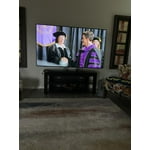
75” Samsung TV was a wonderful purchase for our living room. It was so easy to set up and start watching our TV. It also has a great picture and we are totally satisfied with the delivery and the product. We are able to use other great apps with it.

Review from Samsung US
Helpful?3BX78DZ2P7VO13854766773
Feb 5, 2025
Reviewer name: Disappointed Joe
2 out of 5 stars
2 out of 5 stars review

Not happy at all

When I bought this tv I was very disappointed with the multi function remote and it's abysmal instruction sheet. My Netflix account is set up through Roku so it would not let me sign in to Netflix ,because it did not support Roku. I really disliked that remote! It also has no audio outputs except for a USB port. I could not connect my soundbar to it. I have returned the tv to were I bought it.

Review from Samsung US
Helpful?3BX78DZ2P7VO13854766773
reply from Samsung Advisor

Hi, Thank you for choosing the Samsung DU7200 TV and for taking the time to provide us with detailed feedback on your experience. Your opinion is important to us and will be shared with our internal product teams. The DU72000F TV offers 3 HDMI ports and is Bluetooth and Wi-Fi capable, allowing a seamless connection across multiple devices at a time. If your external device requires an Optical port, we recommend utilizing an HDMI to Optical Converter. These can be found at your local electronics store. Please also keep in mind that an Optical port can be found on our DU8000F Series and above. If you have any questions or would like any support with your audio experience or choosing a Samsung Soundbar to complement your viewing enjoyment, please reach out to us at 1-800-SAMSUNG, 8 AM - 12 AM EST, seven days a week. Or visit us on the Samsung website and click on the ‘Support’ link for: 1) LiveChat 2) Manuals, Software, & Warranty Info ~ Samsung Advisor






