Skip to Main Content
Sam's Club
Sam's Club
Customer reviews for SAMSUNG 65" Class DU7200 Series 4K Smart TV for
SAMSUNG 65" Class DU7200 Series 4K Smart TV
4.3 out of 5 stars
stars1,279 ratings1,091 reviews
  1. 5 stars64% (819)
  2. 4 stars18% (231)
  3. 3 stars8% (102)
  4. 2 stars5% (61)
  5. 1 star5% (66)

Member photos

  • +163 images
Sort by |
Showing 131-140 of 1,091 reviews
Sep 9, 2024
Andie
5 out of 5 stars review

Verified Purchase

Easy setup

Great picture

Helpful?3BX78DZ2P7VO13854766773
Jul 21, 2024
Brandon
5 out of 5 stars review

Verified Purchase

Great

Great

Helpful?3BX78DZ2P7VO13854766773
Jun 24, 2024
Mr Hebert
5 out of 5 stars review

Verified Purchase

Wonderful

Great

Helpful?3BX78DZ2P7VO13854766773
Feb 18, 2025
R W
5 out of 5 stars review

Verified Purchase

This television has bright and brilliant color.

Beautiful Color

Helpful?3BX78DZ2P7VO13854766773
Sep 25, 2024
Ingrid H
5 out of 5 stars review

Verified Purchase

Great Buy

Great image, colors

Helpful?3BX78DZ2P7VO13854766773
Feb 22, 2025
IDOWU
5 out of 5 stars review

Verified Purchase

Excellent pictures

Excellent

Helpful?3BX78DZ2P7VO13854766773
Jan 23, 2025
JenB
3 out of 5 stars review

Great picture, crappy remote

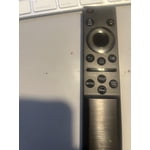
The image quality is excellent. The remote, however is terrible. The small design allows buttons to stick and leaves the TV inoperable. The sound also fluctuates dramatically when changing from network shows to commercials, despite having the settings maximized to prevent it. I have always purchased Samsung TVs, but this latest purchase may be my last.

Helpful?3BX78DZ2P7VO13854766773
reply from Samsung

Hi JenB,Thank you for sharing your opinion on the DU7200 TV remote. We understand there can be a learning curve when you get a new TV! This is why we have built a guide built into the TV that teaches you how to use your remote.You can learn how to use your Samsung Remote by going to Home> (left directional button) Settings> Support> Remote Control Guide.Regarding volume fluctuation, please try adjusting the following Settings to improve your experience. The Auto Volume function automatically adjusts the sound to a certain level when changing channels or switching to another external input. Go to Settings > All Settings> Sound > Expert Settings > Auto Volume = On.You may also want to perform a Sound Test under Support > Self Diagnosis > Start Sound Test.If the issue persists, please reach out to us so that we can provide further troubleshooting. You can call us at 1-800-SAMSUNG, 8 AM - 12 AM EST, seven days a week. Our LiveChat agents are also available by clicking on the ‘Support’ link on our website.~ Samsung Advisor

Mar 30, 2025
REC
4 out of 5 stars review

i PURCHASED THIS TV IN DECEMBER AND HAVE REALLY ENJOYED THE PICTURE QUALITY. THE SOUND WAS OK, BUT i PURCHASED A SAMSUNG C4 SOUND BAR WITH SUBWOOFER AND REALLY SEE THE IMPROVEMENT THE ONLY ISSUE IS THE REMOTE. IT REALLY SUCKS. THE OLDER STYLE SAMSUNG REMOTE WORKED MUCH BETTER.

Helpful?3BX78DZ2P7VO13854766773
Apr 17, 2025
Dee
3 out of 5 stars review

OK only. Not user friendly. Frustrating Interface

The picture is good and the price was right. That's about all I can say about this TV. The interface is not user friendly at all. Can't find my plugged in HDMI connected devices because there is no "Input" button on the remote or tab on the Home Screen. Very difficult to find the attached antenna because it's burried in some setting location that is hard to find and hard to remember when you need to rescan. It's super easy for kids to accidentally land on or buy items. I wanted a Samsung TV so I could play Jackbox Games on the LUNA App which you can only get on Samsung and LG TVs, that's about the only thing that this TV is good for. Had it for a few months and I still haven't gotten used to the layout of the homescreen or the buttons on the remote. Highly dislike

Helpful?3BX78DZ2P7VO13854766773
reply from Samsung

Hi Dee, Thank you for choosing Samsung and for your feedback on the DU7200 TV. We understand sometimes there is a learning curve when you get a new TV! This is why we created step-by-step guides, to make it easier for you. To learn about your TV go to https://www.samsung.com/us/support/answer/ANS00062199/.We are also always available and happy to help you with any questions you may have. You can call us at 1-800-SAMSUNG, 8 AM - 12 AM EST, seven days a week. Our LiveChat agents are also available by clicking on the ‘Support’ link on our website.~Samsung Advisor

Jul 5, 2024
Tim
5 out of 5 stars review

Verified Purchase

Lgbtv

Easy install and set up, picture is clear and sharp

Helpful?3BX78DZ2P7VO13854766773