
 Customer reviews for Epson EcoTank Pro ET-5850 Supertank All-in-One Inkjet Printer, EPSC11CJ29201C for
Unusable
Bought this as a home office printer. Both ADF and tray paper feeder constantly (I'd say 90% of the time when printing or scanning more than 3 pages) grab too many pages. This effectively makes the ADF useless for document scanning, as it regularly misses pages and jams frequently. Complete deal breaker. Scan to cloud also not working. Very disappointed, as there are many great features to this printer, like the supertank, Bluetooth connection, scan quality, etc.
A real workhorse
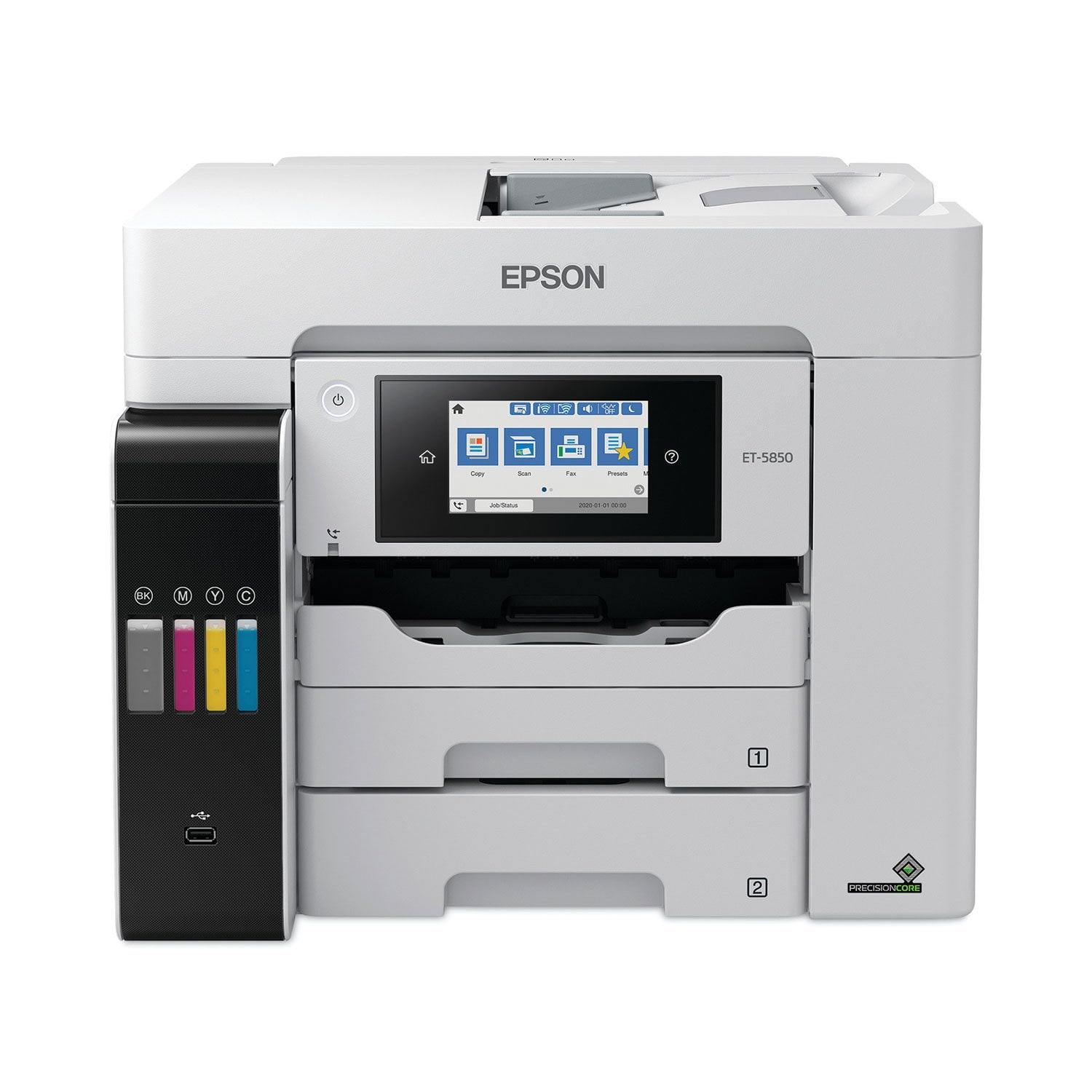
EcoTank Pro ET-5850 is quite a large printer for a desk top, and rather heavy. You may need help unboxing it and setting it up. But once it’s there, the setup is very easy. It comes with complete instructions and pictures showing where all the blue safety tape is so it is easy to find and remove. The instructions provided on the touch screen are clear and easy to follow. In lieu of the usual cartridges, the EcoTank Pro ET-5850 comes with a re-fillable tank and two sets of four color inks. Once the easy fill tanks are ready, it is a little disconcerting to watch the levels drop as the printer is charged, though the instructions say that this is normal and the initial charge should last at least a year, if not more in normal usage. With its three paper sources, two in front and one in back (on top) you are set up for a variety of printing jobs, though to use the various trays you have to manually select the one you want or it automatically opts for the upper front drawer. While the EcoTank Pro ET-5850 has all the usual all-in-one features and can print, copy, scan and fax, what makes this printer unique is that it has an individual email address so that you can print remotely from just about anywhere. I was also very impressed by the printing speed and the fine quality of the product. Even scanned photos came out looking very professional. This is a review for the Epson EcoTank Pro ET-5850 Supertank Printer that I received free of charge to do a beta test and review.
All Around Awesomeness
I was not sure what to expect when I received this printer but,I am overly satisfied .Set up takes about 45 minutes the 1st time and then for each computer/laptop you want to pair it with you can add another 10 minutes each.The 1st laptop I connected to requires you to download Epsons driver and utilities software.Everything you need to use this printer to full effect is included in the bundle.While I was downloading the software I turned on the printer and following the simple touchscreen instructions was easily able to get the printer connected to my network and start printing.Perhaps the slowest part of the process is filling the ink tanks and then charging them.Expect about 9 minutes to complete the charging process.After that you can explore the abilities of this machine . Download the iPrint Epson app from google play and it is also simple to pair with the machine to allow you to send commands to the printer from anywhere.This printer is fast and quiet compared to my other printers .The fact that I can get 6000+ pages out of a full ink charge is fantastic.I was so tired of constantly buying cartridges for my other printer.The touchscreen is very user friendly and intuitive.You can use standard or 11x14 paper and the trays hold 500 sheets !Very easy to get this thing going ,even for an old 58 year old caveman like me.“This is a review for the Epson EcoTank Pro ET-5850 Supertank Printer that I received free of charge to do a beta test and review.”
Everything you need!
The Epson EcoTank Pro ET-5850 is a work horse! The setup was delightfully easy. In the box you'll find the "start here" pamphlet in both English and French, warranty info, a software disc, 2 bottles of each color ink (black, magenta, cyan, and yellow), the power cord, and of course the printer. Following the setup guide was very easy and I found it to be painless. In total, it took about 20 minutes to get it up and running. The printer will hold almost all the ink that's included and adding the bottles was simple and mess free. I do not have a disc drive on my laptop, so I downloaded the software from the link provided in the setup guide. The printer has 3 different areas to print from. Cassettes 1 and 2 that are in the front and another spot on the back/top. The printer can be set up to specifically print different paper sizes and types for each area to print from. Cassette 2 is for standard letter 8.5 x 11 inch plain white paper but other standard sizes work there too. You'll see more options for cassette 1. I did find that if your print settings on your phone or computer do not match what you have set on the printer for size and paper type, the printer will give you an error. I found it to be a little tricky when trying to print different paper sizes. Trial and error got me through and I was able to print what I wanted. Making copies and scanning are very simple. There is a tray on the top of the printer and you put the pages you want copied facing up and press copy on the machine. There you will find all the settings to change it from black and white to color, paper settings, if you want it 2-sided, and many other settings. For scanning to print, you put your document on the scanner and press "copy". You can also scan and send to your email, cloud, a memory device, WSD, computer, or Network folder/FTP. The software came with a program to upload your documents to your computer and I will absolutely be using that feature to upload client contracts. This printer is extremely user friendly and would be great for anyone that has a lot of printing or copying to do. It holds a lot of paper and prints very fast! It has fax but I was unable to test that feature. The ink tanks make these printers the best in my opinion. I will never go back to ink cartridges again! I would definitely recommend this printer to anyone in need of an all-in-one printer! This is a review for the Epson EcoTank Pro ET-5850 Supertank Printer that I received free of charge to do a beta test and review.
Amazing product!
I received this product a few weeks ago and I am so glad I did! This product is so easy to set up! This product works better than any one I have ever seen! There is nothing about this product that I dislike! This product prints perfect every time! This is a review for the Epson EcoTank Pro ET-5850 Supertank Printer that I received free of charge to do a beta test and review.
I love this printer/scanner
I am a (formerly) loyal HP customer. I've always had HP printers/scanners. I made the decision to get this printer because the ink on my HP Color Laser was averaging $800 every 6 months, which is absolutely ridiculous. I chose this model after reading Consumer Reports and learning the EcoTanks have fabulous quality and INEXPENSIVE ink. And it's TRUE. This is not a color laser, but the quality has been GREAT and I'm so glad I made the decision. Also, ink level is so easy to see on the front panel and filling the tanks is easy and no mess.
Awesome All-in-One
The Epson ET-5850 is a great All-in-one printer. It is on the big side and is pretty heavy so I would have someone who can lift and help take it out of the box put it where you would like it to go. After you take it out of the box you can start setting it up by taking off the blue tape that comes on it. The blue tape has little tabs on the ends for easy pull-off. After that you put the ink in. I found this to be very fun and relaxing. This is the first printer that I ever got that has a different type of ink. They come in bottles instead of those ink cartridges that to me are pretty hard to use but these make it very easy. The printer came with the two sets of ink. You will use the first ones when you prime it up. You will also partly use the second ones to refill and top it off. The ink should last a year and a half or so but that would all depend on how much you use it. They each have individual numbers and keys on the top of the bottles, so you know where to put each color. To me it also saves from a lot of unnecessary cartridge fills. It comes with a driver’s DVD but you can also just download them from your computer. It comes with easy and clear instructions on how to set it up. It has a good size touchscreen in the front that is easy to navigate through all the different settings. It does however take a while to get it all set-up due to having to pour in the ink and set the paper. There are numerous options to look at for your needs. This printer has everything a home office and a household would need. It comes with the printer, scanner, fax, and a copier all-in-one. It is meant for big jobs and to print out a lot of paper. I have taken several photos one in full color and one in black and white, I like that the printer has easy access to paper size, it can print envelope size to letter size and has three different areas to print from which in all holds 500 pieces of paper. There is a rear paper cartridge and two front ones that give you a lot of options to choose what you would like to get printed and what size. I printed out several things for my home office including full size book projects, a bunch of photos, and several game and puzzle magazines for my kid and myself. I also copied several important documents and I like the fact that it can also copy both sides which saves me paper because I use it a lot. You can scan from the printer to your cloud, email, and computer. I love that it prints very fast even when it prints double sided. I love everything about this printer. This is a review for the Epson EcoTank Pro ET-5850 Supertank Printer that I received free of charge to do a beta test and review.
Why I Switched From Epson's EcoTank Pro ET-5850 to HP
I recently (actually 2x) purchased the EcoTank Pro ET-5850 with high hopes, given its promise of a cartridge-free system. Unfortunately, my experience has been far from satisfactory. The printer failed twice, necessitating replacements each time. I also encountered significant difficulties connecting the printer to my computer, which cost me several hours of troubleshooting. Ultimately, I switched to an HP model, which has been working without issue. Based on my experience, I cannot recommend the Epson EcoTank Pro ET-5850. For those considering a reliable office printer, I suggest exploring alternatives, particularly from HP. This experience has led me to advise against purchasing this specific Epson model.
Connection/Printer head issues
This printer has been giving us nothing but issues since we bought it for our home office. Constant connection issues. Printer gets clogged often or something because it always looks faded no matter what I do. I bought this printer because it looked like it has good reviews but maybe people who have issues such as I just want to just toss this crappy printer out the window and not ever look back again. I'm going to have to cut my losses and move to a different brand.
Great for the small business owner!
As a small business owner, I’m a bit of a “Jill of all trades.” The main part of my small business is design, but I also do a lot of brochures, flyers, and curriculum planning as a leader of a local non-profit group. Being a “Jill of all trades,” I needed a printer that could keep up with my demands. The Epson EcoTank Pro ET-5850 is the work-horse that I need! Set-up was very easy. There are easy to follow instructions that tell you every step to take in order to get your printer up and running. This was my first experience filling ink reservoirs with containers of ink, and I must say I am very impressed. The biggest advantage to me is the sustainability...no more shipping my old toner cartridges to be recycled. Filling the tanks with the ink as I need them eliminates cartridge waste. The other advantage of filling my ink reservoirs as I need them is the cost savings. I go through a lot of ink and paper, and I need something that can keep up with me! Being able to see exactly how much ink I have in the reservoirs is great; no more “oops I’m out of ink” surprises! The touch-screen is very easy to navigate. I can easily troubleshoot and get to where I need in the menu. I needed to do a cleaning on the printer heads (there was a bit of bleeding of the ink), and I was able to easily navigate my way to that part of the menu (and easily resolve the bleeding ink problem). The detail in the print-outs are great. I did a few test prints of some brochures and old vintage graphic art, and I was very impressed. I plan to do some more prints of the vintage art on higher quality paper, and frame them. They will look great in my home office! The two-sided copying is impressive and time-saving. I do a lot of copying when setting up curriculum for my non-profit, and being able to set the papers in and walk away after starting the copying process is great. It saves a lot of time and paper. The print speed is lightning fast. My papers are printed before I stand up from the computer to grab them off the printer, and I’m only two steps away! This printer is very user-friendly, and an excellent time saver. The cost savings and sustainability are big bonuses to me as well. I highly recommend the EcoTank Pro ET-5850 to anyone in need of an all-in-one printer. This is a review for the Epson EcoTank Pro ET-5850 Supertank Printer that I received free of charge to do a beta test and review.