
 Customer reviews for VIZIO 5.1 V-Series Home Theater Sound Bar - V51-H6 for
Member photos



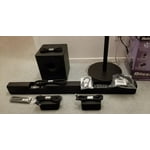
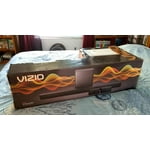
 +20 images
Super easy to install and sounds great
Already love the increased depth of the sound over the TV's sound. Plus love that we can switch the surround sound speakers to mirroring the sound bar when we want. That feature is great when you want people near the surround sound speakers to hear the dialogue even clearer.
AWESOME Soundbar!
I bought this a couple weeks ago and i am totally happy with this soundbar. It's in our living room hooked up to our 55" tv. Powerful, sounds great with tv shows, movies, and music. Great quality product at the right price point. I tried all the various products at the store and this one most definitely stood out from the pack in the same range!
Great Value
We weren't quite ready to splurge on a high-end system just yet so we decided on this model. Unboxing and setup is a breeze. It paired very easily with our Vizio TV. Initial use in movies and video games is very good. We're very happy with our purchase and would definitely recommend!
Sound bar is OK.
Bought a Vizio TV and sound bar, V51-H6. Connected everything, but had no sound. Called Vizio support. After connecting the Optical cable, we were able to get sound. The HDMI Arc never worked. Sound is good through the optical cable, but would have been better through the HDMI Arc.
Hello Dale8526, in the event that an issue does happen, VIZIO strives to provide our customers with the award-winning service and support to ensure issues are handled as quickly and easily as possible. We appreciate that you reached out to us and gave us the opportunity to correct this unfortunate situation. Please do keep in contact with our support team if you continue to experience issues with the HDMI ARC connection. We want to make sure to exhaust all troubleshooting and options to find the best resolution for you.
Very easy setup - great sound!
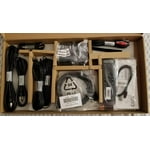
Kit came with all the cables you might need for your setup. I had to use Digital Optical Audio (Toslink) Cable because I ran out of HDMI connections from TV and the kit had it! Also comes with voice help to guide you through installation. Whole setup was less than 20 minutes. As for the sound quality, it's fantastic. Rich base and clear dialogue. I was blown aways at how good it sounds. There are preloaded EQ profiles as well as individual setting you can use to get the sound just the way you like it.
Good Sound, Difficult to use
[This review was collected as part of a promotion.] There are plenty of things I like about this sound bar. The sound is great for what you would spend on the unit. It is very easy to install, and I love the wireless sub and rear speaker idea. I wish it were easier to adjust EQ and balance. I would prefer to have a visual menu on a tv to adjust settings. Adjusting is done through the remote with dots on the sound bar moving up or down. I have young children, so most of my watching happens when they’re asleep. It’s difficult to get dialogue loud enough to understand without making the music and other effects in movies way too loud. That was after spending 20 minutes adjusting all the levels through the EQ on the remote. It’s nice to be able to connect my phone directly to the sound bar via Bluetooth, however there seem to be issues with that as well. The other day I tried turning the sound bar off while it was playing music from my phone, and it kept turning itself back on. I ended up having to change the source on the sound bar, then turn it off. It seems like you can’t turn it off if it’s receiving an audio signal. Also when playing from my phone, it isn’t consistent in allowing me to adjust the volume directly from my phone. One time it worked with my phone volume buttons, the next time it didn’t. I appreciate the simplicity of the system, but for my particular application, there are too many downsides.
Hi ZacL, thanks for taking the time to leave a detailed review with your valuable feedback. It sounds like your phone may have been actively paired to the Sound Bar. The Sound Bar is designed to power and begin playing audio when it detects an audio signal, that way your Sound Bar turns on when your TV does. If you don't want it to play audio through Bluetooth, you can unpair your phone when you don't want to use it. If you'd like assistance, you can reach our award-winning customer support team by visiting the Support section and selecting 'Contact Us' for help over phone, chat, and SMS.
Customization options are great
I just bought this soundbar yesterday. The soundbar itself and the subwoofer provide plenty ample enough sound just by using an digital optical cable. The settings allow for a very clear and crisp sound if setup correctly. Also, having the sound bar link to the tv's or roku's remotes for the tv to control the sound is great. My only issue thus far is getting the satellite speakers to work. All I hear is an extremely low static. Literally nothing else.. I just bought it yesterday and received it today, so we will see how tech support can help to fix this.. so far im pretty satisfied even without the satellite speakers.. (just wanna get them working since, i mean.. it came with it.. lol)
v series 5.1 sound system
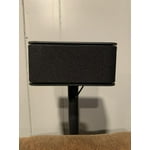
Wife bought me this surround sound system for Christmas. Just set it up. Couldn't be easier. My old one was difficult. Plugged this in and gave voice prompts and done in minutes. Sound is very good especially given price point. Has bluetooth for my devices. Seems very easy to use. The sub woofer is wireless but the additional 2 speaks do plug into that with wires, so a couple wires. Has brackets for the sound bar to wall mount. I have to move some other wires to wall mount that so didn't use that yet. I wish the small back speakers had different mounting so I could angle one speaker a bit but very minor issue. Very pleased over all and would recommend !
Hard to Customize
One of the reasons I choose this model was that the product description and reviews said it made the dialogue clear during movies. My wife has a hearing difficulty and most movies when there is background music or action she can't hear or understand the dialogue. The default setting out of the box was not a help for her hearing. Vizio should have a setting that emphasizes dialog to help people with hearing problems. This way people with hearing problems can enjoy the movies rather than hearing a mumble of words. Vizio as a company should be more attuned to this. The User Manual does not even describe how to set the Dialogue level settings. I happened to see a Dialog entry scrolling through the level settings. No description in the manual of Dialog setting entry in the manual. Some of the settings I have no clue what they mean or what what the result will be if I do alter them. This is what happens when you have tech people write manuals. Examples In Equalizer Mode what is "Direct" and how is it different than the other Equalizer Mode settings. What is "AV Delay" and why would I want to delay or speed up AV? Most buyers are not audiophile techs. The LED lights settings: The manual shows lights in on and off as white dots or circles respectively. But some of the diagrams for LED behavior are blank. What does this mean?
Hello dahutz43, thank you for taking time to leave us your feedback today. The "Dialogue" setting, Use the Next/Previous buttons to increase/decrease the dialogue level. The LED indicators will move to the top with increasing level and to the bottom with decreasing level. The "AV Delay" setting, LEVEL > AV Delay > Use the Next/Previous buttons to increase/decrease the amount of audio delay. The LED indicators will move to the top with increasing audio delay level. This setting is used in the situations where the lip sync seems to be off or not matching the mouth of the person on screen. It can also sometimes be seen when explosions or doors closing are not in sync as well. In regards to Equalizer modes, it is best to test each out individually to determine which one works best for you. I would also do the same with the Center Level, Surround Level, and TruVol as well. Your Center Level is generally where most dialogue audio comes from. Surround Level will be where most music and back ground audio comes from. TruVol will help balance out those levels automatically, but in your case it might not be best for you, I would test it both on and off to see what is best for you. If you’d like any assistance adjusting these settings, our customer support team would love to help you dial in the sound bar to your preference, you can reach them at 844-254-8087.
DO NOT BUY VIZIO
I bought one unit in May and it started making loud crackling sounds and cutouts. They became increasingly frequent and the sound started cutting out as well. Returned to Sams thankfully before the 90 day policy expired. A year and a half later and same issue as the first. Vizio has proven to be zero quality and at $299 obviously a waste of a lot of money. If this had been a one time I could understand sometimes a unit will sneak through the cracks, but both units with same issue says the product and company are junk. Just out $300. DO NOT BUY Vizio!!!
Can you give us some additional details about the issue you are experiencing? This is not typical so I would like to learn more so we can assist with troubleshooting. Please visit support.VIZIO.com and click on ‘Contact Us’. We’ve got agents ready to chat, text message, or speak with you on the phone.