Skip to Main Content
Sam's Club
Sam's Club
All Departments
All Services
Customer reviews for SAMSUNG 11.1.4 Channel Sound Bar with Wireless Subwoofer, Q-Symphony & Dolby ATMOS Audio for
SAMSUNG 11.1.4 Channel Sound Bar with Wireless Subwoofer, Q-Symphony & Dolby ATMOS Audio
4.6 out of 5 stars
stars
840 ratings840 reviews
  1. 5 stars79% (662)
  2. 4 stars12% (103)
  3. 3 stars3% (25)
  4. 2 stars1% (12)
  5. 1 star5% (38)

Member photos

  • +258 images
Sort by |
Showing 241-250 of 840 reviews
Nov 20, 2025
Reviewer name: PnwBuyer
5 out of 5 stars
5 out of 5 stars review

Really fills the room - great apartment addition!

[This review was collected as part of a promotion.] I bought this sound system for my apartment this past summer. It's been really great and has left me wondering how I watched things using the TV's own speakers. Can never go back!

Review from Samsung US
Helpful?0WSCS8GR8B8W13575772414
Oct 13, 2025
Reviewer name: Smthinclever
5 out of 5 stars
5 out of 5 stars review

Amazing sound.

[This review was collected as part of a promotion.] I'm very happy the purchase of this sound bar the bass is booming and voices in movies are crystal clear. Would recommend.

Review from Samsung US
Helpful?0WSCS8GR8B8W13575772414
Dec 8, 2025
Reviewer name: Jwilson
5 out of 5 stars
5 out of 5 stars review

Perfect soundbar
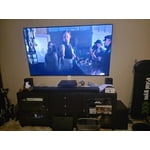
[This review was collected as part of a promotion.] Took advantage of the holiday discount, and it's definitely worth the price Even without the sale at full price. it is LOUD! Easy to set up and it will surprise you.

Review from Samsung US
Helpful?0WSCS8GR8B8W13575772414
Dec 13, 2024
Reviewer name: Perry
5 out of 5 stars
5 out of 5 stars review

Verified Purchase

out standing

Review from walmart.com
Helpful?0WSCS8GR8B8W13575772414
Nov 16, 2024
Reviewer name: WalmartCustomer
5 out of 5 stars
5 out of 5 stars review

Verified Purchase

Wonderful sound system

Review from walmart.com
Helpful?0WSCS8GR8B8W13575772414
Sep 27, 2025
Reviewer name: TDS unhappy
1 out of 5 stars
1 out of 5 stars review

Don't buy

Does not keep connection to rear speakers or subwoofer Samsung has responded and I have spent hours doing what they have already reported in their response. I now need to download new firmware which may or may not work . Again I suggest not to buy. Discount is attractive but you are left with a lemon.

Review from Samsung US
Helpful?0WSCS8GR8B8W13575772414
Oct 7, 2025
Reviewer name: mjasonuk30
5 out of 5 stars
5 out of 5 stars review

Absolute best soundbar combo product!

[This review was collected as part of a promotion.] Absolute best soundbar combo product! Booming bass, clear center channel, convincing overhead effects (for a soundbar), solid rear outputs, lots of customization available in the app. It does disconnect from the app frequently which requires it to be "re-added" but not a deal-breaker. No drop-outs of satellites that I've noticed.

Review from Samsung US
Helpful?0WSCS8GR8B8W13575772414
Feb 20, 2026
Reviewer name: KevO
5 out of 5 stars
5 out of 5 stars review

Amazing surround sound

These speakers make you feel like you're in the middle of the movie. Excellent quality.

Review from Samsung US
Helpful?0WSCS8GR8B8W13575772414
Feb 5, 2026
Reviewer name: Chris
3 out of 5 stars
3 out of 5 stars review

Underwhelming for a flagship

Really underwhelmed by the bass and sound spread and soundstage.

Review from Samsung US
Helpful?0WSCS8GR8B8W13575772414
reply from Samsung Solutions

Hi Chris, We appreciate you providing your feedback and experience with the HW-Q990D soundbar. Please know there are a wide range of audio adjustments available to tune the sound to your liking. You can manually optimize your audio experience by pressing the SOUND CONTROL button (which looks like a gear), you can set the audio function such as Auto EQ, Spacefit sound, AVA, Voice Enhance mode, Night mode, Sync, Surround speaker mode, Virtual. The desired item can be adjusted using the Up/Down buttons. Alternatively, you can press and hold the SOUND CONTROL button for about 5 seconds to adjust the sound for each frequency band. 150Hz, 300Hz, 600Hz, 1.2kHz, 2.5kHz, 5kHz, and 10kHz are selectable using the Left/Right buttons and each can be adjusted to a setting between -6 to +6 using the Up/Down buttons. You can try quickly optimizing the audio by pressing the SOUND MODE button on your remote, and then select the desired sound effect by choosing STANDARD, SURROUND SOUND, GAME, or ADAPTIVE SOUND. To control the volume of each speaker, press the CH LEVEL button on the provided remote. Then select CENTER LEVEL, SIDE LEVEL, WIDE LEVEL, FRONT TOP LEVEL, REAR LEVEL, or REAR TOP LEVEL. Once you find the channel you are looking for, adjust the volume between -6 to +6 by using the Up/Down buttons. There are multiple ways to control the bass levels for your new Soundbar. 1) Using the WOOFER button on the provided Soundbar remote. Use the woofer button by pushing forward or pulling backward on the button itself to adjust the bass levels between -12 or -6/+6. If you want to reset the bass to 0 then push the button in. 2) When you press the TONE CONTROL button, you can adjust the treble or bass levels between -6/+6. Alternatively, you can adjust all of these same settings and more within the SmartThings app. Download the app for your iOS or Android device and then connect your Soundbar to Wi-Fi. From here, you will be able to adjust all of the same settings as the provided remote, but with the added benefit of being able to see the changes on your smart device. I hope these tips help you enjoy your new product. You can always contact us for further help at 1-800-SAMSUNG (Ask for Soundbars), 8 AM – 12 AM EST, 7 days a week. Our Live Chat agents are also available by clicking on the ‘Support’ link on our website. ~ Samsung Solutions

Jan 21, 2026
Reviewer name: Parishe
5 out of 5 stars
5 out of 5 stars review

Amazing sound!

Very good sound quality from all the channels. The setup gives a good emersive experience.

Review from Samsung US
Helpful?0WSCS8GR8B8W13575772414