
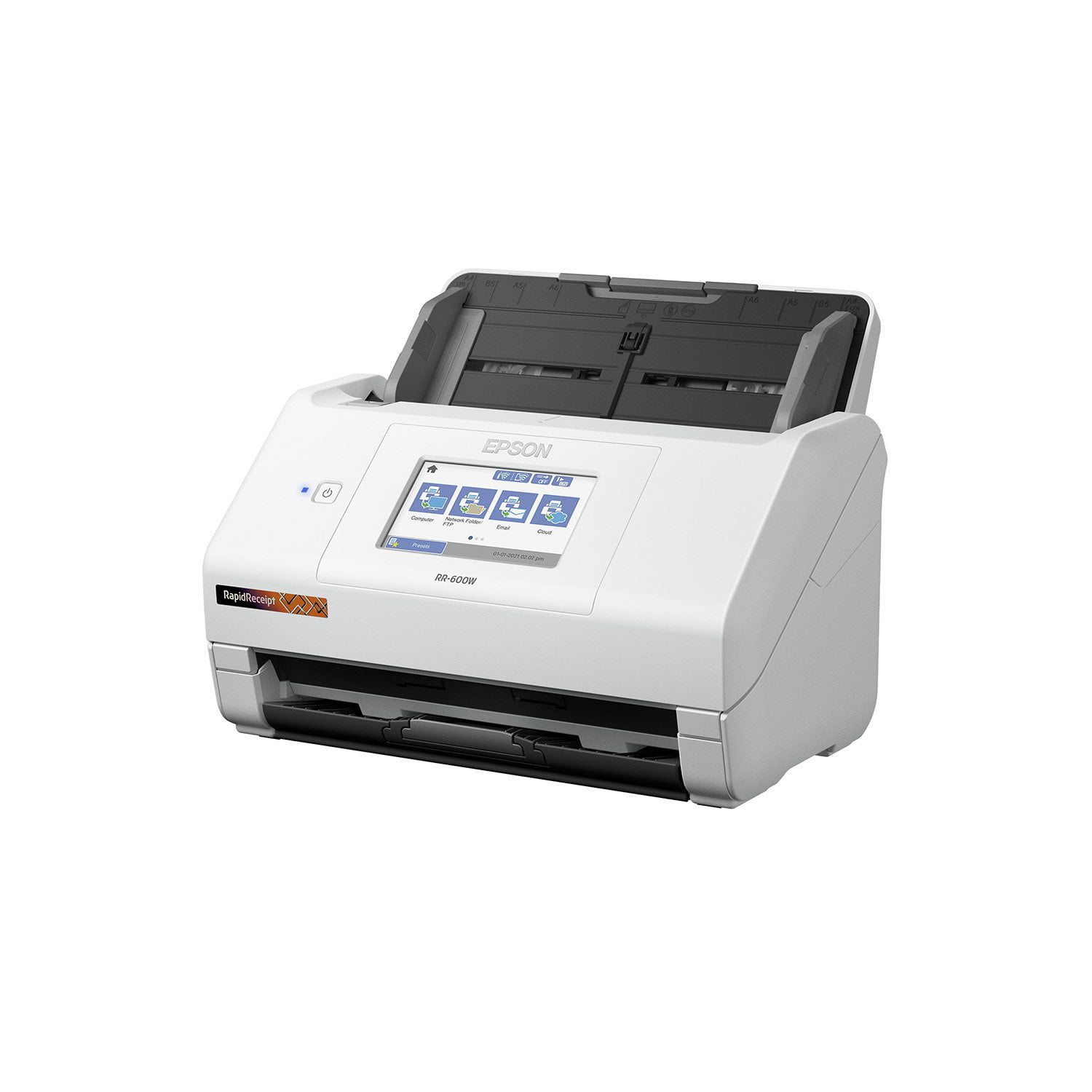
 Customer reviews for Epson RapidReceipt RR-600W Special Edition Scanner, 100-Sheet Duplex Auto Document Feeder for
Super good performance and features!!
This scanner is very practical and is exactly what is needed at home, it is very easy to configure both the scanner, as well as the wireless connection, it has a large touch screen 2 inches high by 4 inches wide, on this screen you can you can adjust its brightness, background color, sleep timer, and other scan settings. It does a great job on all kinds of documents, whether it's color, black / white, or grayscale. If you are looking to scan receipts, scan many of them as this scanner makes high quality scans of many documents at once and even those of different sizes, this is the ability to scan two pages at a time and its speed. Best of all, you don't have to worry about handling USB keys all the time. This is a review of the Epson RR-600W touchscreen duplex wireless scanner that I received for free for beta testing and review.
Master of Scanning
Your thoughts may be same as mine when we're thinking why is this unit; a scanner, so expensive compared to other all in one units. Where other units is a jack of all trades, this is a master of scanning and quite literally at that. It scans easily and fast, different sizes and double sided. There's no need to keep it near your computer even for installation. It quickly connects to wifi, the touchscreen is very responsive. Need to scan all your mail before shreading it? Done! Need all your reciepts scanned to a specific folder? Done! Need docs uploaded to FTP or a Google Drive? Done! You don't even need a computer to do the setup. It'll help speed some stuff up but once you're set up, you can do it all on the scanner itself. All the scanning, size, location, and scanning settings can be customized on the scanner itself. Just plop it into the feeder and hit scan. This is a review for the Epson RR-600W Wireless Duplex Touchscreen Scanner that I received free of charge to do a beta test and review.
A True Must Have for Business Needs!
The Epson Rapid Receipt RR-600W is a workhorse scanner that gets important documents scanned in a matter of seconds. This scanner comes right on time as I have been trying to seriously eliminate the “paper monster” by organizing and creating a file system that houses important data. I have chosen to access the data via an organizational file system via my computer and/or the clouds. I have accounts with Evernote, Dropbox, One Drive, and Google Drive. The scanner is very easy to set up as Epson has included a quick start guide that instructs how to connect and input your computer’s Wi-Fi info, download the necessary drivers, and from there, you are good to go with scanning! I found that this scanner has a touch screen which is an added bonus as it lends to the intuitiveness of the scanning process. The visibility of the screen makes the process of scanning to be efficiently done as it enables you to see the whole process as it occurs. So far, I have scanned hundreds of documents such as old tax forms, medical documents, and business documents. The documents I scanned have immense clarity and conciseness. I have a lot of business cards that I have collected over the years that I was able to scan and file. Additionally, the free included receipt software is another added bonus as I save most of my receipts. I especially found its duplex capability to be great too; as I scanned lots of documents that were two-sided. Additionally, I am elated that this scanner is wireless as this eliminates restrictions. Overall, I am extremely pleased with the features, functions, and performance of this scanner. I am sure I will get many years of production from this workhorse!! “This is a review for the Epson RR-600W Wireless Duplex Touchscreen Scanner that I received free of charge to do a beta test and review.”
Quick, Accurate, Wireless, Touchcreen Scanner
I work in the Higher Education Administration field. I’ve been working remotely for about a year now. I miss having accessibility to the Canon C650 in my office. The Epson RR-600W Wireless Duplex Touchscreen Scanner is making me miss the Canon C650 in my office much less though. This is my first Epson Scanner and I am very impressed. The RR-600W measures about 6.9 (H) by 11.8 (W) by 6.6 inches (D) with its trays closed and weighs 8.1 pounds. It is plug and play. I took it out of the box, attached a few parts, and then plugged in the power adapter. Needless to say, it was easy to assembly, set up, and it is very light (not bulky and takes up little space). The intent of the Epson RR-600W Wireless Duplex Touchscreen Scanner is specifically designed for organizing and managing receipts and invoices. My job does not include organizing and managing receipts and invoices in Higher Education Administration. Thus, I used this feature to scan my personal receipts and invoices. My receipts come in different lengths and widths. For example, I recently went to H-E-B to restock after a winter storm in my area, and that receipt was very long because I bought a lot of items. Another example, I had a doctor’s appointment and that receipt was thin, 5 inches long by 2 inches wide. I put both receipts in the tray and the scanner scanned the receipts seamlessly. Within seconds the receipts appeared wirelessly onto my MacBook Air via the ScanSmart Accounting Edition, also known as the Receipt Manager software. This software is very impressive. It was able to identify vendor names, date on the receipt, total amount, sales tax, etc. I can see how this can benefit business owner who collect tons of receipts daily. They no longer need to manually enter data because the software accurately extracts and organizes data from receipts and invoices, and seamlessly integrates the data into Excel spreadsheets, QuickBooks, TurboTax, Quicken, etc. As mentioned in the above paragraph the Epson RR-600W is wireless. You do not need extra cables to connect the Epson RR-600W to your computer. I’m grateful that the Epson RR-600W is wireless because my MacBook Air only has two Thunderbolt ports. I’m glad I do not need to buy extra attachments. I use the Epson RR-600W mainly for its TWAIN driver feature. The TWAIN driver feature easily integrates my documents into PDF. I can now create searchable and editable PDFs at no cost and sent it to coworkers. I use the 4.3-inch touch screen control panel often. The screen control panel is very user friendly. The first thing I did was connected the Epson RR-600W to my wifi network. I scrolled right using the arrow to find “Settings” icon. I tapped the “Settings” icon and used the down arrow to scroll down to find the “Network Settings” icon. Then I clicked on the “Wifi Setup” icon. I’ve also used the 4.3-inch touch screen control panel to send data from the Epson RR-600W to my computer, to send data from the Epson RR-600W to coworker’s email, and to send data from the Epson RR-600W to a thumb drive. Lastly, the Epson RR-600W has a duplex feature. I’ve put a piece of paper with writing on front and back into the Epson RR-600W tray. The Epson RR-600W automatically scans both sides with me having to reinsert the back page manually. All features have been accomplished quickly and accurately. While the Epson RR-600W has many advantages; I wish it also included a way to print so that I could get rid of my bulky Brother HL-5070N printer. This is a review for the Epson RR-600W Wireless Duplex Touchscreen Scanner that I received free of charge to do a beta test and review.
Simple to set up and easy to use!
[This review was collected as part of a promotion.] This scanner is great! It has made categorizing and storing receipts and other documents so easy. It is much more efficient to use than a traditional scanner that only allows you to scan one page at a time. You can stack your papers and place them in the tray like you would paper in a printer, and it scans each item in succession. It also isn't very big so it doesn't take up a ton of space. The fact that it is wireless adds to it's versatility because you can place it anywhere in your home or office and still connect through wifi to the scanner. Another great feature is the easy export to other programs such as excel and QuickBooks. When I get my small business going this will be a great asset. Over all I am so happy with the efficiency and ease of use of this scanner and I highly recommend it!
Epson RR-600W is an Excellent Desktop Scanner
I previously used a Fujitsu Scansnap S-1500. This review is written in comparison to that device. Pros: * The Epson RR-600W is fast to setup and easy to use. This is facilitated by the touchscreen that allows you to directly input your Wi-Fi information. * The Epson has a large volume paper feed, holding 100 pages. * The Epson is scans significantly faster than the Fujitsu. It automatically selects color vs grayscale or B&W and duplex scans. * The touchscreen and wireless connectivity are very convenient, so you can scan to any computer on your network (or to USB or a cloud drive). * The automated receipt software with integrated OCR is unique and convenient for being able to feed various finance programs. Cons: * I prefer how the Fujitsu folds up when not in use. This prevents dust from entering into the paper feed slot. The Epson paper feed is fixed. * The Epson is a bit bigger than the Fujitsu. This is partially due to the Epson not having a folding paper feed. * With the bundled software, the Fujitsu is able to automate OCR for scanned files in the background. It doesn’t appear that the Epson is able to do that (except for receipts). With the bundled Kofax software, you have to manually select the files that you want to OCR. This is a review for the Epson RR-600W Wireless Duplex Touchscreen Scanner that I received free of charge to do a beta test and review.
Awesome scanner for receipts and documents!
The Epson RR-600W is a fantastic space saving scanner designed to quickly scan in documents and receipts with the touch of an on screen button to many different locations, either via USB or your wireless network with ease. Setting up the Epson RR-600W was very simple, with easy to follow instructions on the bright and clear 4” LCD touch screen. Initial setup was a breeze, inputting date and time settings were easy and clear to set. To connect to Wifi, you do need to go into the settings, and configure the network settings. In my case, the scanner found my wifi network and I just needed to enter the wifi key. Once done, you have the option to register with Epson Connect services, which appeared to be required before you can scan to cloud services. In the case you do not want to scan wirelessly, Epson does include a USB cable to directly connect to a computer, as well as including the ability to scan to a USB flash drive. I tried both scanning via Wifi and via USB to computer, both were simple and easy to do. USB to PC scanning did require the download of the Espon software from Epson’s website, and setup of that software was quick and easy, and included registration of the scanner. When it comes to the operation of the scanner, the Automatic Document Feeder holds approximately 100 pages to be scanned, however I never found the need to batch scan so many any a time. At a rate of 70 pages per minute (in monochrome), this is no slouch. The ability to place a stack of receipts and send them directly to Google Drive has been such a time save. That feature is very handy if you find yourself expensing invoices to your employer. The duplex feature makes scanning double sided documents a breeze, a quick scan and both sides of your document appear in your chosen location. Duplexing options should just be standard nowdays, so kudos on that. There are plenty of options within scanning to get your document to easily be legible, regardless of how the original document appears. Black text on red background, no problem! The Epson ScanSmart software, which is included via download with the Epson RR-600W allows for automatic text extraction, as well as searchable PDFs. The ability to search scanned documents presents an even greater value, especially when scanning very important documents that may need to be referenced. For any of us that have had to manually comb through a scanned document for verbiage, this comes as a welcome. The receipt scanning portion of the software will also read the receipt for information like retailer, purchase cost, and date of purchase, among other things, again, making things much easier to keep purchases organized in a clean and simple way. You can also import receipts and expenses into Quickbooks, TurboTax and Quicken! A license is provided for Kofax PowerPDF for Windows or Mac for PDF manipulation. Presto! Bizcard 7 is also provided for simplifying the scanning and organization of business cards, another great function of the scanner. You can’t go wrong with the Epson RR-600W scanner. From speed, to scan quality, to fantastic OCR, this checks all my boxes for a great space saving document and receipt scanner. This is a review for the Epson RR-600W Wireless Duplex Touchscreen Scanner that I received free of charge to do a beta test and review.
Best scanner I have ever used!
This is review of Epson RR-600W. First impression, It is simple and easy to use. Setup is simple, bonus is that this scanner is wireless and is completed in less than 10 minutes, including unboxing the scanner. This scanner offers different modes of scanning and locations of where the document will be stored. The scanner allows for double sided scans, and you can scan different items, including business cards, receipts, and documents in one batch. Scans can be exported to QuickBooks, TurboTax, Quicken, Excel, Dropbox, Google Drive, and more. The mobile app for the scanner works flawlessly. Another bonus feature is that the scanner has touchscreen capability, no more outdated, push buttons. The scanner comes with receipt management software included, no subscription required. The software allows you to automatically and accurately extract key data from receipts. I have used this on multiple occasions, and it works like a charm. Makes preparing receipts for tax documents a breeze. “This is a review for the Epson RR-600W Wireless Duplex Touchscreen Scanner that I received free of charge to do a beta test and review. I have had multiple scanners before and the quality, ease of use, setup, and speed are by far the best of any scanner I have ever had.
Great Companion for the organizer in you
I like to digitize my life, and I was looking for a quick and efficient way to digitize my receipts. I already own a flatbed scanner and that was taking way too long. Then I came across the Epson RapidReceipt RR-600W printer. The device is very compact and is made up of three parts. The printer itself along with upper and lower tray components. Once assembled Epson directs you to download their Navi software, which helps you setup your printer quickly and efficiently. Once things are setup, you can use Epson’s ScanSmart software or the ample touchscreen display on the printer to navigate and organize your documents. You can scan single sided or double sided (duplex), and the RR-600W is very quick. The software includes an invoice/receipt manager that lets you store and organize your important invoices, with a link to QuickBooks if you want to take it one step further. The RR-600W also offers storing files on network FTP folders, USB devices or your favorite cloud services like OneDrive or Google Drive. You can even directly email documents you’ve scanned directly from your printer. One of the biggest drawbacks of this product was the software itself. While I was able to quickly set it up the first time on my personal laptop, Epson’s Navi suite didn’t detect the printer on my desktop computer. I had to directly connect the printer through USB in order for it to be detected. First time users would also likely have to adjust the scanning speed when they are dealing with stapled documents or double feeds. Overall I would still recommend this product for small businesses or folks you like to better organize their digital lives. Its compact size, fast speeds and rich features make it a valued addition to your work desk.
Best Scanner I've used!
I had a folder full of documents ready after the email of confirmation. I left it working and in less than 20 mins. Its a very compact design and being wireless is another great feature. The duplex system saves so much time of having to flip the individual papers from previous models or older scanners. Epson RR-600W Wireless Duplex Touchscreen Scanner cleared up my desktop from having unnecessary loose papers in no time. The added software makes all of them easily manageable to storage systems. It gives an option to scan, edit, or search for specifications on the receipts or documents. Overall, great product and easy to use! This is a review for the Epson RR-600W Wireless Duplex Touchscreen Scanner that I received free of charge to do a beta test and review.