Skip to Main Content
Sam's Club
Sam's Club
Customer reviews for Epson RapidReceipt RR-600W Special Edition Scanner, 100-Sheet Duplex Auto Document Feeder for
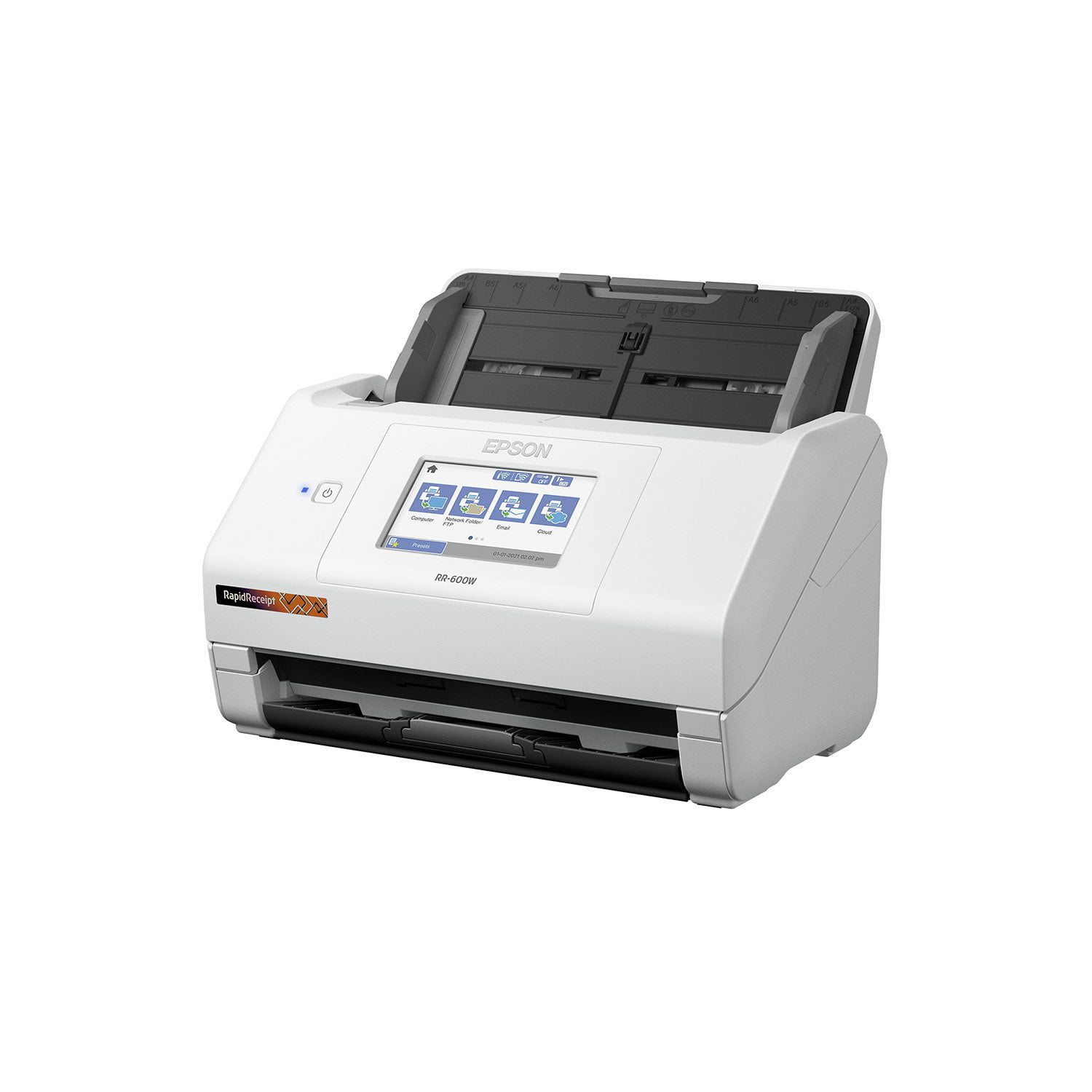
Epson RapidReceipt RR-600W Special Edition Scanner, 100-Sheet Duplex Auto Document Feeder
4.4 out of 5 stars
stars87 ratings84 reviews
  1. 5 stars70% (61)
  2. 4 stars14% (12)
  3. 3 stars5% (4)
  4. 2 stars5% (4)
  5. 1 star7% (6)
Sort by |
Showing 41-50 of 84 reviews
Apr 3, 2022
crod1070
4 out of 5 stars review

Works Great; More Information Would Help

From opening the box to loading the software and scanning documents, it is all easy and the scanner performance is flawless. However, the receipt processing software just has inadequate documentation. The neat receipt scanner I had is very slow compared to RapidReceipt, but the software is straight forward and can produce a expense report quickly. The Smart Scan software is just not documented and it has been hours so far and it appears the only solution is to buy quicken to get an expense report. So hey Epson it's a great scanner - but the software documentation is well - just substandard. I have a radical idea, make a video on how to use your software to produce an expense report.

Review from epson.com
Helpful?4QEVN054VB7813572772776
Mar 2, 2021
jdb1980
5 out of 5 stars review

Perfect For Personal Productivity!

The Epson RR-600W is a fantastic scanner! I work in accounting, and part of my job involves scanning documents on a high capacity scanner for uploading to my company’s intranet. So, I know a thing or two about scanners and how one should interact with them. This scanner provides for a perfect user experience, and I’ll tell you why. First of all, it is so easy to set up. I couldn't believe how a scanner that does so much could be so easily setup! The directions on how to set up the scanner are displayed on its touchscreen, which is a very cool addition because most scanners don't have touchscreens. Second of all, it’s wireless; so, you can print from anywhere in your house if you connect it to your wireless network (which, of course, you should!). Third, it's duplex feature is awesome and greatly adds to your productivity. Fourth, it can scan very swiftly without jamming or double-feeding. Finally, it's receipt scanning ability is far and above any other scanner I've ever dealt with; it doesn't tear the receipts and produces very clear images. I could really go on and on about this scanner, but I believe that succinct reviews are superior to ones that read like a novel. Best thing I could say - buy this scanner because you won’t regret it one single bit!! This is a review for the Epson RR-600W Wireless Duplex Touchscreen Scanner that I received free of charge to do a beta test and review.

Review from epson.com
Helpful?4QEVN054VB7813572772776
Feb 22, 2021
Scott248
5 out of 5 stars review

Solid performer with great features, easy to use touchscreen

I've used many, many types of scanners over the past couple of decades, including flatbed, document, copier/scanner, scanner-printer, etc., etc. and the Epson RR-600W doesn't disappoint! While the RR-600W is called "Rapid Receipt" (and it does well with receipts), it really is a full-function document scanner that will satisfy the needs someone who requires desktop scanning for a multitude of document/receipt/statement/etc. sizes. It scans quickly and can handle multiple page sizes in one stack. What I like most about the Epson RR-600W is the touchscreen, and the ability to scan things even without having my computer on. I can scan items to a USB memory stick, send a document via e-mail, send it to a network folder, or to the cloud -- no computer needed! You can also set up Presets (favorites) to quickly carryout functions you use the most. Of course, you can also use the Epson RR-600W with the manufacturer-provided software with your computer to easily scan and save documents quickly. I have the scanner connected to my wi-fi network and also to my computer via USB. The unit uses wi-fi so you can do things without your computer on, like send scans via e-mail or the cloud. Because the RR-600W has a large touchscreen the size of a smartphone, you can program everything on the screen, but also program many of the same features using the computer software. The touchscreen is intuitive enough that you can swipe like you can on a smartphone and easily navigate the screens. The included software lets you scan to PDF, graphic formats, etc., etc. It scans both sides of the document (but you can turn that off). I also like that you can save as an archival PDF/A, and can add passwords to PDFs. You can also set the PDF so it's searchable. Also included is the handy Invoice/Receipt Manager, which is software that takes receipts and breaks down the information in easy-to-use fields, including vendor/store, total, tax, tip, pay method, etc. You can then export the information to QuickBooks Online, QuickBooks Desktop, Quicken QIF File, TurboTax TXF file, CSV File or IMG Image file. The CSV file can easily be opened in Microsoft Excel, so you can do additional work on the data for recordkeeping or tax purposes. One spot for improvement (but not a dealbreaker) is that the computer software does not let you set all of the settings for the scanner - you have to use the touchscreen on the unit for certain things. For some things, it can be easier to use a computer keyboard, but that's my personal preference. Everything about the Epson RR-600W makes it a solid choice for keeping even the busiest professional or home user organized. This is a review for the Epson RR-600W Wireless Duplex Touchscreen Scanner that I received free of charge to do a beta test and review.

Review from epson.com
Helpful?4QEVN054VB7813572772776
Feb 21, 2021
Preacher406
5 out of 5 stars review

Amazing speed, at amazing quality! 2nd to none!

This is a high end scanner, at a high end price. Does it earn its price? Absolutely! A lot of good about this scanner, and so little bad. Setup is a breeze, with detailed instructions and pictures starting from opening the box and setup. The size is perfect, and the scanner unit sits on my next to my monitor. After plugging the scanner in, and a few clicks, you are on your way. The unit FEELS quality to the touch. From the bright color screen to the adjustment areas for the size of the paper. There are options for scanning via USB, and receiving it via internet through a variety of means (Email, Google Drive, etc). I tried them all, and all were very straight forward. I went with the USB directly to my computer option because it was already on my desk, and it is so fast. Lets talk speed; SO FAST. I couldn’t believe how fast it was. I thought it wasn’t scanning. But it is scanning. DOUBLE SIDED. And not double sided by scanning once, and flipping it. At the same time. And somehow, just incredible quality. No paper became safe. I was introduced to the world of instant, high speed scanning. High quality scans of photos, yes! Better than an all in one flatbed for photos. A lot better. High quality scans of that receipt that is wrinkled and in your pocket, yes! High quality scans of that double sided document you have in a folder in your desk because you have to store it, yes! My paper desk drawer went from bulging to empty in an afternoon. The PDF software it comes with, combined with the touch screen made scanning over 500 pages, receipts, and pictures makes a “paper drawer” a thing of the past. Honestly, the only thing this scanner leaves me wanting is a high-quality paper shredder! “This is a review for the Epson RR-600W Wireless Duplex Touchscreen Scanner that I received free of charge to do a beta test and review.”

Review from epson.com
Helpful?4QEVN054VB7813572772776
Mar 1, 2021
Jillb2021
5 out of 5 stars review

Great addition to any office

The Epson Rapid Receipt RR-600W has been an amazing addition to my home office. I work for a non profit and most of my work is done from home. This scanner has enabled me to scan receipts and documents to export to Quickbooks. It has easy to follow instructions, setup is quick and understandable with minimal effort. First I set up wireless, downloading the app on my smartphone and software on the computer. The touchscreen on the scanner is easy to use, clear to read and makes setup uncomplicated. The buttons and instructions are easy to follow. I’m able to scan double sided documents with easy and without having to then the paper over. This saves lots of time. The scanned document is quickly sent so I can export data. Overall, this scanner has been an amazing addition to my desk. It saves time, is easy to use and gets the job done. This is a review for the Epson RR-600W Wireless Duplex Touchscreen Scanner that I received free of charge to do a beta test and review.

Review from epson.com
Helpful?4QEVN054VB7813572772776
Feb 17, 2021
avpat
5 out of 5 stars review

Good Value Scanner

I was looking for a scanner to replace my ScanSnap s1300i. I needed to upgrade to a more compatible and better device. I am really enjoying using this Epson scanner. If you are looking for a flexible, easily upgradable sheet fed scanner I highly recommend it. The quality of the equipment is good. It scans well, sheets pass smoothly and has duplex functionality. The softwarAvishe is easy and with the touchscreen, it is just as one-touch as my old scanner. When using the scanner to scan receipts, it works perfectly and the included software has powerful OCR so it pulls the information from the receipt! Now that I’ve used it, I’m realizing it is a must! All scanning software should have this! Another great plus of this scanner is that it works wirelessly. This means it’s easy for me to scan to my laptop without having to plug in. I’m all about mobility and flexibility and this functionality allows that. Overall, this is a great scanner. It’s a great value buy that has all the basic functionality one could need and more. The quality of the scans is great and the speed is more than anyone should need. I highly recommend it. This is a review for the Epson RR-600W Wireless Duplex Touchscreen Scanner that I received free of charge to do a beta test and review.

Review from epson.com
Helpful?4QEVN054VB7813572772776
Jun 14, 2021
irishup1
5 out of 5 stars review

Timesaver

[This review was collected as part of a promotion.] I really did need to get better organized and the Epson Rapid Receipt has the capabilities to do just that. Sorting through the piles of receipts we tend to accumulate was time consuming. We also were able to scan & organize documents that were sitting in piles. It did a great job of scanning both sides of the documents at once. The scanning of receipts worked seamlessly except for a few that were quite wrinkled and I was able to straighten them enough to then scan them. I started with twenty or more receipts and it rapidly scanned them with no problems at all. The speed & accuracy is such a timesaver. The touchscreen is clear and easy to use. The compact size & the fact that this machine is wireless is appreciated.

Review from epson.com
Helpful?4QEVN054VB7813572772776
Mar 2, 2021
Belle T
5 out of 5 stars review

No Nonsense Scanner

My husband and I constantly have to scan documents to our computer and phones. We used to use a very old all-in-one printer which had a scanner tray, but this scanner was slow and could not connect to our network. This scanner fixes all that in spades. First, it scans at an alarmingly fast rate, so fast in fact, that my husband jumped thinking he had broken something when the scanner almost literally spit the test document out at him. He was very much impressed and loaded up several pages and had the scanner scan both sides. This barely slowed the scanner down at all. In a matter of seconds both front and back scans of 6 documents were available on his phone. My husband said he was able to connect to the scanner fairly quickly using his phone and getting the scans using the Epson Smart Panel app. It will show you a preview of the document and the current rotation. You can easily rotate the document with the click of a button and change resolution and color. The touchscreen on the scanner is also easily traversed. It is very responsive and all the icons are easy to understand. There has been no haptic issues that we noticed. The only issue we had might have been user error. When we downloaded the driver and setup software, it said it had completed but, we couldn’t scan directly to the computer. Resetting the scanner didn’t do anything and neither did resetting the computer. My husband decided to try installing the drivers again and after installation, it went through a setup the hadn’t happened during the first installation. After that, the computer and scanner were working together perfectly. If you scan documents constantly and want a fast reliable scanner, then this will work perfectly for you. This is a review for the Epson RR-600W Wireless Duplex Touchscreen Scanner that I received free of charge to do a beta test and review.

Review from epson.com
Helpful?4QEVN054VB7813572772776
Feb 18, 2021
Genne88
4 out of 5 stars review

the best scanner

I received the RR-600W scanner and it arrived very well packaged, I used it for less than a week and I already scanned several receipts and documents that I had in disorder. And it was very easy to configure it is small it fits well on my desktop. The scanner has made my work days easier with my receipts and documents since I work from home because I have a small company and the scanner is my main work tool. The resolution is fabulous and the speed and it can also be scanned from your smartphone and computer quickly and easily. The best thing is that it has a touch screen and that helps me a lot and also when I want to send documents I can add several recipients It is an elegant and practical scanner with all the scanning options it contains, Another great advantage of this scanner is that it works in a If you need a scanner I recommend this is very practical, This is a review for the Epson RR-600W Wireless Duplex Touchscreen Scanner that I received free of charge to do a beta test and review

Review from epson.com
Helpful?4QEVN054VB7813572772776
Mar 1, 2021
Innoc
5 out of 5 stars review

Awesome scanner for receipts and documents!

The Epson RR-600W is a fantastic space saving scanner designed to quickly scan in documents and receipts with the touch of an on screen button to many different locations, either via USB or your wireless network with ease. Setting up the Epson RR-600W was very simple, with easy to follow instructions on the bright and clear 4” LCD touch screen. Initial setup was a breeze, inputting date and time settings were easy and clear to set. To connect to Wifi, you do need to go into the settings, and configure the network settings. In my case, the scanner found my wifi network and I just needed to enter the wifi key. Once done, you have the option to register with Epson Connect services, which appeared to be required before you can scan to cloud services. In the case you do not want to scan wirelessly, Epson does include a USB cable to directly connect to a computer, as well as including the ability to scan to a USB flash drive. I tried both scanning via Wifi and via USB to computer, both were simple and easy to do. USB to PC scanning did require the download of the Espon software from Epson’s website, and setup of that software was quick and easy, and included registration of the scanner. When it comes to the operation of the scanner, the Automatic Document Feeder holds approximately 100 pages to be scanned, however I never found the need to batch scan so many any a time. At a rate of 70 pages per minute (in monochrome), this is no slouch. The ability to place a stack of receipts and send them directly to Google Drive has been such a time save. That feature is very handy if you find yourself expensing invoices to your employer. The duplex feature makes scanning double sided documents a breeze, a quick scan and both sides of your document appear in your chosen location. Duplexing options should just be standard nowdays, so kudos on that. There are plenty of options within scanning to get your document to easily be legible, regardless of how the original document appears. Black text on red background, no problem! The Epson ScanSmart software, which is included via download with the Epson RR-600W allows for automatic text extraction, as well as searchable PDFs. The ability to search scanned documents presents an even greater value, especially when scanning very important documents that may need to be referenced. For any of us that have had to manually comb through a scanned document for verbiage, this comes as a welcome. The receipt scanning portion of the software will also read the receipt for information like retailer, purchase cost, and date of purchase, among other things, again, making things much easier to keep purchases organized in a clean and simple way. You can also import receipts and expenses into Quickbooks, TurboTax and Quicken! A license is provided for Kofax PowerPDF for Windows or Mac for PDF manipulation. Presto! Bizcard 7 is also provided for simplifying the scanning and organization of business cards, another great function of the scanner. You can’t go wrong with the Epson RR-600W scanner. From speed, to scan quality, to fantastic OCR, this checks all my boxes for a great space saving document and receipt scanner. This is a review for the Epson RR-600W Wireless Duplex Touchscreen Scanner that I received free of charge to do a beta test and review.

Review from epson.com
Helpful?4QEVN054VB7813572772776