Skip to Main Content
Sam's Club
Sam's Club
All Departments
All Services
Customer reviews for SAMSUNG 65” Class M70H Series Mini LED 4K UHD Vision AI Companion Smart Tizen TV for
SAMSUNG 65” Class M70H Series Mini LED 4K UHD Vision AI Companion Smart Tizen TV
4.5 out of 5 stars
stars
254 ratings245 reviews
  1. 5 stars71% (181)
  2. 4 stars14% (36)
  3. 3 stars8% (21)
  4. 2 stars4% (11)
  5. 1 star2% (5)

Member photos

  • +55 images
Sort by |
Showing 61-70 of 245 reviews
Jul 20, 2026
Reviewer name: David
5 out of 5 stars
5 out of 5 stars review

Great picture

[This review was collected as part of a promotion.] I absolutely love this TV. It is a replacement for another brand that stopped working. The Samsung is very responsive, color and contrast, brightness is all top notch. I even slurred and purchased the matching 5.1 sound bar. I love this system.

Review from Samsung US
Helpful?0XWIJWU36LZK19823766916
Jul 5, 2026
Reviewer name: Fred
4 out of 5 stars
4 out of 5 stars review

Changes??

[This review was collected as part of a promotion.] I previously had another 50 inch Samsung tv and loved it! The picture got smaller and smaller, so I replaced it with another Samsung 50 inch tv. I had my tv mounted on a swing out wall mount. The mounting holes on the new tv are 3 inches lower that the previous tv!! Considerable modifications were made to ensure proper placement in cabinet. The power plug in is UNDER the swing arm mounting plate ?? I previously used a BOSE external speaker which utilized an optical cable. No optical plugin on new tv!!!!! I was able to connect with Bluetooth , but have yet to get it functioning properly! Minor issues, but combined they were very time consuming and frustrating! But I am looking forward to watching my new Samsung!! Thank you!

Review from Samsung US
Helpful?0XWIJWU36LZK19823766916
Jun 5, 2026
Reviewer name: SB52
3 out of 5 stars
3 out of 5 stars review

Needs a better sleep timer setting

[This review was collected as part of a promotion.] This TV is the only Samsung that I have in my home. We have a TV in every bedroom so whenever we have family/ guests visit, they will have a TV in their personal space. Of all the TV's we have the Samsung is by far the least responsive to commands. I enjoy falling asleep to the TV in the background, but don't like to wake to it at 3:00 AM, so I use the sleep timer every night. Some of our TV's have the convenience of a verbal command setting that allows you to verbally set the timer. Samsung should look into this and add it.

Review from Samsung US
Helpful?0XWIJWU36LZK19823766916
reply from Samsung Advisor

Hi SB52, We appreciate your feedback on the M70HD TV. For optimal performance, please ensure your TV is running the latest firmware. You can check this by going to: Home > left directional key > Settings > Support > Software Update To further optimize performance, try running Device Care, which checks memory, clears unused cached data, and closes background apps: Home > left directional key > Settings > Support > Device Care > Start Device Care. Please know that although your TV does not have a built-in voice assistant, it does work With Alexa, meaning you’ll need to connect a standalone Alexa device such as an Echo speaker, to control compatible smart home devices and some experiences on your TV. You can also use the Samsung SmartThings app on your mobile device to set up a daily routine, such as turning off the TV at a certain time each night. To set up a routine, please follow the below instructions: Step 1. On your phone, navigate to and open the SmartThings app. Tap the Home icon and select the location with the device you want to use in the Routine. Step 2. Tap Add (the plus sign), and then tap Routine. Step 3. Tap + under "If" to set your desired conditions for the routine, such as the time it will trigger. After tapping +, follow the on-screen instructions for your chosen condition. Step 4. Tap + under "Then" to add an action to the routine. If needed, you can assign an offline device to an routine. If the device says (Offline) next to it, you can still select it and then choose your desired action. Step 5. Read the on-screen instructions to finish the setup, and then tap Save. Step 6. Assign a name to the routine, and then tap OK. When the conditions are met, the device will automatically perform that action! We hope these tips are helpful. If you need any further assistance, please don’t hesitate to call us at 1-800-SAMSUNG (8AM – 9PM EST Mon – Fri, 8AM – 6PM Sat – Sun), or reach us via text anytime. You can also visit ‘Support’ on our website for:. You can also chat with one of our agents by clicking the ‘Support’ link on our website for: • Live Chat • Manuals, Software, & Warranty Info ~ Samsung Advisor

Jul 5, 2026
Reviewer name: Leon
5 out of 5 stars
5 out of 5 stars review

Wonderful product that has been trouble free

[This review was collected as part of a promotion.] My new Samsung tv has very good color with true skin tones, vibrant tones in the primary colors. The contrast and brightness can be set to varying levels all of which could be appreciated based on the light or size of your viewing area!

Review from Samsung US
Helpful?0XWIJWU36LZK19823766916
Jul 20, 2026
Reviewer name: Harmz21
5 out of 5 stars
5 out of 5 stars review

Amazing Hi-Def and Ultra Color TV
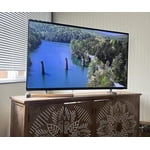
[This review was collected as part of a promotion.] My new 55' Samsung television is so enjoyable with top of the art high definition, contrast, resolution and color along with an incredibly responsive and user friendly Smart TV app (SmartThings) for your phone that allows you to control your TV from anywhere and has an on demand remote if you've lost yours or have your phone on you and simply don't want to get up from the couch to grab the physical remote. I would recommend this TV to anyone, 5-star rating all the way!

Review from Samsung US
Helpful?0XWIJWU36LZK19823766916
Jun 22, 2026
Reviewer name: Ibarra
5 out of 5 stars
5 out of 5 stars review

Very good product

[This review was collected as part of a promotion.] This television offers impressive picture quality with vibrant colors and deep blacks. Its interface is intuitive and easy to navigate, allowing you to access your favorite content without hassle. Connectivity is excellent, making it easier to integrate with other devices in your home. In addition, its modern and elegant design is perfectly suited to any space. You will enjoy an immersive, high-level viewing experience with this device.

Review from Samsung US
Helpful?0XWIJWU36LZK19823766916
Jul 21, 2026
Reviewer name: Clos
4 out of 5 stars
4 out of 5 stars review

Great for sporting events

[This review was collected as part of a promotion.] I love it. My 65” mounted to a wall swivel. Just in time to enjoy every minute of every World Cup Soccer Match. As a sports junkie, I specifically selected this model for the enhanced sports optics.

Review from Samsung US
Helpful?0XWIJWU36LZK19823766916
Jun 21, 2026
Reviewer name: Rich
2 out of 5 stars
2 out of 5 stars review

Other features are okay

[This review was collected as part of a promotion.] Samsung has done the dumbest thing ever! They allow me to use my hearing aids but in doing so theycut off the sound for the rest of the room! I should be able to use the TV speakers at the same time I activate the hearing aids! How stupid!

Review from Samsung US
Helpful?0XWIJWU36LZK19823766916
reply from Samsung Advisor

Hi Rich, Thank you for reaching out to us. Please note that your TV features Multi-output Audio, enabling simultaneous sound through both the TV speakers and Bluetooth headphones. You can also adjust each audio output independently - for instance, keeping the TV volume lower while boosting volume on your headphones. To enable: Home > left directional key > Settings > All Settings > General & Privacy > Accessibility > Multi-output Audio We hope this tip helps. If you need additional help, feel free to reach Samsung Customer Support at 1-800-SAMSUNG (8AM – 9PM EST Mon – Fri, 8AM – 6PM Sat – Sun). You can also LiveChat with an agent or explore more resources under the Support link on our website. ~ Samsung Advisor

Jul 5, 2026
Reviewer name: KJMaxa
5 out of 5 stars
5 out of 5 stars review

What a bright and sharp screen!

[This review was collected as part of a promotion.] What a bright and sharp screen! The mini-LED's were well worth the extra money. Very dark in areas supposed to be dark. Sharp across the entire screen. I do wish it would boot up faster, and have an optical sound output.

Review from Samsung US
Helpful?0XWIJWU36LZK19823766916
Jun 29, 2026
Reviewer name: Looty
5 out of 5 stars
5 out of 5 stars review

One of a Kind Television

[This review was collected as part of a promotion.] I absolutely love this television. The setup is beyond what I imagined. Quick access to Netflix, Amazon Prime, and Samsung Plus. The only negative thing, is that I do not like the volume feature on the remote. For whatever reason, it is difficult for me to use! With that being said, I still plan on buying both a 50 inch and 75 inch (or 65) of the SAME model.

Review from Samsung US
Helpful?0XWIJWU36LZK19823766916