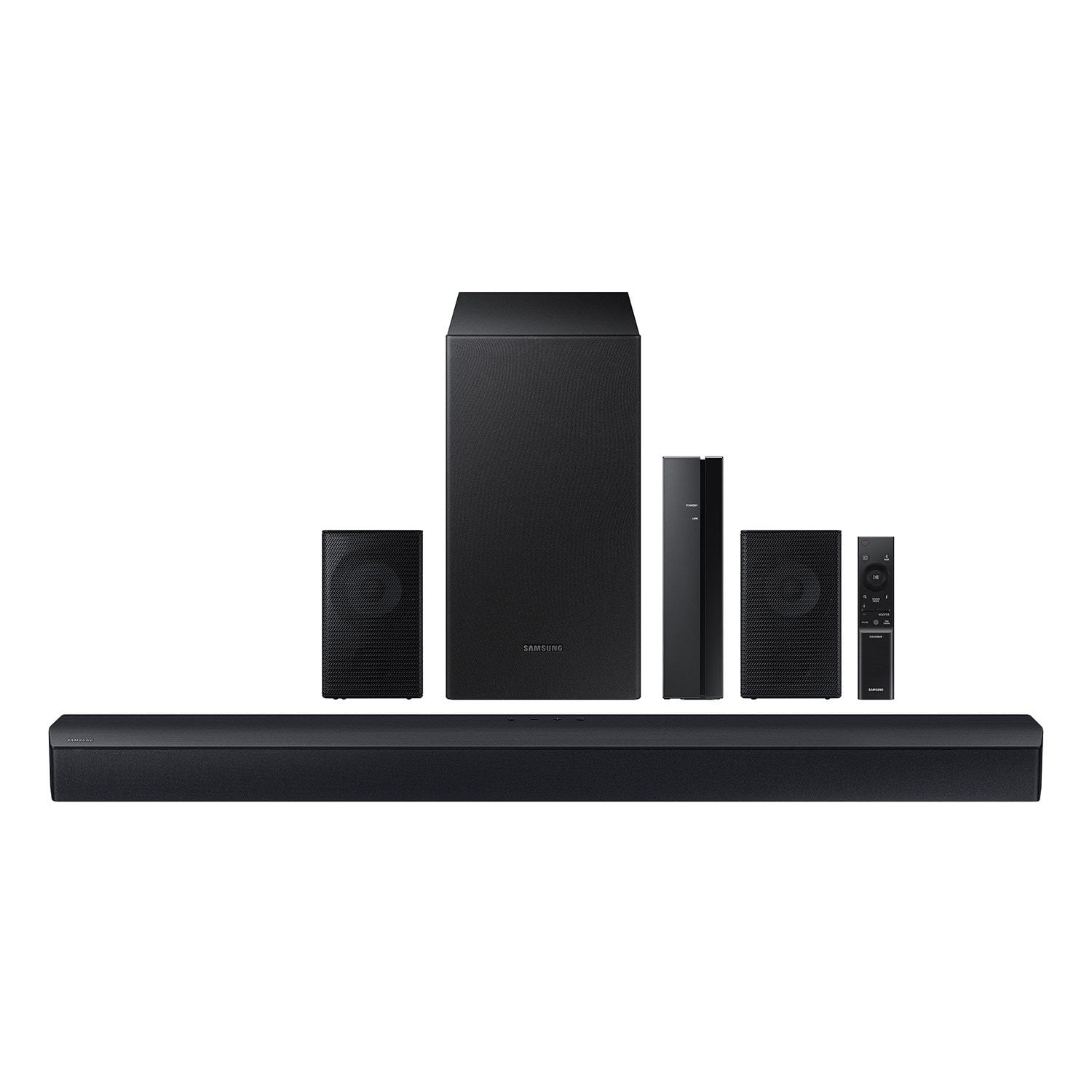
Customer reviews for Samsung 4.1 Channel Soundbar w/Subwoofer - HW C47M forNo Regrets
Great connectivity. It works great w. my Samsung smart TV. Sound quality is great, i use it in a small room, sometimes Im afraid the up and down neighbors could feel the vibrations of the subwoofer. I like it 10 out of 10 and would recommend it. Cool!
Gets loud but 4.1 isn't what I was expecting.
I bought this from my local Walmart. Set up is simple but instructions are rough. This thing will get very loud which is cool. The rear speakers are pointless to me, every setting and every position I tried which where many, you can not hear them they make no difference in the sound to be honest. 95 percent of the sound I get is from the bar itself and that is even with center on -6 and rears on 6. They just don't match the price point I paid for this thing. Having said all that. It does work but just not amazing quality in sound distribution.
Thatguy,<br /><br />Thank you for taking a moment to review the HW-C47M Soundbar.<br /><br />Please know, there are various settings you can adjust to improve your experience with the rear speakers.<br /><br />You can adjust the volume of the rear speakers by using the remote included with the connected soundbar. Press the CH LEVEL button on the soundbar remote, then select REAR LEVEL and use the Up/Down buttons to adjust the volume within a -6 to +6 range.<br /><br />Additionally, make sure that the source (e.g. TV output) is sending surround channels to the Soundbar. If you are using a format such as PCM, you may experience decreased volume to the rear speakers. Select Bitstream, Auto, or Pass-Through as these settings will allow the TV to send the correct channels to the rear speakers.<br /><br />If you need more help, Samsung is here for you. Please call us at 1-800-SAMSUNG, 8AM - 12AM EST (Ask for Soundbars), 7 days a week. Our Live Chat agents are also available by clicking on the ‘Support’ link on our website.<br /><br />~ Samsung Solutions
i love Samsung but not loving 2 remotes
so i bought a new Hisense TV and bought the Samsung 4.1 and sub woofer, and i realized that i would need to use 2 remotes to control volume. I'm not about that. i returned it and git the Hisense sound bar and subwoofer so that i could use just 1 remote. i wish there was a way to use Samsung because the subwoofer and soundbar is made so much better.
Awesome Sound And Quality Product
[This review was collected as part of a promotion.] This sound system is honestly the best I've ever had. The sound is unreal and it captures every little sound of any song, movie, or video. There's been very few sound systems I could say this about. I see myself with this product for a looonnnnggg time! If you want an actual movie theater in your house or wherever get this, seriously!
Crap soundbar with the rest
The soundbar is trash after turning it up once with alternative rock it started to make an ugly sound on the right side. Very disappointed in the power, the ONN BLAST 5.1 is louder but cheaper quality material. Subwoofer is very nice but lacks real bump with some music. Two rear l/r speakers are great!
Hello Roy,<br /><br />We appreciate you taking a moment to review the HW-C47M Soundbar. We’re sorry your experience didn’t match your expectations.<br /><br />You can optimize your audio performance to your liking by pressing the SOUND MODE button on your soundbar remote and then selecting the desired sound effect by choosing SURROUND SOUND, GAME, or STANDARD. <br /><br />By pressing the TONE CONTROL button, you can adjust the volume of the treble or bass sound between -6~+6 by using the Up/Down buttons. <br /><br />Additionally, using the WOOFER button on the remote, you can adjust the subwoofer’s volume between -6 to +6 by toggling the button up or down. To set the subwoofer volume level to 0, press the button down. <br /><br />When you press the CH LEVEL button, you can adjust the volume of the VIRTUAL CENTER LEVEL. This will allow you to adjust the overall dialogue between -6 to +6 using the UP/DOWN button on the provided Soundbar remote. When you press the CH LEVEL button when the Wireless Rear Speaker Kit connected to the Soundbar, you can adjust the rear speakers between -6 to +6 using the UP/DOWN buttons. <br /><br />Press and hold the SOUND CONTROL button for about 5 seconds to adjust the sound for each frequency band. 150Hz, 300Hz, 600Hz, 1.2kHz, 2.5kHz, 5kHz, and 10kHz are selectable using the Left/Right buttons and each can be adjusted to a setting between -6 to +6 using the Up/Down buttons. (Make sure the Sound mode is set to “STANDARD”. <br /><br />If we can help with anything else, please call us at 1-800-SAMSUNG (Ask for Soundbars), 8 AM – 12 AM EST, 7 days a week. LiveChat with an agent as well as manuals, software, and warranty info can be found at the ‘Support’ link on our Samsung website. <br /><br />~ Samsung Solutions
Ok could have been great
Speakers are loud and clear but I was expecting more. It is listed as 4.1 but it uses a virtual center speaker that is broadcast in all 4 speakers, which drowns out the rear channel. I am using the optical out with the same results from 5.1 sources. When running the speaker tests that test each channel Front R L and Mid all play on the corresponding rear speaker.
Hello CFLacky, Thank you for sharing your review of the HW-C47M Soundbar. There are a few steps you can take to improve your overall experience. To increase the rear speaker levels, press the CH LEVEL button on the provided Soundbar remote. You will see REAR LEVEL on your Soundbar and use the UP/DOWN buttons on the remote to increase/decrease the volume levels of your rears. Make sure that your Audio Digital Format within your TV is set to Bitstream, Auto, or Pass-Through. If your TV is set to PCM, then you will only receive a stereo experience. Also using the Soundbar remote, press the SOUND MODE button to use either Game or Surround Modes. These Sound Modes will send the audio channels correctly to the rear speakers. Should you ever have questions or need help, please call us at 1-800-SAMSUNG (ask for Soundbars), available 8 AM – 12 AM EST, 7 days a week. For additional support resources, visit us on the Samsung website and click on the ‘Support’ link in the upper right corner of the homepage for: 1) Chat with Us/Product Help: To begin a chat or find solutions, choose ‘TVs & Home Theater’ and select your model & topic. 2) Manuals & Software 3) Warranty Info 4) Register a Product: For access to easy warranty support, convenient opt-in to special promos and offers, faster troubleshooting and service, and quick notification of system updates 5) Contact Us ~ Samsung Solutions
Almost 5 stars
I bought this yesterday. Was a bit hesitant cuz I am the first person to review it. Couldn’t find anyone or any website that had insight on it! For the price it was a little risky. I anticipated a very meh experience for a low price sound bar. Thankfully I was wrong. Overall I’m very pleased. Don’t let the 4.1 channel deter you. Has a great design. Easy set up. Wish the rear speakers were 100% wireless. So I can’t quite give it 5 stars. But the rear speakers are still great. The system gets very loud. Loudest I took it was 65% of max volume. It is Fantastic for movies. Film scores massage your ears effortlessly. The subwoofer bangz. Although while testing out music It did struggle to keep up with rock/metal music a bit. But the Bass for hip hop/ pop is solid. However the remote allows you to adjust bass/treble, rear/central speaker volume tons other modes, adjustments for clarity performance. Maybe that will solve the treble issues. Simply, It’s very impressive for a low budget system. I’m honored to be the first to review it!
Love my sound system
[This review was collected as part of a promotion.] I use my sound system almost solely for television and movies. The system's size is easily manageable and looks great in the entertainment center, under my wall mounted television. I've never had any issues with blown or cracking speakers and we've definitely tested it very close to its upper limits.
Not worth it
Rear speakers dead within a year. Module still shows it’s paired but no sound comes out. Tried to reset and pair it again and nothing. When everything worked it sounded decent for my average size living room. I’m glad I got this on sale for 100 off and didn’t pay the 240 price tag.
aaron,<br /><br />Thank you for taking a moment to review the HW-C47M Soundbar.<br /><br />There are a few steps you can take to troubleshoot your Soundbar. <br /><br />First, you will want to download the latest software for your Soundbar. You can download the firmware directly from Samsung’s website by clicking “Support” in the top right corner. Then go to “Manuals & Software” > “TVs & Home Audio” > “Home Audio” > “Sound Bars”. From there, you can select the HW-C47M under Standard Series. <br /><br />Download the update and install it via USB thumb stick to your soundbar. If you need additional help, there are how-to instructions on this page. Please know that Samsung Customer Service is here to assist as well.<br /><br />Alternatively, you can download SmartThings on your iOS or Android device. This will allow you to update your Soundbar automatically or manually right from your phone or tablet.<br /><br />Please verify that you are running the latest firmware on your TV. You can check to see what software version your TV is using and if there is an available update through the settings on your TV. Go to: Menu > Settings > Support > Software Update. <br /><br />First, try doing a soft reset, unplug the soundbar from the outlet for roughly 30 seconds and then plug it back in. <br /><br />If this still does not correct your issue, then do a hard reset. With the Soundbar on, press the + & - Volume buttons on the body of the soundbar at the same time for at least 5 seconds. INIT OK” appears on the display and then the Soundbar is reset.<br /><br />Samsung products are engineered to the highest standards of performance and quality, and we back this model with a 1-year limited manufacturer's warranty, if purchased brand-new directly from an authorized seller.<br /><br />If you need more help, Samsung is here for you. Please call us at 1-800-SAMSUNG, 8AM - 12AM EST (Ask for Soundbars), 7 days a week. Our Live Chat agents are also available by clicking on the ‘Support’ link on our website.<br /><br />~ Samsung Solutions
Bang for your Buck!
I bought this today. Was a bit hesitant cuz I am the first person to review it. Couldn’t find anyone or any website that had insight on it! For the price it was a little risky. I anticipated a very meh experience for a low price sound bar. Thankfully I was wrong. Overall I’m very pleased. Don’t let the 4.1 channel deter you. Has a great design. Easy set up. Wish the rear speakers were 100% wireless. So I can’t quite give it 5 stars. But the rear speakers are still great. The system gets very loud. Loudest I took it was 65% of max volume. It is Fantastic for movies. Film scores massage your ears effortlessly. The subwoofer bangz. Although while testing out music It did struggle to keep up with rock/metal music a bit. But the Bass for hip hop/ pop is solid. However the remote allows you to adjust bass/treble, rear/central speaker volume + tons other modes, adjustments for clarity performance. Maybe that will solve the treble issues. Simply, It’s very impressive for a low budget system. I’m honored to be the first to review it!
Hello Howyoudoin007, Thank you for purchasing the new HW-C47M Soundbar and taking the time to share your experiences. We appreciate your review and I am thrilled to see you are loving your overall audio experience. To be able to fine-tune your soundbar, press and hold the SOUND CONTROL button for about 5 seconds to adjust the sound for each frequency band. 150Hz, 300Hz, 600Hz, 1.2kHz, 2.5kHz, 5kHz, and 10kHz are selectable using the Left/Right buttons and each can be adjusted to a setting between -6 to +6 using the Up/Down buttons. (Make sure the Sound mode is set to “STANDARD”). I hope this tip helps improve your enjoyment. For more help, please call us at 1-800-SAMSUNG (Ask for Soundbars), 8 AM – 12 AM EST, 7 days a week. LiveChat with an agent as well as manuals, software, and warranty info can be found at the ‘Support’ link on our Samsung website. ~ Samsung Solutions