Skip to Main Content
Sam's Club
Sam's Club
All Departments
All Services
Customer reviews for SAMSUNG 65" Class U7900F Series 4K Crystal UHD Smart TV for
SAMSUNG 65" Class U7900F Series 4K Crystal UHD Smart TV
4.5 out of 5 stars
stars
4,239 ratings4,160 reviews
  1. 5 stars74% (3,117)
  2. 4 stars15% (632)
  3. 3 stars6% (258)
  4. 2 stars2% (102)
  5. 1 star3% (130)

Member photos

  • +1610 images
Sort by |
Showing 461-470 of 4,160 reviews
Sep 21, 2026
Reviewer name: sweetPof3
5 out of 5 stars
5 out of 5 stars review

Samsung lover

[This review was collected as part of a promotion.] I absolutely love my Samsung 65” TV. The quality of the picture is awesome. Easy to set up. Would never by anything but a Samsung.

Review from Samsung US
Helpful?7052JBFI9KAV17348165019
Sep 21, 2026
Reviewer name: Clint
4 out of 5 stars
4 out of 5 stars review

Glitch in operating system

[This review was collected as part of a promotion.] Ever so often it'll glitch. Like the operating system will glitch. It'll be playing and then flicker off

Review from Samsung US
Helpful?7052JBFI9KAV17348165019
Sep 22, 2026
Reviewer name: Allaboutsamsung
4 out of 5 stars
4 out of 5 stars review

Amazing Television Overall

[This review was collected as part of a promotion.] I love the TV overall I've been using Samsung products for over 30 years and I've been buying their TVs the whole time tablets Etc exceptional products. great quality

Review from Samsung US
Helpful?7052JBFI9KAV17348165019
Sep 10, 2026
Reviewer name: Adriana
3 out of 5 stars
3 out of 5 stars review

Love the TV but room for improvement

[This review was collected as part of a promotion.] I'm not a fan of the tiny remote with the limited buttons. Bad decision to make such a small remote; the Home Screen is too busy

Review from Samsung US
Helpful?7052JBFI9KAV17348165019
reply from Samsung Advisor

Hi Adriana, We appreciate your thoughts on the U7900FD TV’s remote. While it may appear minimal at first glance, many of the buttons are designed with dual or long-press functions to help reduce clutter without sacrificing functionality. For example: • Volume rocker: Push UP/DOWN to adjust volume; press and release quickly to MUTE. • Long-press Volume button: Hold for more than 1 second to access Accessibility Shortcuts. • RETURN button: Press to go back to the previous screen or menu; when watching TV, it takes you back to the previous channel. These combined functions help create a cleaner design while keeping everything you need just a button away. If you ever need help with your remote or want to learn more shortcuts, we’re here to assist. You can reach us at 1-800-SAMSUNG (8AM – 9PM EST Mon – Fri, 8AM – 6PM Sat – Sun). LiveChat is also available via the ‘Support’ link on our website. ~ Samsung Advisor

Sep 20, 2026
Reviewer name: Klowe
5 out of 5 stars
5 out of 5 stars review

Great Features with vivid pictures

[This review was collected as part of a promotion.] My 75 inch Samsung TV offers many features with excellent picture quality. Sound is very good compared to other televisions.

Review from Samsung US
Helpful?7052JBFI9KAV17348165019
Sep 5, 2026
Reviewer name: Sugar dad pt3
5 out of 5 stars
5 out of 5 stars review

Great feathers for a unthinkable price

[This review was collected as part of a promotion.] Samsung makes some of the best products I0nly wish I could afford to watch there big 86 inch the ospind lighting and pizz are something of great picture quality

Review from Samsung US
Helpful?7052JBFI9KAV17348165019
Sep 20, 2026
Reviewer name: Brilliant Picture
5 out of 5 stars
5 out of 5 stars review

Everything about my smart TV is excellent
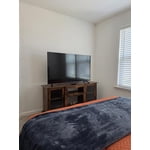
[This review was collected as part of a promotion.] Picture is sharp, lighting is amazing and the over all experience is spectacular especially the surround sound...

Review from Samsung US
Helpful?7052JBFI9KAV17348165019
Sep 22, 2026
Reviewer name: Steve
4 out of 5 stars
4 out of 5 stars review

Nice picture

[This review was collected as part of a promotion.] Great picture quality like that I can tone down the contrast. Would like a little bit more sound volume.

Review from Samsung US
Helpful?7052JBFI9KAV17348165019
Sep 5, 2026
Reviewer name: Sleed
5 out of 5 stars
5 out of 5 stars review

Awesome picture!

[This review was collected as part of a promotion.] Awesome picture, great features, great television! Great brand, nice Samsung channels. Good colour s and good price.

Review from Samsung US
Helpful?7052JBFI9KAV17348165019
Sep 5, 2026
Reviewer name: AZGUY
1 out of 5 stars
1 out of 5 stars review

Always dark

[This review was collected as part of a promotion.] Everything is dark. All the time. I've adjusted multiple settings. Read reviews and different guides and it's still incredibly dark.

Review from Samsung US
Helpful?7052JBFI9KAV17348165019
reply from Samsung Advisor

Hi AZGUY, We’re sorry to hear you’re not fully satisfied with the picture quality on your Samsung U7900F TV. If the image appears too dark, we suggest disabling certain energy-saving features, which can automatically adjust brightness and affect how the screen looks. Go to: Settings > All Settings > General & Privacy > Power and Energy Saving, then turn off Brightness Optimization, Energy Saving Solution, Motion Lighting, and/or Contrast Enhancer. You can also adjust the Picture Mode to better suit your environment: Settings > All Settings > Picture > Picture Mode • Standard – Default mode for general viewing • Dynamic – Brighter and clearer, ideal for well-lit rooms • Movie – Best for dark room viewing • Eco – Energy-saving mode • Filmmaker Mode – Preserves content as intended by creators To fine-tune brightness, go to: Home > Settings > All Settings > Picture > Expert Settings, then adjust the Brightness level (0–50) to your preference. Lastly, please make sure your TV is running the latest firmware: Home > Settings > Support > Software Update > Update Now We hope these tips help improve your viewing experience. If you need further support, feel free to contact us at 1-800-SAMSUNG (8AM – 9PM EST Mon – Fri, 8AM – 6PM Sat – Sun). LiveChat is also available via the ‘Support’ link on our website. ~ Samsung Advisor