
 Customer reviews for SAMSUNG 65" Class U7900F Series 4K Crystal UHD Smart TV for
Member photos









 +1610 images
It’s just ok
[This review was collected as part of a promotion.] I have an older Samsung TV that is great. This one is just ok. Color is not that good and it is hard to navigate. It takes a while to come on and when it does it comes on whatever you were watching last.
Tigerfan, We appreciate your feedback on the picture quality of Samsung’s 2025 U7900F TV. If the image doesn’t quite match your preferences, there are several adjustments you can make to better suit your viewing environment and content type. First, please ensure your TV is running the latest firmware, as updates may include important picture quality and performance enhancements. Go to: Home > Left directional button > Settings > Support > Software Update > Update Now To explore picture mode options, navigate to: Home > Left directional button > Settings > All Settings > Picture > Picture Mode. Options include: • Standard – Ideal for general viewing • Dynamic – Brighter and more vibrant for well-lit spaces • Eco – Optimized for energy efficiency • Movie – Best for viewing in low light • Filmmaker Mode – Preserves the content creator’s intent and disables motion smoothing for supported content You can further customize your image by going to: Settings > All Settings > Picture > Expert Settings, where you can adjust Brightness, Contrast, Color Tone, Sharpness, Contrast Enhancer and more. To help you get the most from your TV, you can download the full e-Manual and more by visiting Samsung’s website then navigating to: Support > Manual & Software > TVs & Home Theater. From there, you can search for and select your U7900F TV model to view or download the available guides. The e-Manual and Remote Control Guide are also conveniently built into your TV: Settings > Support > Tips and User Guides If you need additional help, please contact Samsung Support at 1-800-SAMSUNG, 8AM – 12AM EST, 7 days a week. LiveChat agents are also available through the ‘Support’ link on our website. ~ Samsung Specialist
Crystal clear tv
[This review was collected as part of a promotion.] I haven’t bought a new tv in years and this one far exceeds my expectations. The picture is amazing. You feel like you are right there with them in the room. I like to watch Criminal Minds and I feel like I’m in the interrogation room with Olivia. I’m extremely satisfied with the quality, the technology, and the easy setup.
Amazing Picture Quality & Great Value!
[This review was collected as part of a promotion.] I've been using the Samsung U7900F Crystal UHD TV (2025) for a while now and I’m very impressed. The picture quality is vibrant, sharp, and clear—even in brightly lit rooms. The colors really pop, and the 4K upscaling makes everything look better. Setup was super easy, and the smart features are fast and responsive. Streaming apps like Netflix and YouTube run smoothly, and the remote is user-friendly. Sound quality is decent out of the box, though I paired it with a soundbar for a fuller experience. Overall, it’s a fantastic TV for the price—perfect for movies, gaming, and everyday use. Highly recommended! ⭐️⭐️⭐️⭐️⭐️
Not the Samsung I’m used to!
Bought this tv yesterday. Did the setup and it was confusing to say the least. I’ve set up many TVs and most are straightforward and intuitive. I’ve even set up other Samsungs and this was by far the worst for set up. Now for the actual picture. Right out of the box the picture was not very good. Picture was “washed out” and just didn’t look right compared to our other TVs. Tried online suggestions for correcting colors and sharpness of image. Nothing improves the picture. So disappointed in this Samsung!!! Our cheapy TV, all our other TVs (all 6) are so much better. Our other Samsung (older set) is fine. Plus it has a mind of its own. After turning it off and then returning to watch tv it goes into Samsung plus instead of our satellite provider. This issue just started. At first at least when set was turned on we had our satellite on. And I HATE the remote. Even had our son over to help with adjustments and settings with no luck. Very disappointing product!

Hi Teachit, We appreciate your feedback and are glad you reached out to us. There are a few adjustments you can make that may improve your experience. First, let's ensure you are running the latest Firmware. Go to Settings> Support> Software Update. If the picture appears unclear, dull, or lacks definition, there are several settings you can adjust to improve clarity and overall image quality. Go to: Settings > All Settings > Picture > Expert Settings, and review these key settings: Picture Clarity Settings: While originally intended for motion handling, these can also impact overall clarity • Off: Disables motion enhancements • Auto: Automatically adjusts based on content • Custom: Lets you fine-tune: o Judder Reduction – Helps smooth out uneven motion o LED Clear Motion – Boosts sharpness in fast-moving content o Noise Reduction – Reduces distortion and enhances detail in lower-resolution sources Core Picture Settings • Brightness – Controls overall screen brightness • Contrast – Enhances the difference between bright and dark areas • Sharpness – Adjusts edge definition; closer to 20 increases detail • Color – Enhances depth and intensity of colors Finally, while your TV may currently default to Samsung TV Plus when powered on, you can customize what your TV does at startup by adjusting the Start Screen Options. To do this, navigate to: Settings > All Settings > Advanced Features > Start Screen Option and choose from the following: 1. Start with Smart Hub Home – Automatically launches Smart Hub when the TV is turned on. You can enable or disable this option based on your preference. 2. Autorun Multi View Casting – If you cast YouTube content from your mobile device, the TV will automatically display the content using Multi View. 3. Autorun Multi View Mirroring – When you screen mirror your mobile device, Multi View will automatically open to show your device’s screen. If you need help adjusting these settings or have any other questions, please contact Samsung Support at 1-800-SAMSUNG, 8AM – 12AM EST, 7 days a week. LiveChat agents are also available by clicking on the ‘Support’ link on our website. ~ Samsung Advisor
A great TV
[This review was collected as part of a promotion.] My fiancée and I use this TV all the time to watch movies and it is great. The image is fantastic quality and the size is perfect. Setup was super easy, so we could just get right to watching which was great.
Samsung Crystal 55” Perfect for Bedroom
[This review was collected as part of a promotion.] We needed to replace an older (non-smart?) TV which we had for years in our master bedroom. The 55” size and quality of this unit were perfect for the room. Easy to assemble and easy to set up streaming with our various services. Thanks Samsung!
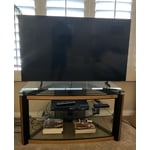
Great features and pictures
[This review was collected as part of a promotion.] I use my Samsung YV to watch over the air television, internet surfing, virtual doctor's visits, for watching movies/TV shows, listening to music and playing games with the Samsung game app and also with my PS3. Graphics, sound and color saturation is excellent. There are so many features that I have yet to crack the surface. Everyday, I'm learning something new. It sometimes seems as if I'm actually in the picture. I love my television and believe that this is one of the best television purchases I've ever made. The value is great,as well. I broke my ankle, leg and elbow, at the same time, all on the same side. I'm homebound so I decided to purchase a new television for my bedroom. I'd like to thank Samsung, for it has helped pass the time with wonderful entertainment and a great distraction learning what my television is capable of. I learn something new everyday. If you're researching and considering purchasing a new television, you can't go wrong, with Samsung.
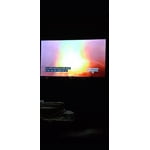
Been a great purchase!
[This review was collected as part of a promotion.] At first I was a little worried because it is so large, but the crystal clear picture makes it so after a while, you want to go bigger! The picture along with my Samsung sound bar and subwoofer are an incredible pairing!!
Jury is still out
[This review was collected as part of a promotion.] 1500 Character Maximum I have had the television for almost 1 month and debating whether to call and report a problem. Periodically, when I put on the television, the screen flickers. Have to shut off the television and restart it. Also, sometimes when I first put on the television, there is no sound / volume. Similarly, I have to shut down and restart it. Lastly, sometimes picture freezes and then reverts to Home Screen.

Hi Giddle, Thank you for reaching out to us. Please try the steps below to resolve the flickering and sound issues you mentioned. If you're noticing flickering or unexpected changes in screen brightness, we recommend disabling the following energy-saving features: Settings > General & Privacy > Power and Energy Saving • Brightness Optimization • Motion Lighting • Energy Saving Solution You may also want to turn off Contrast Enhancer, which can cause brightness shifts during certain scenes: Settings > Picture > Expert Settings > Contrast Enhancer Lastly, make sure your TV is running the latest firmware: Settings > Support > Software Update > Update Now. Regarding sound issues: if you're not hearing sound from your TV, please try the following: • Check your volume and mute settings, and confirm external speakers are powered on. • If using HDMI ARC/eARC, make sure you’re using a certified HDMI cable and go to: Settings > All Settings > Sound > Expert Settings > HDMI eARC Mode = Auto. Also enable Anynet+ (HDMI-CEC) under External Device Manager. • For Optical, be sure the external audio device is on before connecting, and set Sound Output = Optical. • For Bluetooth, try unpairing and reconnecting: Settings > Sound > Sound Output > Bluetooth Speaker List • For Wi-Fi speakers, use: Sound Output > Wi-Fi Speaker Surround Setup and make sure both devices are on the same network. You can also try running a Sound Test: Settings > Support > Device Care > Self Diagnosis > Sound Test If your issue continues, we’re happy to help at 1-800-SAMSUNG, 8AM – 12AM EST, 7 days a week. Our LiveChat agents are also available by clicking the ‘Support’ link at Samsung.com. ~ Samsung Advisor
Beautiful Picture
I just love the clear, bright picture. The sound is great. After getting it out of the box and powered on, I set up the TV settings. That took a bit. There is so much content that can be accessed through the TV that I just pushed buttons and clicked links just to see what I could see. Wow!! I might downgrade my streaming services for awhile since I have so many other options now