Skip to Main Content
Sam's Club
Sam's Club
All Departments
All Services
Customer reviews for SAMSUNG 65" Class U7900F Series 4K Crystal UHD Smart TV for
SAMSUNG 65" Class U7900F Series 4K Crystal UHD Smart TV
4.5 out of 5 stars
stars
4,222 ratings4,143 reviews
  1. 5 stars74% (3,105)
  2. 4 stars15% (631)
  3. 3 stars6% (256)
  4. 2 stars2% (103)
  5. 1 star3% (127)

Member photos

  • +1590 images
Sort by |
Showing 2,881-2,890 of 4,143 reviews
Oct 22, 2025
Reviewer name: 3417norb
5 out of 5 stars
5 out of 5 stars review

58" Crystal UHD

[This review was collected as part of a promotion.] The 58" Crystal has a very clear picture, this is a high quality TV for the price, we were very impressed with the quality of the picture also the sound is magnificent, we are considering to replace another TV with another 58 Crystal UHD

Review from Samsung US
Helpful?7052JBFI9KAV17348165019
Oct 13, 2025
Reviewer name: JunkTV
2 out of 5 stars
2 out of 5 stars review

Not nearly as good as the 20 year old Vizio i had

[This review was collected as part of a promotion.] The remote is unreliable sometimes it works other times it doesn’t. The smart things app usually does work. The sound is terrible using the internal speakers. I was forced to use a soundbar for adequate volume. Only two HDMI inputs is unacceptable. Overall I would not recommend this product and look forward to replacing it soon.

Review from Samsung US
Helpful?7052JBFI9KAV17348165019
reply from Samsung Advisor

Hi JunkTV, We appreciate your feedback on the U7900 TV. If your TV is responding slowly or inconsistently to the remote, try the following steps: 1. Re-pair the remote – Stand within 1 foot of your TV and press Return and Play/Pause simultaneously for at least 5 seconds. A message should appear confirming it's connected. 2. Check the battery level – Go to: Home > left directional key > Settings > All Settings > General & Privacy > Remote Control 3. Ensure proper charging – SolarCell Remotes can charge using: o Room light or direct sunlight (solar panel should face light source) o USB-C cable (preferably Samsung-branded) 4. Update your TV’s firmware – Go to: Settings > Support > Software Update > Update Now 5. Run Device Care to clear memory and close background apps that may slow performance: Settings > Support > Device Care > Start Device Care If these steps don’t resolve the issue, please contact Samsung Support at 1-800-SAMSUNG, 8AM – 12AM EST, 7 days a week. LiveChat is also available through the ‘Support’ link on our website. ~ Samsung Advisor

Nov 10, 2025
Reviewer name: teacherpack
5 out of 5 stars
5 out of 5 stars review

Best Picture on the Market in this Scope

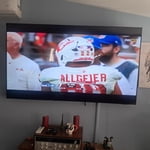
[This review was collected as part of a promotion.] I replaced a Visio 55" with this Samsung 58" and the difference in picture quality is astounding! I can literally see the beads of sweat on a player's face in a game. The included apps make this TV a great value for your money as well. I highly recommend it.

Review from Samsung US
Helpful?7052JBFI9KAV17348165019
Nov 8, 2025
Reviewer name: Themightyguy11
4 out of 5 stars
4 out of 5 stars review

It is a great product

[This review was collected as part of a promotion.] I think this product is a really good deal. The features you get for this price is good. I do think it could be a bit better. Like I did have it lag like 5 times, but other than that I don't have any complaints. This is a great product.

Review from Samsung US
Helpful?7052JBFI9KAV17348165019
Oct 19, 2025
Reviewer name: 1SADSUNG
2 out of 5 stars
2 out of 5 stars review

THIS PRODUCT SHOULD BE SADSUNG

[This review was collected as part of a promotion.] it is quite frustrating with the use of such a small remote. the buttons dont light up and since my fios remote is not properly paired to the tv i am stuck having to use the small remote that came with the tv. i do not like how the tiles are all over the place which just makes things more difficult to find. the remote is not voice activated like most of the other newer ones i have seen and the volume is very awkwardly set up as well. to change channels and use the volume the buttons must be toggled a certain way which is also annoying. it makes the experience a lot more stressful than necessary. the tv also is constantly freezing and pixelating. it seems more blurry on multiple channels. it is not good for visually impaired or neurodivergent people who have disabilities.

Review from Samsung US
Helpful?7052JBFI9KAV17348165019
reply from Samsung Advisor

Hi 1SADSUNG, We appreciate your feedback on the U7900 TV. To ensure performance is optimized on your TV, please check the Firmware is up to date. Go to Settings> Support> Software Update. To further optimize performance, try running Device Care, which checks memory, clears unused cached data, and closes background apps: Home > left directional key > Settings > Support > Device Care > Start Device Care. If you still notice blurring or pixelating on your channels, the issue you’re encountering may be related to network strength or stability. We recommend the following steps: 1. Connect to a 5GHz Wi-Fi network, if available 2. Use a wired LAN connection for increased stability 3. Reposition your router to reduce obstacles between the TV and the router Finally, if you need help setting up a third-party remote or have any questions, please do not hesitate to reach out to us. Reach out by calling 1-800-SAMSUNG between 8AM - 12AM EST, any day of the week. You can also chat with us online by visiting the ‘Support’ section of our website. ~ Samsung Advisor

Dec 27, 2025
Reviewer name: Jumbo1
4 out of 5 stars
4 out of 5 stars review

85" Crystal UHD

[This review was collected as part of a promotion.] Great TV so far, the colors and sound quality is exceptional. My only issues are that i am not a fan of the main screen, kinda hard to navigate i feel like there's too much going on. The older version with the apps on the bottom was better. Also the remote is small and hard to hold because of my big hands. No major complaints

Review from Samsung US
Helpful?7052JBFI9KAV17348165019
Nov 13, 2025
Reviewer name: Love2Shop
4 out of 5 stars
4 out of 5 stars review

Its decent

[This review was collected as part of a promotion.] Its an alright tv. It makes a weird noise every now and then even though its brand new. He remote isnt that great and theres not too many hdmi ports. Other than that just decent with okay picture and sound

Review from Samsung US
Helpful?7052JBFI9KAV17348165019
Nov 30, 2025
Reviewer name: Lauren
5 out of 5 stars
5 out of 5 stars review

The perfect value

[This review was collected as part of a promotion.] This is the perfect TV for a family to put in the living room! Even though it's a lower price range Samsung TV, that doesn't mean it's low in quality. Samsung just doesn't do low quality. Colors are vibrant, picture is sharp, and blacks are deep. You almost can't tell the difference between the TV speakers and the soundbar (if you have one), A+ on the integrated speakers. Everything you need in a TV.

Review from Samsung US
Helpful?7052JBFI9KAV17348165019
Jan 6, 2026
Reviewer name: PaulM
4 out of 5 stars
4 out of 5 stars review

Great Value 4K TV

Samsung is known for its TVs and this TV is very good. The High Dynamic Range (HDR) and the 4K resolution are better than average and for the price this is an excellent value TV. A Fiber optic would have been nice for my soundbar, but this TV doesn't have one of those kinds of outputs. Also worth to note it only have 2 HDMI inputs. One of the negivitves about this TV is the Smart Hub is underpowered and tends to freeze and have to be reserted to fix the issue. I love my AppleTV (4K HDR) with this TV and have no issues this way, plus I get higher quality output then the SmartHub with Apps are able to output.

Review from Samsung US
Helpful?7052JBFI9KAV17348165019
Nov 6, 2025
Reviewer name: RobW59
2 out of 5 stars
2 out of 5 stars review

Disappointed with new TV

[This review was collected as part of a promotion.] TV was purchased for my elderly father, when his old TV quit working. The remote and operating system is not user friendly for a senior. It has taken much longer for him to learn to use the system. In hindsight I would have done much more research to find a senior friendly option for the tv and/or remote.

Review from Samsung US
Helpful?7052JBFI9KAV17348165019
reply from Samsung Advisor

Hi RobW59, We appreciate you sharing your user experience. To help you get the most from your TV, you can download the full e-Manual and more by visiting Samsung’s website then navigating to: Support > Manual & Software > TVs & Home Theater. From there, you can search for and select your U7900 TV model to view or download the available guides. The e-Manual and Remote Control Guide are also conveniently built into your TV: Settings > Support > Tips and User Guides If you need additional help, please contact Samsung Support at 1-800-SAMSUNG, 8AM – 12AM EST, 7 days a week. LiveChat agents are also available through the ‘Support’ link on our website. ~ Samsung Advisor