Skip to Main Content
Sam's Club
Sam's Club
All Departments
All Services
Customer reviews for SAMSUNG 65" Class U7900F Series 4K Crystal UHD Smart TV for
SAMSUNG 65" Class U7900F Series 4K Crystal UHD Smart TV
4.5 out of 5 stars
stars
4,222 ratings4,143 reviews
  1. 5 stars74% (3,105)
  2. 4 stars15% (631)
  3. 3 stars6% (256)
  4. 2 stars2% (103)
  5. 1 star3% (127)

Member photos

  • +1590 images
Sort by |
Showing 2,561-2,570 of 4,143 reviews
Jan 20, 2026
Reviewer name: aeonixx
5 out of 5 stars
5 out of 5 stars review

Love how easy everything is to set up

I already had a 65 inch Samsung that was getting along in years. Still worked great but didnt have all the bells and whistles. The U7900F is a wonderful replacement. The picture is so vibrant and clear, I am astonished that the price was so affordable for this quality. I am very impressed. I am so impressed I am going to buy another one for the guest bedroom.

Review from Samsung US
Helpful?7052JBFI9KAV17348165019
Oct 19, 2025
Reviewer name: 1SADSUNG
2 out of 5 stars
2 out of 5 stars review

THIS PRODUCT SHOULD BE SADSUNG

[This review was collected as part of a promotion.] it is quite frustrating with the use of such a small remote. the buttons dont light up and since my fios remote is not properly paired to the tv i am stuck having to use the small remote that came with the tv. i do not like how the tiles are all over the place which just makes things more difficult to find. the remote is not voice activated like most of the other newer ones i have seen and the volume is very awkwardly set up as well. to change channels and use the volume the buttons must be toggled a certain way which is also annoying. it makes the experience a lot more stressful than necessary. the tv also is constantly freezing and pixelating. it seems more blurry on multiple channels. it is not good for visually impaired or neurodivergent people who have disabilities.

Review from Samsung US
Helpful?7052JBFI9KAV17348165019
reply from Samsung Advisor

Hi 1SADSUNG, We appreciate your feedback on the U7900 TV. To ensure performance is optimized on your TV, please check the Firmware is up to date. Go to Settings> Support> Software Update. To further optimize performance, try running Device Care, which checks memory, clears unused cached data, and closes background apps: Home > left directional key > Settings > Support > Device Care > Start Device Care. If you still notice blurring or pixelating on your channels, the issue you’re encountering may be related to network strength or stability. We recommend the following steps: 1. Connect to a 5GHz Wi-Fi network, if available 2. Use a wired LAN connection for increased stability 3. Reposition your router to reduce obstacles between the TV and the router Finally, if you need help setting up a third-party remote or have any questions, please do not hesitate to reach out to us. Reach out by calling 1-800-SAMSUNG between 8AM - 12AM EST, any day of the week. You can also chat with us online by visiting the ‘Support’ section of our website. ~ Samsung Advisor

Oct 13, 2025
Reviewer name: JunkTV
2 out of 5 stars
2 out of 5 stars review

Not nearly as good as the 20 year old Vizio i had

[This review was collected as part of a promotion.] The remote is unreliable sometimes it works other times it doesn’t. The smart things app usually does work. The sound is terrible using the internal speakers. I was forced to use a soundbar for adequate volume. Only two HDMI inputs is unacceptable. Overall I would not recommend this product and look forward to replacing it soon.

Review from Samsung US
Helpful?7052JBFI9KAV17348165019
reply from Samsung Advisor

Hi JunkTV, We appreciate your feedback on the U7900 TV. If your TV is responding slowly or inconsistently to the remote, try the following steps: 1. Re-pair the remote – Stand within 1 foot of your TV and press Return and Play/Pause simultaneously for at least 5 seconds. A message should appear confirming it's connected. 2. Check the battery level – Go to: Home > left directional key > Settings > All Settings > General & Privacy > Remote Control 3. Ensure proper charging – SolarCell Remotes can charge using: o Room light or direct sunlight (solar panel should face light source) o USB-C cable (preferably Samsung-branded) 4. Update your TV’s firmware – Go to: Settings > Support > Software Update > Update Now 5. Run Device Care to clear memory and close background apps that may slow performance: Settings > Support > Device Care > Start Device Care If these steps don’t resolve the issue, please contact Samsung Support at 1-800-SAMSUNG, 8AM – 12AM EST, 7 days a week. LiveChat is also available through the ‘Support’ link on our website. ~ Samsung Advisor

Jan 15, 2026
Reviewer name: Apollo11guy
3 out of 5 stars
3 out of 5 stars review

Missing a very important feature

This 50" was a birthday gift from our son to my wife. It replaces our 44-yr old 600 lb set that just would not die. While we love the improved picture, the big drawback is that it doesn't automatically jump to the HD channel when you input the SD channel number that we have used forever. I needed to make a conversion chart we have to refer to whenever we turn it on or change the channel. Even our old cheapo sets can do this useful task automatically.

Review from Samsung US
Helpful?7052JBFI9KAV17348165019
reply from Samsung Advisor

Hi Apollo11guy, We appreciate your purchase and for sharing your experience with us. Please know your feedback will be shared with our internal teams. If you have any questions or need help, we’re always here. Call 1-800-SAMSUNG from 8AM - 12AM EST, seven days a week, or connect with a LiveChat agent anytime by selecting ‘Support’ on our website. ~Samsung Advisor

Nov 20, 2025
Reviewer name: RICKEYDSAINSR
5 out of 5 stars
5 out of 5 stars review

This TV is awesome and perfect
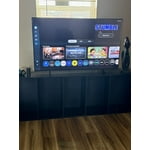
[This review was collected as part of a promotion.] I had no idea how wonderful this TV is when I ordered it through a special promotion from my internet provider. The features are easy to use. The picture is clear and vivid. The sound is perfect for my living room size. I works flawlessly with my other Samsung products. I'm looking forward to getting another Samsung TV for my bedroom.

Review from Samsung US
Helpful?7052JBFI9KAV17348165019
Dec 24, 2025
Reviewer name: Biggersound71
5 out of 5 stars
5 out of 5 stars review

Love the features
[This review was collected as part of a promotion.] I'd like to remember it.I wish there were more audio features.Available more options as far as like external speakers.You can adjust them more precisely.Good picture, good color quality, especially for a four hundred dollar tv or I want a bigger one already

Review from Samsung US
Helpful?7052JBFI9KAV17348165019
Oct 22, 2025
Reviewer name: 3417norb
5 out of 5 stars
5 out of 5 stars review

58" Crystal UHD

[This review was collected as part of a promotion.] The 58" Crystal has a very clear picture, this is a high quality TV for the price, we were very impressed with the quality of the picture also the sound is magnificent, we are considering to replace another TV with another 58 Crystal UHD

Review from Samsung US
Helpful?7052JBFI9KAV17348165019
Dec 17, 2025
Reviewer name: Gemfreak
5 out of 5 stars
5 out of 5 stars review

Love it just right

[This review was collected as part of a promotion.] I just love my TV it's so lightweight and sleek. It's the perfect size and the picture it's the best picture I've ever seen the colors are so bright and vivid just vibrant it's one of the best investments I've made recently Love my tv

Review from Samsung US
Helpful?7052JBFI9KAV17348165019
Feb 5, 2026
Reviewer name: SNS1963
3 out of 5 stars
3 out of 5 stars review

Decent TV - but wish I had gone with the next up

[This review was collected as part of a promotion.] The TV is ok for a exercise room. It is nice, thin and the pic quality is bright with goo resolution. However, Ia a bit disappointed in the response time of switching between connections. It takes 5 to 7 seconds to switch from the TV to the HDMI connection and it often goes back to the TV for no reason at all.

Review from Samsung US
Helpful?7052JBFI9KAV17348165019
reply from Samsung Advisor

Hi SNS1963, Thank you for your feedback on response time. For optimal performance, please ensure your U7900F TV is running the latest firmware. You can check this by going to: Home > left directional key > Settings > Support > Software Update To further optimize performance, try running Device Care, which checks memory, clears unused cached data, and closes background apps: Home > left directional key > Settings > Support > Device Care > Start Device Care If issues continue, please reach Samsung Support at 1-800-SAMSUNG, available 8AM – 12AM EST, 7 days a week. LiveChat is also available via the ‘Support’ link on our website. ~ Samsung Advisor

Dec 9, 2025
Reviewer name: LILJAYP
5 out of 5 stars
5 out of 5 stars review

Awesome Samsung U7900F Crystal UHD TV (2025)

[This review was collected as part of a promotion.] This Samsung U7900F Crystal UHD TV (2025) is an awesome TV. It is full of smart features, rich vibrant colors and the design is very good. It is the right size for my office and goes well with the decor and I'm able to watch my favorite shows whilst working. All of my appliances are Samsung and this TV will fit right into my Smart Things ecosystem. The experience of setting it up was a breeze and the setup walks you right thru everything and within a few minutes you're watching this brilliant TV. I am very pleased with this SamsungU7900F Crystal UHD TV (2025) and excited about upgrading my old Samsung TV to this 2025 model with Smart Features.

Review from Samsung US
Helpful?7052JBFI9KAV17348165019