Skip to Main Content
Sam's Club
Sam's Club
All Departments
All Services
Customer reviews for SAMSUNG 65" Class U7900F Series 4K Crystal UHD Smart TV for
SAMSUNG 65" Class U7900F Series 4K Crystal UHD Smart TV
4.5 out of 5 stars
stars
4,239 ratings4,160 reviews
  1. 5 stars74% (3,117)
  2. 4 stars15% (632)
  3. 3 stars6% (258)
  4. 2 stars2% (102)
  5. 1 star3% (130)

Member photos

  • +1610 images
Sort by |
Showing 121-130 of 4,160 reviews
Sep 20, 2026
Reviewer name: MeMeMeMeMeMe
1 out of 5 stars
1 out of 5 stars review

Zero Stars

[This review was collected as part of a promotion.] Default “Movie Hub is disgustingly! I keep changing it to ESPN but Samsung overwrites my selection everytime TV is turned off. Sound keeps automatically dropping in the middle if shows to level 3. (Remote is across the room, no one is sitting on it) No manual off button on TV, if you misplace, the cheap, non-functional remote, your only option is to yank the plug. Constantly manually updating software! Optimization is nil.

Review from Samsung US
Helpful?7052JBFI9KAV17348165019
reply from Samsung Advisor

Hi MeMeMeMeMeMe, Thank you for your review. While your U7900F TV may currently default to Samsung TV Plus when powered on, you can customize what your TV does at startup by adjusting the Start Screen Options. To do this, navigate to: Settings > All Settings > Advanced Features > Start Screen Option and choose from the following: 1. Start with Smart Hub Home – Automatically launches Smart Hub when the TV is turned on. You can enable or disable this option based on your preference. 2. Autorun Multi View Casting – If you cast YouTube content from your mobile device, the TV will automatically display the content using Multi View. 3. Autorun Multi View Mirroring – When you screen mirror your mobile device, Multi View will automatically open to show your device’s screen. Next, please know there is a power button located on the bottom of your TV underneath the Samsung logo. Finally, to help stabilize volume levels, try enabling the Auto Volume function, which automatically adjusts sound when switching channels or inputs: Settings > All Settings > Sound > Expert Settings > Auto Volume > On You may also want to run a Sound Test to check for audio issues: Settings > Support > Device Care > Self Diagnosis > Sound Test If your issue continues, we’re happy to help at 1-800-SAMSUNG, 8AM – 12AM EST, 7 days a week. Our LiveChat agents are also available by clicking the ‘Support’ link at Samsung.com. ~Samsung Advisor

Sep 20, 2026
Reviewer name: Bigbug716
5 out of 5 stars
5 out of 5 stars review

Great price for Samsung features.

[This review was collected as part of a promotion.] Device is smooth with beautiful picture. Picture is easily adjustable and switches into gaming modes flawlessly all setting intact.Biggest weakness is in the OS, The apps constantly need to have passwords reentered. Every few days some of my apps need to have passwords logged back in. Picture settings are accurate, Picture is bright when it needs to be and contrast is easily maintained as well. Tv has web browser but its flawed.

Review from Samsung US
Helpful?7052JBFI9KAV17348165019
Sep 21, 2026
Reviewer name: Bill
4 out of 5 stars
4 out of 5 stars review

The tv has great picture and sound.

[This review was collected as part of a promotion.] My Samsung TV sometimes loses the wifi signal. Other then that it has a great picture and sound. I've had it for a couple years and it runs 24/7 and I've never had any other problems. I recommend it to my son and bother they both got the same tv in the newer model. They also have had no problems.

Review from Samsung US
Helpful?7052JBFI9KAV17348165019
Sep 21, 2026
Reviewer name: Anonymous
5 out of 5 stars
5 out of 5 stars review

Everything you except and more!

[This review was collected as part of a promotion.] I was blown away by the bright vibrant colors it added a extra layer of emersion to all my movies and video games as well as the responsiveness of the UI also the ability to adjust the contrast id highly recommended this product

Review from Samsung US
Helpful?7052JBFI9KAV17348165019
Sep 12, 2026
Reviewer name: Jana
2 out of 5 stars
2 out of 5 stars review

Would return if I could

[This review was collected as part of a promotion.] picture is fine however the tv itself isnt very smart, it lacks HDMI outlets just has 2, doesnt have a way to hook up speakers via wires nor does it hook up to my bluetooth speaker for surround sound, or at all evcen thougfh it ways it is connected, only can use one bluetooth device at a time, the app is confusing to use the settting are confusing there is no booklet explaining. it took me over 2 weeks to figure out how to turn up the volume.

Review from Samsung US
Helpful?7052JBFI9KAV17348165019
reply from Samsung Solutions

Hello Jana, Thanks for sharing your review of Samsung’s U7900F TV. We value your feedback regarding U7900F and will share it with our teams. We appreciate you taking the time to let us know about your experience. So that we can better troubleshoot this issue and provide steps towards a solution, please contact Samsung Support at 1-800-SAMSUNG (8AM – 9PM EST Mon – Fri, 8AM – 6PM Sat – Sun), or visit our website for LiveChat. ~ Samsung Specialist

Sep 21, 2026
Reviewer name: TVTime
5 out of 5 stars
5 out of 5 stars review

What a great TV

[This review was collected as part of a promotion.] We're super happy with this TV! The refresh rate is great for responsiveness when gaming and it came work great contrast/ brightness settings for is default. One thing I constantly notice is how vibrant everything is. Even when watching older programming, the upscaling is great to make it feel modern!

Review from Samsung US
Helpful?7052JBFI9KAV17348165019
Sep 20, 2026
Reviewer name: TSL62
5 out of 5 stars
5 out of 5 stars review

Bright, punchy picture with excellent contrast

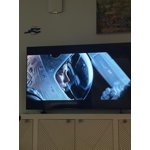
[This review was collected as part of a promotion.] 5/5 – Excellent overall Brightness is outstanding. Even in a well-lit room the picture stays punchy and doesn't wash out. Contrast is excellent. Blacks look deep and the image has real depth instead of looking flat. Responsiveness is very good (4/5). Motion is clean and menus feel snappy, but there's a tiny bit of lag if you're used to the absolute fastest screens. Upscaling is excellent. Older or lower-resolution content looks surprisingly sharp and detailed instead of soft or mushy. Vibrancy is very good (4/5). Colors pop and look lively without being overcooked, though a couple of scenes felt just a hair short of the most vivid sets I've seen. Really happy with it. Solid picture and easy to live with.

  • +1 image
Review from Samsung US
Helpful?7052JBFI9KAV17348165019
Jul 4, 2026
Reviewer name: Pepper1010
1 out of 5 stars
1 out of 5 stars review

Junk

In 18 months Im on my 2nd samsung tv, after my 1st tv lasted 6 yrs, no problems, sadly when I moved it was damaged by movers and replaced. Then replaced again in 8 months. The new ones don't keep your favorites saved. Every 2 months, yes I've clocked it on my calendar, I have to reset the favorites. I even have an account and should be able to restore settings. Nothing. 3 hrs on hold to get support, 2 times to only get hung up on. SAD BUSINESS SAD

Review from Samsung US
Helpful?7052JBFI9KAV17348165019
reply from Samsung Specialist

Thank you for your review. If there’s anything we can assist with, please don’t hesitate to call us at 1-800-SAMSUNG (8AM – 9PM EST Mon – Fri, 8AM – 6PM Sat – Sun), or reach us via text anytime. You can also visit ‘Support’ on our website for: • Live Chat • Manuals, Software, & Warranty Info ~ Samsung Specialist

Sep 22, 2026
Reviewer name: Cel67
3 out of 5 stars
3 out of 5 stars review

Difficult software update

[This review was collected as part of a promotion.] Software update failed at least 25 times. Finally worked after a couple of months. After update color was fine. Before it was lime green on any shade of green. Working ok now. It sometimes loses connection to my Samsung soundbar. Have to turn everything off, forget the soundbar and then reconnect. Have done that maybe 5 times. It's been an adventure.

Review from Samsung US
Helpful?7052JBFI9KAV17348165019
reply from Samsung Solutions

Hi Cel67, Thanks for your review. If your TV isn’t sending sound to your soundbar via HDMI ARC/eARC, try these steps: • Confirm you’re using the HDMI ARC/eARC ports on both devices with a High-Speed HDMI cable with Ethernet. • On your TV, go to: Settings > All Settings > Sound > Expert Settings > HDMI eARC Mode > Auto • Enable Anynet+ (HDMI-CEC): Settings > All Settings > General & Privacy > External Device Manager > Anynet+ (HDMI-CEC) = On • Adjust Digital Output Audio Format to Auto if your soundbar doesn’t support Dolby Digital+: Settings > All Settings > Sound > Expert Settings > Digital Output Audio Format > Auto • Make sure your TV is running the latest firmware: Settings > Support > Software Update > Update Now If sound still doesn’t play, check the soundbar’s input setting is set to HDMI or ARC. If you're still having issues, we’re happy to help at 1-800-SAMSUNG (8AM – 9PM EST Mon – Fri, 8AM – 6PM Sat – Sun). LiveChat is also available via the ‘Support’ link on our website. ~ Samsung Solutions

Sep 5, 2026
Reviewer name: Monie love
5 out of 5 stars
5 out of 5 stars review

Best Television Ever

[This review was collected as part of a promotion.] Never purchased a Samsung Television before but I have always Samsung phone products.This Television does not disappoint..the picture, the quality, the features i especially love how much its compatible to my Samsung galaxy phone. Lose your phone use the Television, all your apps on the phone so easy to set up your TV!!! I love this TV so much that im going switch out the other brand of Televisions that I have for a Samsung TV!!!! Big difference when I go from one tv to the other an again the picture is beautiful. I just found out about the remote on the smart things app on my phone too. Glad my sister told me about the sale the store had and I couldn't resist. I guess I need to stick with the brand that I know and love. If you dont know about these tvs you gotta try one and treat yourself today please

Review from Samsung US
Helpful?7052JBFI9KAV17348165019