
Skip to Main Content
Sam's Club
Sam's Club
All Departments
All Services
Customer reviews for SAMSUNG 65" Class U7900F Series 4K Crystal UHD Smart TV for
SAMSUNG 65" Class U7900F Series 4K Crystal UHD Smart TV
4.5 out of 5 stars
stars
4,239 ratings4,160 reviews
  1. 5 stars74% (3,117)
  2. 4 stars15% (632)
  3. 3 stars6% (258)
  4. 2 stars2% (102)
  5. 1 star3% (130)

Member photos

  • +1610 images
Sort by |
Showing 91-100 of 4,160 reviews
Sep 20, 2026
Reviewer name: Rages
4 out of 5 stars
4 out of 5 stars review

Good tv

[This review was collected as part of a promotion.] Very responsive but after a while the left side of my panel started going dark and I have no idea why. The brightness is very good. Contrast us better than any other tv I've used. And it just overall seems like a good tv besides the change in brightness.

Review from Samsung US
Helpful?7052JBFI9KAV17348165019
Sep 6, 2026
Reviewer name: Mary
5 out of 5 stars
5 out of 5 stars review

The pictures, contrast, brightness etc everything

[This review was collected as part of a promotion.] Everything about my Samsung TV is super, I love it..... I dnt have any regrets buying it. Good job to Samsung company because I use Samsung phone also and I love all my Samsung products. They're perfect for me

Review from Samsung US
Helpful?7052JBFI9KAV17348165019
Sep 5, 2026
Reviewer name: Ammy
5 out of 5 stars
5 out of 5 stars review

Great features!

[This review was collected as part of a promotion.] I love Samsung products, so I might not be the best one to review Samsung objectively. All 4 TVs at home are Samsung and I have no complaints. We discovered Bixby when my daughter lost her vision. I'd let her do the review on that.

Review from Samsung US
Helpful?7052JBFI9KAV17348165019
Jun 29, 2026
Reviewer name: Dissatisfied
1 out of 5 stars
1 out of 5 stars review

No auxiliary hook up's

[This review was collected as part of a promotion.] I am highly doubtful in this TV because it has only one place to hook up accessories. I can't use my DVD player, my Roku or my soundbar ect. Highly dissatisfied. If you can tell me how I can use my devices I would appreciate it.

Review from Samsung US
Helpful?7052JBFI9KAV17348165019
reply from Samsung Advisor

Hi Dissatisfied, Thank you for sharing your thoughts on the available inputs for the U7900F. If an Optical port is a crucial part of your setup needs, you’ll find that connection starting with our QN70H Series and above. For future purchases, we recommend double-checking the product specs on Samsung's site to ensure the model you choose has the ports you need. Should you ever need assistance with your TV, Samsung is here for you. Reach out by calling 1-800-SAMSUNG (8AM – 9PM EST Mon – Fri, 8AM – 6PM Sat – Sun). You can also chat with us online by visiting the ‘Support’ section of our website. ~ Samsung Advisor

Sep 20, 2026
Reviewer name: Mistiza
5 out of 5 stars
5 out of 5 stars review

Great features

[This review was collected as part of a promotion.] Love my 58”. New place and THE BEST “starter TV! I love Samsung design for the TVs. Treating myself to 65” for Christmas living room and 58” moved to the common room. Thank you for the best in tv products !

Review from Samsung US
Helpful?7052JBFI9KAV17348165019
Sep 21, 2026
Reviewer name: Tdub
5 out of 5 stars
5 out of 5 stars review

Best tv out here
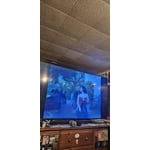
[This review was collected as part of a promotion.] I love my TV it's next level I can see everything clearly it is amazing for games and it really generates the cleanest picture imaginable I can watch just about anything on here the app systems are amazing and I love my remote the uniformity of the TV is amazing it really upscale my games with the contrast and brightness the remote is very responsive

Review from Samsung US
Helpful?7052JBFI9KAV17348165019
Sep 5, 2026
Reviewer name: Carolyn
5 out of 5 stars
5 out of 5 stars review

All enclusive in the tv

[This review was collected as part of a promotion.] This is the best tv I've ever had and I'm a senior citizen it's all enclusive and the only thing I might like is extra volume as my hearing isn't the same now and some movies have a low volume thank you kay

Review from Samsung US
Helpful?7052JBFI9KAV17348165019
Sep 5, 2026
Reviewer name: Kevin Curtis
5 out of 5 stars
5 out of 5 stars review

I love my samsung products

[This review was collected as part of a promotion.] I've been amazed since day one before I even turned it on. The box was so light that I thought they forgot the tv or the driver kept it. I live all the free apps and channels. I've had it a few months now and I will be buying another Samsung when I need one.

Review from Samsung US
Helpful?7052JBFI9KAV17348165019
Sep 20, 2026
Reviewer name: Mick
4 out of 5 stars
4 out of 5 stars review

Love the TV, Hate the remote.

[This review was collected as part of a promotion.] The TV is fine, but I find the remote control cumbersome and difficult to use. Samsung smart TV remotes used to be much simpler and user friendly. This remote does not even operate the same way twice; for example, when trying to find or switch to a specific channel - please, bring back the old remote!!!

Review from Samsung US
Helpful?7052JBFI9KAV17348165019
Sep 5, 2026
Reviewer name: Monique
1 out of 5 stars
1 out of 5 stars review

Glitch

[This review was collected as part of a promotion.] Tv was purchase during Black Friday sale. Not worth it. After a couple weeks of watching tv it seems to have issues with the screen. A green line appears and glitches every so often. Will not be buying Samsung again.

Review from Samsung US
Helpful?7052JBFI9KAV17348165019
reply from Samsung Advisor

Hi Monique, Thank you for sharing your experience with Samsung’s U7900F. If your TV is displaying lines on the screen, we recommend the following steps to help isolate the issue: 1. Check all input cable connections for any external devices (e.g., HDMI, streaming boxes, Blu-ray players) 2. Switch channels or inputs to see if the issue appears across all sources 3. Run a Picture Test to check for panel-related issues: Settings > Support > Device Care > Self Diagnosis > Picture Test 4. Perform a cold boot by holding the power button on your remote for about 10 seconds 5. Ensure your TV has the latest software installed: Settings > Support > Software Update If the issue continues after these steps, the TV may require service. For further assistance, please contact Samsung Support at 1-800-SAMSUNG (8AM – 9PM EST Mon – Fri, 8AM – 6PM Sat – Sun). LiveChat and additional support resources are also available through the Support link on our website. ~ Samsung Advisor








