Skip to Main Content
Sam's Club
Sam's Club
All Departments
All Services
Customer reviews for SAMSUNG 85" Class Q6FD Series 4K QLED Smart TV for
SAMSUNG 85" Class Q6FD Series 4K QLED Smart TV
4.6 out of 5 stars
stars
1,259 ratings1,240 reviews
  1. 5 stars76% (953)
  2. 4 stars18% (226)
  3. 3 stars3% (43)
  4. 2 stars1% (14)
  5. 1 star2% (23)

Member photos

  • +400 images
Sort by |
Showing 611-620 of 1,240 reviews
Mar 24, 2026
Reviewer name: Lowlycook
5 out of 5 stars
5 out of 5 stars review

AWESOME!!!!!!

[This review was collected as part of a promotion.] My eyes aren't the greatest but the definition of this television is so awesome I bought another for the bedroom for my wife to watch.

Review from Samsung US
Helpful?6LYU84RQNP0O17341204722
May 16, 2026
Reviewer name: Mzzg
5 out of 5 stars
5 out of 5 stars review

Love the picture

[This review was collected as part of a promotion.] The picture quality is better than real life. The colors are life like. The resolution is unmatched.

Review from Samsung US
Helpful?6LYU84RQNP0O17341204722
Mar 23, 2026
Reviewer name: Oggun973
5 out of 5 stars
5 out of 5 stars review

Color and speakers are amazing
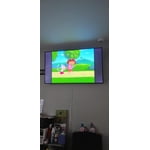
[This review was collected as part of a promotion.] The color and a contrast is amazing.. The resolution is great.. The brightness is comfortable the interface it's perfect..

Review from Samsung US
Helpful?6LYU84RQNP0O17341204722
Feb 27, 2026
Reviewer name: Luv it
4 out of 5 stars
4 out of 5 stars review

Awesome

[This review was collected as part of a promotion.] I love it it's one of the best TVs I've ever had. I would suggest have one of these TVs if you want the best picture.

Review from Samsung US
Helpful?6LYU84RQNP0O17341204722
Feb 17, 2026
Reviewer name: Pkm5881
5 out of 5 stars
5 out of 5 stars review

Lovely piece

[This review was collected as part of a promotion.] Excellent color and contrast, exceptional sound quality, brightness is conducive to the eye. Strong and reliable interface and the resolution is very good. Would recommend it to my friends

Review from Samsung US
Helpful?6LYU84RQNP0O17341204722
Apr 6, 2026
Reviewer name: Customer
3 out of 5 stars
3 out of 5 stars review

A few issues

[This review was collected as part of a promotion.] The picture is GREAT but setting it up was quite a challenge as well trouble shooting issues that have arisen since. A hard-copy owner's manual would have been nice.

Review from Samsung US
Helpful?6LYU84RQNP0O17341204722
reply from Samsung Specialist

We appreciate you sharing your experience. To help you get the most from your TV and remote functions, you can download the full e-Manual and more by visiting Samsung’s website then navigating to: Support > Manual & Software > TVs & Home Theater. From there, you can search for and select your TV model to view or download the available guides. The e-Manual & Remote Control Guide are also conveniently built into your TV: Settings > Support > Tips and User Guides. For additional guidance, your TV also includes Accessibility features designed to assist with navigation and remote use. • Learn Menu Screen provides audio guidance for on-screen menus by announcing the name and function of each item as you scroll – without making any changes. This is especially helpful for users who are visually impaired or new to Smart TV menus. Enable via: Settings > All Settings > General & Privacy > Accessibility > Learn Menu Screen. To exit, press the Return key twice. • Learn TV Remote helps users become familiar with the layout and function of each button on the Samsung remote. Pressing a button (other than Power) will prompt the TV to announce its name and purpose, again without affecting TV operation. Enable via: Settings > All Settings > General & Privacy > Accessibility > Learn TV Remote. To exit, press the Return key twice. If you’d like more assistance with these features, please reach Samsung Support at 1-800-SAMSUNG (8AM – 9PM EST Mon – Fri, 8AM – 6PM Sat – Sun). LiveChat agents are also available through the ‘Support’ link on our website. ~ Samsung Specialist

Mar 24, 2026
Reviewer name: Frank535
4 out of 5 stars
4 out of 5 stars review

Good tv but could be better
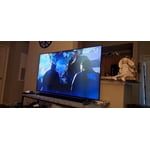
[This review was collected as part of a promotion.] The TV was great has great sound, resolution, and contrast, but with time it got black marks down the middle of the screen. Hopefully Samsung correct this on newer models.

Review from Samsung US
Helpful?6LYU84RQNP0O17341204722
Apr 1, 2026
Reviewer name: Jdobbz210
3 out of 5 stars
3 out of 5 stars review

Great picture when direct in front of me

[This review was collected as part of a promotion.] Too bright not enough color saturation, contrast is pretty much right on interface too basic and resolution is great.

Review from Samsung US
Helpful?6LYU84RQNP0O17341204722
reply from Samsung Specialist

Jdobbz210, We appreciate your feedback on the picture quality of Samsung’s Q6F TV. If the image doesn’t quite match your preferences, there are several adjustments you can make to better suit your viewing environment and content type. First, please ensure your TV is running the latest firmware, as updates may include important picture quality enhancements. Go to: Home > Left directional button > Settings > Support > Software Update > Update Now To explore picture mode options, navigate to: Home > Left directional button > Settings > All Settings > Picture > Picture Mode. Options include: • Standard – Ideal for general viewing • Dynamic – Brighter and more vibrant for well-lit spaces • Eco – Optimized for energy efficiency • Movie – Best for viewing in low light • Filmmaker Mode – Preserves the content creator’s intent and disables motion smoothing for supported content You can further customize your image by going to: Settings > All Settings > Picture > Expert Settings, where you can adjust Brightness, Contrast, Color Tone, Sharpness, Contrast Enhancer and more. If you’d like help finding the best picture settings for your preferences, please don’t hesitate to contact Samsung Support at 1-800-SAMSUNG (8AM – 9PM EST Mon – Fri, 8AM – 6PM Sat – Sun). You can also LiveChat with an agent or explore additional resources on our website by clicking the ‘Support’ link. ~ Samsung Specialist

Feb 17, 2026
Reviewer name: King
5 out of 5 stars
5 out of 5 stars review

IM LOVUNG IT !!!!
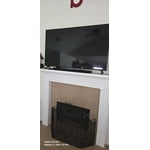
[This review was collected as part of a promotion.] Great picture quality good size, no bad glare issues when blinds are open , remote is awesome as well, automatic update are my most liked feature can't go wrong with a Samsung T.V.

Review from Samsung US
Helpful?6LYU84RQNP0O17341204722
Feb 17, 2026
Reviewer name: My tv
5 out of 5 stars
5 out of 5 stars review

65 qled 4k smart tv

[This review was collected as part of a promotion.] Great TV. Samsung has never let me down. Has all the bells and whistles ease of using and great picture and sound

Review from Samsung US
Helpful?6LYU84RQNP0O17341204722