Join Now
Skip to Main Content
Sam's Club
Sam's Club
All Departments
All Services
Customer reviews for SAMSUNG 48” Class S90FD Series 4K OLED Smart TV for
SAMSUNG 48” Class S90FD Series 4K OLED Smart TV
4.7 out of 5 stars
stars
687 ratings687 reviews
  1. 5 stars78% (538)
  2. 4 stars14% (99)
  3. 3 stars4% (26)
  4. 2 stars2% (15)
  5. 1 star1% (9)

Member photos

  • +224 images
Sort by |
Showing 101-110 of 687 reviews
Aug 20, 2026
Reviewer name: Joe C at the Beach
5 out of 5 stars
5 out of 5 stars review

Beautiful Picture, Crisp and Clear
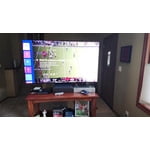
[This review was collected as part of a promotion.] This smart TV has everything you need to enjoy a nice evening at home. The picture is so crisp and clean! It's a real pleasure watching football on this TV. Easy access to apps and other video selections. I recommend this television to anyone who wants to get their moneys worth of enjoyment!

Review from Samsung US
Helpful?47UFZLBAKP7S17341154852
Sep 20, 2026
Reviewer name: Michael
5 out of 5 stars
5 out of 5 stars review

Same Quality I Always Expect
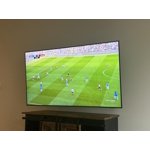
[This review was collected as part of a promotion.] I now have purchase Samsung TVs exclusively for probably 10 years. The picture is always high quality and the tv runs every streaming app ive ever needed from spectrum cable in NC to xfinity or fios in PA ive never had issues.

Review from Samsung US
Helpful?47UFZLBAKP7S17341154852
Sep 20, 2026
Reviewer name: Bellzo
5 out of 5 stars
5 out of 5 stars review

Awesome Picture Quality
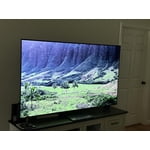
[This review was collected as part of a promotion.] We love this Samsung Television! It has absolutely amazing picture quality! The picture is incredibly sharp, vibrant, and detailed, with outstanding contrast and deep blacks. Colors look rich and natural, and the brightness is excellent even in our well-lit open space living room. The upscaling is impressive, making everything look fantastic. The responsiveness is also excellent. Overall, this TV delivers an awesome viewing experience and has exceeded our expectations. Highly recommended!

Review from Samsung US
Helpful?47UFZLBAKP7S17341154852
Aug 20, 2026
Reviewer name: Sparky
3 out of 5 stars
3 out of 5 stars review

Looks good if you can figure it out.

[This review was collected as part of a promotion.] One small remote !?! It would have been very helpful to have an idiots guide to learn this remote and TV. Cabeling and selection of connected devices took me forever to learn and I know that some is still not working. Yeah, you guessed it , I'm 80 years old and not a technophobe. I cannot profess to being a person currently up with technology but so what! Can't younger people write product use guides for the older masses needing a new TV?

Review from Samsung US
Helpful?47UFZLBAKP7S17341154852
reply from Samsung Specialist

Thank you for sharing your feedback with us. To help you get the most from your TV, you can download the full e-Manual and more by visiting Samsung’s website, then navigating to: Support > Manual & Software > TVs & Home Theater. From there, you can search for and select your S90FD TV model to view or download the available guides. The e-Manual & User Guide are also conveniently built into your TV: Settings > Support > Tips and User Guides. Your TV includes Learn Menu Screen, an accessibility feature that provides audio guidance for on-screen menus. When enabled, your TV will announce the name and function of each menu item as you scroll, without making any changes. This feature is particularly helpful for users who are visually impaired or new to Smart TV menus. To enable, go to: Settings > All Settings > General & Privacy > Accessibility > Learn Menu Screen. To exit, press the Return key twice. If you’d like more assistance with this feature, please reach Samsung Support at 1-800-SAMSUNG (8AM – 9PM EST Mon – Fri, 8AM – 6PM Sat – Sun). LiveChat agents are also available through the ‘Support’ link on our website. ~ Samsung Specialist

Sep 5, 2026
Reviewer name: Bronze Otter
4 out of 5 stars
4 out of 5 stars review

Nice OLED TV

[This review was collected as part of a promotion.] The picture quality is great. Also, being able to add Bluetooth earbuds while leaving on the main sound is a nice touch since I am hard of hearing. The only issue that drives me crazy is that the HDMI port is not defaulting to my FireStick HDMI (1) port. Keeps going to HDMI 3. Tries several solutions with no luck. I also wish there was one document that discussed all the setting you can set. Flipping through multiple web sites is a pain with many times not getting a clear understanding of the setting. Overall is a nice upgrade.

Review from Samsung US
Helpful?47UFZLBAKP7S17341154852
Aug 5, 2026
Reviewer name: JJSAMSUNG
5 out of 5 stars
5 out of 5 stars review

New Samsung

[This review was collected as part of a promotion.] Finally we replaced an older system that served us well. Unfortunately, the speakers and picture was less than desirable. It was not a Samsung. New Samsung has a great picture and sound. Looking forward to many years of great watching and listening experiences.

Review from Samsung US
Helpful?47UFZLBAKP7S17341154852
Sep 5, 2026
Reviewer name: Nipper
5 out of 5 stars
5 out of 5 stars review

Fantastic TV, worth every penny!
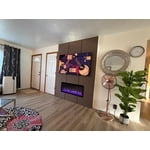
[This review was collected as part of a promotion.] This is a fantastic TV! It installed and started up immediately, meshed perfectly with my other products and the updates installed seamlessly. The picture quality is outstanding, so glad I didn't choose a cheaper unit. The sound is great, I will be installing a Sonos bar next. We will definitely purchase more of this class, I hope it comes in 100" for the next room. The TV is amazingly thin, it looks like a floating sheet of glass on the wall.

Review from Samsung US
Helpful?47UFZLBAKP7S17341154852
Sep 22, 2026
Reviewer name: Danny
4 out of 5 stars
4 out of 5 stars review

Excellent TV

[This review was collected as part of a promotion.] Great TV! The picture is excellent, clear, and crisp with great color. I enjoy that the screen is nearly completely edge to edge, and the screen is surprisingly thin. Everyone compliments it when they come over to watch football. 77" was the perfect size for the wall we put it on in our house, and with that size players are life size on the screen. It's like the players are in our house. Gaming is very good too. The TV did fail after about 9 months. Something went bad with the motherboard I belive, but samsung had someone come out and repair it quickly. The menus are fast, and all the apps I use are easily available.

Review from Samsung US
Helpful?47UFZLBAKP7S17341154852
Aug 5, 2026
Reviewer name: Santa Kapp
4 out of 5 stars
4 out of 5 stars review

still learning

[This review was collected as part of a promotion.] remote too small for big hands. cannot make adjustments to personalize screens because it blips out before completion. difficult to set up blueteeth one wireless headphones. the other roku remote

Review from Samsung US
Helpful?47UFZLBAKP7S17341154852
Aug 21, 2026
Reviewer name: Mechanic94538
3 out of 5 stars
3 out of 5 stars review

Not as expected, a little disappointing

[This review was collected as part of a promotion.] When I looked at the TV at the local warehouse store, the images were sharp and very clear. At home, despite internet speed of 300 MBPS, it is not so sharp or clear. Disappointing but too much hassle to return it.

Review from Samsung US
Helpful?47UFZLBAKP7S17341154852
reply from Samsung Specialist

We appreciate your input on the picture quality of Samsung’s S90FD TV. If the image isn’t meeting your expectations, there are several adjustments you can make to improve your viewing experience. First, please ensure your TV is running the latest firmware, as updates may include important picture quality enhancements. Go to: Home > Top directional button > Settings > Support > Software Update > Update Now Then, select a Picture Mode that best fits your environment: Home > Home > top directional key > Settings > All Settings > Picture > Picture Mode 1. Standard – Default mode for general viewing 2. Dynamic – Brighter and clearer in well-lit rooms 3. Eco – Optimized for energy saving 4. Movie – Best for watching in dark environments 5. Filmmaker Mode – Preserves content exactly as intended by creators You can also enhance your experience by enabling AI Mode, which automatically adjusts picture and sound based on your surroundings and usage patterns: Settings > All Settings > Advanced Features > AI Mode Settings > AI Mode If these adjustments don’t improve your picture quality, feel free to contact Samsung Customer Support at 1-800-SAMSUNG (8AM – 9PM EST Mon – Fri, 8AM – 6PM Sat – Sun). You can also LiveChat with an agent or find helpful guides by visiting the ‘Support’ section of our website. ~ Samsung Specialist