
 Customer reviews for SAMSUNG 75” Class U7900F Series 4K Crystal UHD Smart TV for
Member photos

 +1528 images
Hope I WIN
[This review was collected as part of a promotion.] The words don't match the lips. TV looses it's volume alot .TV cuts off on its own.but great picture. The resolution is great and my Ai doesn't work..brightness is slightly off.my neighbors hack into..asking to download. The lips mess with the anesthetics don't match the color
Hi Winner, Thank you for your feedback on the lip sync issues you're experiencing with your Samsung U7900F TV. This may be related to the content source, but if you're noticing the audio delay across all sources or channels, especially when using an external speaker setup (soundbar, receiver, etc.), there are a few settings that may help: 1. Adjust Digital Audio Delay. You can manually increase the audio delay to better match the video: Settings > All Settings > Sound > Expert Settings > Digital Output Audio Delay 2. Enable Audio Pass-Through. Samsung TVs include an audio pass-through option, which sends the audio signal directly to your connected soundbar or receiver without additional processing by the TV. This can reduce delay when using external audio devices: Settings > All Settings > Sound > Expert Settings > Digital Audio Output Format > Pass-Through 3. Check for Firmware Updates. Ensure your TV is running the latest software, which may include performance improvements related to sound or sync: Home > left directional key > Settings > Support > Software Update > Update Now If the issue continues after these steps, please contact Samsung Support for additional troubleshooting or assistance. We’re here to help at 1-800-SAMSUNG, 8AM – 12AM EST, 7 days a week. LiveChat and additional support resources are also available through the Support link on our website. ~ Samsung Advisor
Overall Great TV
[This review was collected as part of a promotion.] So far this has been a Great TV. for my family. We have had it approximately 3 months and we are very pleased with the screen resolution, brightness, sound quality of the speakers and the smart features available. The vibrant screen is also a plus.
Another great Samsung product
[This review was collected as part of a promotion.] It's a great TV I love the features that it has such as the building hub for my smart devices and the q-symphony download it appears with my Samsung soundbar it's an awesome combination the only thing I don't like it sometimes it can be a little sluggish and a little delayed whenever you hit the buttons but other than that it's a great TV
WOW
[This review was collected as part of a promotion.] We did not know what we were missing all these years with our 5+ year old TV until we purchased our new 65" Samsung. The picture is out of this world. We are still learning all the perks that this TV has. We are enjoying our shows even more with such high def and resolution.
Easy to use!
[This review was collected as part of a promotion.] I like to watch tv at night, so the ability to easily control the brightness is a GOD SEND. The home screen is easy to navigate. I love how they separate my consoles hdmi inputs from my streaming services. Love Samsung tvs
Top Tier Television!
[This review was collected as part of a promotion.] To say that I love my Samsung TV in a vast understatement! It has everything that you could possibly need and or want! From free TV channels to beautiful vivid scenery and pictures that just pop off the screen then you want to go with Samsung... Once you had your own you just laugh at other TV brands. Also it was affordable actually it was quite affordable and you can't beat that with a stick!
might be better off saving your money
[This review was collected as part of a promotion.] I'm not sure if it's a software problem but whatever operating system is on this TV is very slow and laggy even with the best of the best internet I've tried it on fiber and I've also tried it with the most expensive star link plan there's no difference there that's how I know it's the TV and not a internet connection. The interface itself also is very disappointing there's all these recommended garbage things that I don't want and I actually have to scroll down through the trash to find my actual apps or the actual features that I'm looking for which is very inconvenient for me I like to be able to turn on a TV and go instantly to where I want kind of like the Roku settings are. So keep that in mind when you're designing other things. There's also an issue with a lot of the pre-downloaded programs. They will not let you delete them you can go through the whole deleting process and you can click okay to delete and it still stays there as well as new things you download you have to delete them three maybe five times before they'll actually be removed from your TV. The lack of an input section is fairly confusing I'm young so I was able to figure it out pretty quickly but for an elderly person I do not think this thing would be a good choice. I also don't like the fact that Samsung monitors everything I play on the TV for advertisement purposes and sells that data that's very bothersome and disturbing to me and if I would have known that before I spent the money I would not have purchased this TV. I am sick of being tracked with every little thing I do! Honestly if this TV wasn't so difficult to hang I would have returned it because of what I have described above.
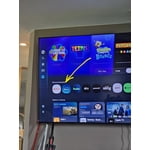
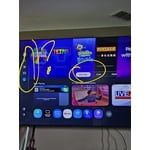
Hi ktmrider77, We appreciate your detailed feedback. Please know your opinion is important to us and will be shared with our internal teams. We recommend ensuring your TV is running the latest Firmware, version 1132.0. Go to Settings> Support> Software Update. If this firmware version is not yet available on your TV, you can download the update on a USB drive and manually update your TV: 1. On Samsung's website (upper right corner), go to: Support > Manual & Software > Find your TV model, and click on the Firmware – Upgrade File. 2. When the file has finished downloading, locate it and then unzip it. There is normally one folder inside but there may be multiple files. 3. Copy or move all of the files that were included in the zip file to a USB flash drive, but do not place them inside any other folders. If you place the software folders inside a folder on the USB flash drive, the TV or monitor will not find them. 4. Connect the USB drive containing the software upgrade into a USB port on your device. 5. Using your device's remote, navigate to and select Settings, then select All Settings, and then select Support. Select Software Update, select Update Now, and then select Yes if prompted. Your device will search the USB drive for update files. Follow the on-screen instructions to install the updated software. Updates usually take a few minutes; please do not turn off the TV until the update is complete. When the update is finished, it will restart automatically. If you need additional support, Samsung is here to help. Please call us at 1-800-SAMSUNG, available 8AM – 9PM EST Mon – Fri, 8AM – 6PM Sat – Sun. You can also chat with a LiveChat agent by clicking the ‘Support’ link on our website. ~ Samsung Advisor
Great for TV, gaming, and as a laptop monitor
[This review was collected as part of a promotion.] My bedroom is also my office, and I use this TV for both business and pleasure. It makes a terrific monitor for my laptop, with super crisp definition, accurate color, and the brightness and contrast adjustments I need to make my work day easy on the eyes. It's big enough that I can open many windows to multitask on my screen. Then it transitions nicely to my evening TV and movie watching. The brights are nice and bright, the colors are vivid, the shadows are rich and dark, and the definition and refresh rate make video smooth, which I especially appreciate because I also use it for video gaming. I also make and sell t-shirts, and when I create the artwork the images have the color accuracy and detail level I need for my artwork. The TV is light and flat enough that it mounts easily on a standard wall mount, which I need in order to have a large TV in a small space. I took off a half star each for two minor inconveniences. The first is that there are some aspects of the "smart" navigation that I wish I could change, to adapt it more to my preferences. The second is that I hate the remote control - in particular the volume toggle, which I find difficult to work comfortably. I ended up replacing the remote with a compatible universal one that has buttons with a better feel. If not for those two small annoyances, I would have easily given this TV 5 stars.
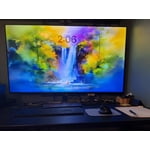
Great menu options and the sound wow!
[This review was collected as part of a promotion.] I have had my t.v. for awhile had it in my bedroom but ultimately put in living room. The color is amazing. The resolution was impressive. Great options on the brightness! With good security options for online usage. Vibrancy is also great with the sun coming through our windows.
Hardware malfunction
The first 4-6 weeks, the TV had no issues other than a slower interface. As I write this, I am roughly 2 months in and there is a hardware issue; a line runs across the top and there is a green dot. Save yourself a headache and do not purchase this item. First photo shows the green spot and part of the line. The second photo shows the entire line running across the TV.

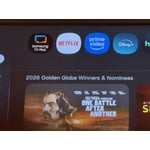
Hi Frankie, We regret to hear about your experience with the Samsung U7900F TV. Samsung stands behind the quality and performance of our products and offers a 1-year limited warranty covering manufacturer defects when purchased new from an authorized seller. You can enter your model number to review the full terms here: https://www.samsung.com/us/support/warranty/ If you haven’t already, please contact Samsung Customer Support at 1-800-SAMSUNG (available 8AM – 12AM EST daily) or via LiveChat on our website under the ‘Support’ section. We’d welcome the chance to assist. ~ Samsung Specialist