Skip to Main Content
Sam's Club
Sam's Club
Customer reviews for SAMSUNG 75” Class U7900F Series 4K Crystal UHD Smart TV for
SAMSUNG 75” Class U7900F Series 4K Crystal UHD Smart TV
4.6 out of 5 stars
stars1,967 ratings1,941 reviews
  1. 5 stars77% (1,513)
  2. 4 stars14% (285)
  3. 3 stars5% (89)
  4. 2 stars2% (34)
  5. 1 star2% (46)

Member photos

  • +759 images
Sort by |
Showing 721-730 of 1,941 reviews
Nov 10, 2025
Myhubbyspoilsme
5 out of 5 stars review

Samsung tv

[This review was collected as part of a promotion.] Picture is crystal clear love the fact it has a gaming hub installed to allow gaming with your favorite controller without a console. Tv is very easy to setup and operate within minutes. Download mutiple apps or just watch one of there many channels available for free on Samsung tv. This TV has exceeded my expectations. So much more this TV can do i could go on and on.

Review from Samsung US
Helpful?5E42PT4DC65117304274207
Jan 6, 2026
Ski9072
5 out of 5 stars review

Love my new tv

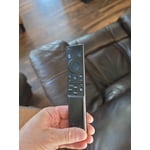
This thing is amazing, love the picture and samsung tv. It was easy to connect to my apps. I have a samsung tablet and phone, so connecting to them is super easy. The only thing I would complain about is the small remote, I prefer something with numbers on it, not push a button to have the numbers appear on screen

Review from Samsung US
Helpful?5E42PT4DC65117304274207
Nov 5, 2025
Cliente
3 out of 5 stars review

El prodcuto puede mejorar

[This review was collected as part of a promotion.] Good afternoon. Before receiving this product, I had the U8000 model. The difference is remarkable in terms of image quality, the way the menu is presented in general, and the configuration. The change is very noticeable. To be honest, I don't like this 7900 product very much; I prefer the version I had. It's more user-friendly and has better quality. After turning it on, I somehow felt I should upgrade to something better because I feel it doesn't meet my expectations.

Review from Samsung US
Helpful?5E42PT4DC65117304274207
reply from Samsung Advisor

Hi Cliente, Thank you for sharing your experience on the U7900 TV's image and User Interface. If the image doesn’t quite match your preferences, there are several adjustments you can make to better suit your viewing environment and content type. First, please ensure your TV is running the latest firmware, as updates may include important picture quality enhancements. Go to: Home > Left directional button > Settings > Support > Software Update > Update Now To explore picture mode options, navigate to: Home > Left directional button > Settings > All Settings > Picture > Picture Mode. Options include: • Standard – Ideal for general viewing • Dynamic – Brighter and more vibrant for well-lit spaces • Eco – Optimized for energy efficiency • Movie – Best for viewing in low light • Filmmaker Mode – Preserves the content creator’s intent and disables motion smoothing for supported content You can further customize your image by going to: Settings > All Settings > Picture > Expert Settings, where you can adjust Brightness, Contrast, Color Tone, Sharpness, Contrast Enhancer and more. If you’d like help finding the best picture settings for your preferences, please don’t hesitate to contact Samsung Support at 1-800-SAMSUNG, available 8AM – 12AM EST, 7 days a week. You can also LiveChat with an agent or explore additional resources on our website by clicking the ‘Support’ link. ~ Samsung Advisor

Oct 14, 2025
minnesotaguy
4 out of 5 stars review

Great TV and features except closed captioning

[This review was collected as part of a promotion.] We primarily use this for over the air television broadcasts. Also for streaming on a number of streaming services. We have been able to eliminate a separate Roku since Samsung supports all the streaming services we use. This makes it much easier. The one continuing problem is the closed captioning on broadcasts. There is no simple way to turn closed captioning on and off. You are required to go through a number of menus to do this. Why can't there be a SINGLE button on the remote like other manufacturers provide to simply turn it on and off? And what are the color buttons for? I have never seen any use for them. maybe allow them to be programmed?

Review from Samsung US
Helpful?5E42PT4DC65117304274207
Jan 4, 2026
Anonymous
1 out of 5 stars review

It’s a BLUR

Don’t buy this TV if you watch sports. Everything has tracers and not clear during a game. The 60 refresh rate is wholly Insufficient. Idk how you can make a tv that literally doesn’t show a clear picture. I understand the price Point but as consumer I am counting on th tv to show a clear picture, not the best but clear. This tv does NOT do that. I have a 65” TCL with the same 60 refresh rate and NEVER has this problem. If I could do it over I would spend whatever is needed to get at least a 120 refresh rate

Review from Samsung US
Helpful?5E42PT4DC65117304274207
reply from Samsung Specialist

Hi, Thank you for your feedback on the Samsung U7900F TV and your experience when watching fast-motion content. If the picture appears blurry or unnatural during high-speed scenes, there are several settings you can adjust to improve motion clarity. Go to: Home > left directional key > Settings > All Settings > Picture > Expert Settings, and review these key settings: Picture Clarity Settings • Off: Disables all motion enhancement • Auto: Automatically adjusts motion clarity based on content • Custom: Enables manual control of: o Judder Reduction: Smooths motion in film-based content o LED Clear Motion: Increases sharpness during fast movement o Noise Reduction: Helps reduce distortion in lower-quality sources Additional Picture Controls • Brightness – Adjust overall image brightness • Contrast – Controls the difference between light and dark areas • Sharpness – Enhances the definition of object edges • Color – Adjusts color intensity for more natural or vivid tones We hope these settings help improve your viewing experience, especially with fast-moving content. If you'd like further assistance, feel free to reach out to Samsung Support at 1-800-SAMSUNG, 8AM – 12AM EST, 7 days a week. LiveChat is also available via the ‘Support’ link on our website. ~ Samsung Specialist

Dec 9, 2025
LILJAYP
5 out of 5 stars review

Awesome Samsung U7900F Crystal UHD TV (2025)

[This review was collected as part of a promotion.] This Samsung U7900F Crystal UHD TV (2025) is an awesome TV. It is full of smart features, rich vibrant colors and the design is very good. It is the right size for my office and goes well with the decor and I'm able to watch my favorite shows whilst working. All of my appliances are Samsung and this TV will fit right into my Smart Things ecosystem. The experience of setting it up was a breeze and the setup walks you right thru everything and within a few minutes you're watching this brilliant TV. I am very pleased with this SamsungU7900F Crystal UHD TV (2025) and excited about upgrading my old Samsung TV to this 2025 model with Smart Features.

Review from Samsung US
Helpful?5E42PT4DC65117304274207
Oct 25, 2025
Tracylocks
5 out of 5 stars review

Great Picture

[This review was collected as part of a promotion.] The picture is very clear. I have always purchased Samsung TVs and they perform great. Crystal clear details, to the point you can see the actors pores and imperfections. Would highly recommend Samsung as a top choice.

Review from Samsung US
Helpful?5E42PT4DC65117304274207
Oct 17, 2025
BJ1979
5 out of 5 stars review

This is one the best products I've bought

[This review was collected as part of a promotion.] I love how easy it is to stream movies for the family and the Samsung 50" is so clear and easy to use. I can go from watching my shows. To letting the kids click right over to play there games in one simple click this is one the best TV I've ever owned and recommend it to anyone that loves to stream movies or play games all the way to been able to connect with my business partners and have meeting all in the comfort of my own home. I give the tv a 10 star rating.

Review from Samsung US
Helpful?5E42PT4DC65117304274207
Dec 31, 2025
Diefree50783
4 out of 5 stars review

Low end samsung 4k tv.

[This review was collected as part of a promotion.] I like the new styling of the menus. Nice integration with my phone. Very easy to start dex or smartview. It even has an experimental ai search feature when you open the smarthings remote app for the tv it has an Ai button that triggers it. It shows the actors and related shows to what's on the screen.

Review from Samsung US
Helpful?5E42PT4DC65117304274207
Dec 5, 2025
ANTreu90
3 out of 5 stars review

Picture Skips

[This review was collected as part of a promotion.] Just bought the tv a couple weeks ago, and sometimes while watching tv, the picture skips, repeatedly sometimes. It’ll look like a person is going forward and backwards multiple times. Very annoying.

Review from Samsung US
Helpful?5E42PT4DC65117304274207
reply from Samsung Advisor

Hi ANTreu90, Thank you for sharing your experience. Buffering during streaming is typically related to internet speed or signal strength. This can happen when your connection isn’t able to deliver data quickly enough for smooth playback. We recommend the following steps to help improve streaming performance: 1. Use a 5GHz Wi-Fi connection, if available 2. Try a wired LAN connection for more stability 3. Reposition your router to minimize obstacles between it and the TV 4. Make sure your TV is running the latest firmware (Settings > Support > Software Update) 5. Run Device Care to optimize performance: Home > left directional key > Settings > Support > Device Care > Start Device Care If buffering continues, you may want to contact your internet service provider to check your current speed or explore upgrade options. If we can assist further, please call us at 1-800-SAMSUNG, available daily from 8AM - 12AM EST. You can also chat with a LiveChat agent by clicking the ‘Support’ link on our website for: • Live Chat • Manuals, Software, & Warranty Info • Creating a Service ticket ~ Samsung Advisor