
Skip to Main Content
Sam's Club
Sam's Club
All Departments
All Services
Customer reviews for SAMSUNG 75” Class U7900F Series 4K Crystal UHD Smart TV for
SAMSUNG 75” Class U7900F Series 4K Crystal UHD Smart TV
4.5 out of 5 stars
stars
3,936 ratings3,909 reviews
  1. 5 stars73% (2,886)
  2. 4 stars15% (599)
  3. 3 stars6% (238)
  4. 2 stars2% (92)
  5. 1 star3% (121)

Member photos

  • +1528 images
Sort by |
Showing 3,771-3,780 of 3,909 reviews
Aug 24, 2025
Reviewer name: Samsungbro
5 out of 5 stars
5 out of 5 stars review

Been a great purchase!

[This review was collected as part of a promotion.] At first I was a little worried because it is so large, but the crystal clear picture makes it so after a while, you want to go bigger! The picture along with my Samsung sound bar and subwoofer are an incredible pairing!!

Review from Samsung US
Helpful?5E42PT4DC65117304274207
Aug 20, 2025
Reviewer name: Teachit
1 out of 5 stars
1 out of 5 stars review

Not the Samsung I’m used to!

Bought this tv yesterday. Did the setup and it was confusing to say the least. I’ve set up many TVs and most are straightforward and intuitive. I’ve even set up other Samsungs and this was by far the worst for set up. Now for the actual picture. Right out of the box the picture was not very good. Picture was “washed out” and just didn’t look right compared to our other TVs. Tried online suggestions for correcting colors and sharpness of image. Nothing improves the picture. So disappointed in this Samsung!!! Our cheapy TV, all our other TVs (all 6) are so much better. Our other Samsung (older set) is fine. Plus it has a mind of its own. After turning it off and then returning to watch tv it goes into Samsung plus instead of our satellite provider. This issue just started. At first at least when set was turned on we had our satellite on. And I HATE the remote. Even had our son over to help with adjustments and settings with no luck. Very disappointing product!

Review from Samsung US
Helpful?5E42PT4DC65117304274207
reply from Samsung Advisor

Hi Teachit, We appreciate your feedback and are glad you reached out to us. There are a few adjustments you can make that may improve your experience. First, let's ensure you are running the latest Firmware. Go to Settings> Support> Software Update. If the picture appears unclear, dull, or lacks definition, there are several settings you can adjust to improve clarity and overall image quality. Go to: Settings > All Settings > Picture > Expert Settings, and review these key settings: Picture Clarity Settings: While originally intended for motion handling, these can also impact overall clarity • Off: Disables motion enhancements • Auto: Automatically adjusts based on content • Custom: Lets you fine-tune: o Judder Reduction – Helps smooth out uneven motion o LED Clear Motion – Boosts sharpness in fast-moving content o Noise Reduction – Reduces distortion and enhances detail in lower-resolution sources Core Picture Settings • Brightness – Controls overall screen brightness • Contrast – Enhances the difference between bright and dark areas • Sharpness – Adjusts edge definition; closer to 20 increases detail • Color – Enhances depth and intensity of colors Finally, while your TV may currently default to Samsung TV Plus when powered on, you can customize what your TV does at startup by adjusting the Start Screen Options. To do this, navigate to: Settings > All Settings > Advanced Features > Start Screen Option and choose from the following: 1. Start with Smart Hub Home – Automatically launches Smart Hub when the TV is turned on. You can enable or disable this option based on your preference. 2. Autorun Multi View Casting – If you cast YouTube content from your mobile device, the TV will automatically display the content using Multi View. 3. Autorun Multi View Mirroring – When you screen mirror your mobile device, Multi View will automatically open to show your device’s screen. If you need help adjusting these settings or have any other questions, please contact Samsung Support at 1-800-SAMSUNG, 8AM – 12AM EST, 7 days a week. LiveChat agents are also available by clicking on the ‘Support’ link on our website. ~ Samsung Advisor

Jul 5, 2025
Reviewer name: Samsung4Life
5 out of 5 stars
5 out of 5 stars review

Easy Set Up

[This review was collected as part of a promotion.] I use my Samsung for streaming only. I love all the apps that are available. The picture quality is excellent. This is the third Samsung TV that I have purchased my first one was not a smart TV, so that tells you how long I have owned each one. I have had a 32 inch, 47 inch, and have recently graduated to a 55 inch.

Review from Samsung US
Helpful?5E42PT4DC65117304274207
Aug 22, 2025
Reviewer name: Love2Shop
5 out of 5 stars
5 out of 5 stars review

Tv is Great

[This review was collected as part of a promotion.] I love everything about the tv but my favorite features is how I can call my phone I can change the brightness settings and it is it has Bluetooth that is really cool. I couldn't find my cables to my sound bar and was and to use the Bluetooth and every time I turn on the TV it asks me if I want to connect it to the sound bar.

Review from Samsung US
Helpful?5E42PT4DC65117304274207
Sep 5, 2025
Reviewer name: Franks
4 out of 5 stars
4 out of 5 stars review

Good Picture

[This review was collected as part of a promotion.] The TV has a great picture and sound. We enjoy it very much. It was difficult for us to set up our YoutubeTv service but once we figured it out it was great. Internet connectivity is better than our previous brand. So very happy.

Review from Samsung US
Helpful?5E42PT4DC65117304274207
Jul 21, 2025
Reviewer name: CHL1350
3 out of 5 stars
3 out of 5 stars review

Many preset channels to watch but lacks features

[This review was collected as part of a promotion.] It came with many preset channels to watch but after a while I realized most channels just repeates same programs so it gets boring. Also the channel guide doesn't change as I watch different channels so it gets confusing. Tv volume is not great so I wanted to use my sound bar but it didn't come with optical connection so I had to buy an adapter and it is a hassle to control the volume.

Review from Samsung US
Helpful?5E42PT4DC65117304274207
reply from Samsung Specialist

CHL1350, Thanks for sharing your review of Samsung’s U7900F TV. We value your feedback and will share it with our teams. Should you need further assistance or have questions, please contact Samsung Customer Support at 1-800-SAMSUNG, available daily from 8AM - 12AM EST. You can also visit the Samsung website and click on ‘Support’ for: • Live Chat • Manuals, Software, & Warranty Info ~ Samsung Specialist

Sep 6, 2025
Reviewer name: Newtosamsung
5 out of 5 stars
5 out of 5 stars review

Absolutely love it!

[This review was collected as part of a promotion.] The only issue is I can’t figure out how to add my most used apps on my Home Screen instead of all the ones I never use. Picture is so clear and appreciate the entire delivery process and removing l the packaging! Great experience!

Review from Samsung US
Helpful?5E42PT4DC65117304274207
Aug 16, 2025
Reviewer name: GardenGal
5 out of 5 stars
5 out of 5 stars review

Great TV! Love it!

[This review was collected as part of a promotion.] I love my Samsung TV.The color and the pitcher are beautiful.Clear and just nice, no spots or any problems with the television. One thing is I need replacement remote because I have 3 of the same mono.And we only have one remote working. Other than that I will be buying samsung tellies from now on! I love all my Samsung products 😍 they're GREAT!!

Review from Samsung US
Helpful?5E42PT4DC65117304274207
Jun 27, 2025
Reviewer name: LDTSamsung
5 out of 5 stars
5 out of 5 stars review

LDT1 Samsung

[This review was collected as part of a promotion.] This is a great TV best picture quality I have ever seen, your internet service has to provide the recommended 4k for the best picture quality. Easy to set up from start to finish, most everting is done with the remote enjoy.

Review from Samsung US
Helpful?5E42PT4DC65117304274207
Jun 21, 2025
Reviewer name: VisPerR
5 out of 5 stars
5 out of 5 stars review

Samsung TVs - Are My Fave
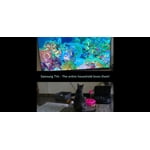
[This review was collected as part of a promotion.] Samsung TV - This is my 3rd - different sizes - for different rooms. My favorite tv's ever and love all the features, especially having channels and music, including the ocean channels for relaxing background ambiance.

Review from Samsung US
Helpful?5E42PT4DC65117304274207









