Skip to Main Content
Sam's Club
Sam's Club
All Departments
All Services
Customer reviews for SAMSUNG 75” Class U7900F Series 4K Crystal UHD Smart TV for
SAMSUNG 75” Class U7900F Series 4K Crystal UHD Smart TV
4.6 out of 5 stars
stars
3,311 ratings3,284 reviews
  1. 5 stars75% (2,472)
  2. 4 stars15% (501)
  3. 3 stars5% (179)
  4. 2 stars2% (66)
  5. 1 star3% (93)

Member photos

  • +1328 images
Sort by |
Showing 2,161-2,170 of 3,284 reviews
Jul 5, 2026
Bruh
4 out of 5 stars review

Decent enough tv

It's decent enough for a television , it provides a viewing experience.

Review from Samsung US
Helpful?5E42PT4DC65117304274207
Jul 28, 2026
2nd panel
4 out of 5 stars review

2nd panel but still a long.lastung Tv
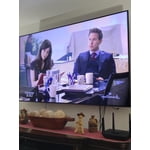
This is my 2nd panel for this TV and still the picture is great

Review from Samsung US
Helpful?5E42PT4DC65117304274207
Jul 20, 2026
Costcobuyer
1 out of 5 stars review

Turns on randomly for no reason

This TV turns on randomly for no reason. I can't figure out what's doing it.

Review from Samsung US
Helpful?5E42PT4DC65117304274207
reply from Samsung Advisor

Hi Costcobuyer, Thanks for sharing your experience. If your TV is powering on by itself, there are a few settings and external triggers to review: 1. Power On with Mobile – Your TV may be connected to the SmartThings app or other networked devices. To stop wake signals, turn this feature off: Settings > All Settings > Connection > Network > Expert Settings > Power On with Mobile = Off 2. Check for Active Timers – Go to Settings > All Settings > General & Privacy > System Manager > Time > Timer Settings, then disable any On Timers or Sleep Timers 3. Anynet+ (HDMI-CEC) – If your TV is connected to external HDMI devices, one of them may be triggering power-on behavior. To disable this feature: Settings > All Settings > General & Privacy > External Device Manager > Anynet+ (HDMI-CEC) = Off 4. Software Update – Make sure your TV is up to date: Settings > Support > Software Update > Update Now If you’ve ruled out all the above and your TV still powers on unexpectedly, try unplugging it for 30 seconds. Should the issue continue, please call Samsung Support at 1-800-SAMSUNG (8AM – 9PM EST Mon – Fri, 8AM – 6PM Sat – Sun). LiveChat is available under the ‘Support’ link on our website. ~ Samsung Advisor

Jul 5, 2026
South texas boy
5 out of 5 stars review

Great tvs
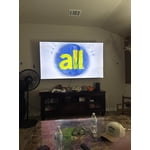
Great TVs , I have 2 Samsungs a 85 and a 70 inch great TVs .

Review from Samsung US
Helpful?5E42PT4DC65117304274207
Jul 6, 2026
PT357Ranch
4 out of 5 stars review

Mostly great

A little dark and slow to respond but otherwise serviceable.

Review from Samsung US
Helpful?5E42PT4DC65117304274207
Jul 27, 2026
Amberm
5 out of 5 stars review

Great features
Perfect size, easy to use and navigate. Great picture.

Review from Samsung US
Helpful?5E42PT4DC65117304274207
Jul 21, 2026
MNOIM
1 out of 5 stars review

Samsung Crystal 4K TV

Worst purchase ever. TV lasted on 6 months. No picture but the sound.

Review from Samsung US
Helpful?5E42PT4DC65117304274207
reply from Samsung Advisor

Hi MNOIM, Thank you for sharing your experience with your U7900F TV. If your screen goes black or you're intermittently losing picture and no external device is connected, please try the following: 1. Check for signs of power. Press the Home button on your remote - if the menu appears, the TV is powered on and the issue may be with the signal or source. 2. Confirm the red standby light is functioning. When off, the standby light should be on. When the TV is in use, the light should turn off. If the standby light is off at all times, your TV may not be receiving power. 3. Run a Picture Test to rule out hardware issues: Home > Settings > Support > Device Care > Self Diagnosis > Picture Test 4. Update your TV's firmware if the screen stays on long enough: Settings > Support > Software Update > Update Now 5. Factory Reset if the issue persists: Settings > General & Privacy > Reset > Enter PIN (default: 0000) If the screen remains black and you’re unable to access any menu, the TV may require service. Please give us a call at 1-800-SAMSUNG (8AM – 9PM EST Mon – Fri, 8AM – 6PM Sat – Sun), or visit the ‘Support’ section on our website to chat live with an agent. ~ Samsung Advisor

Jul 5, 2026
bell
2 out of 5 stars review

bad features

The brightness and color are bad with this tv. Do not buy!

Review from Samsung US
Helpful?5E42PT4DC65117304274207
reply from Samsung Advisor

Hi bell, We’re sorry to hear you’re not fully satisfied with the picture quality on your Samsung U7900F TV. If the image appears too dark, we suggest disabling certain energy-saving features, which can automatically adjust brightness and affect how the screen looks. Go to: Settings > All Settings > General & Privacy > Power and Energy Saving, then turn off Brightness Optimization, Energy Saving Solution, Motion Lighting, and/or Contrast Enhancer. You can also adjust the Picture Mode to better suit your environment: Settings > All Settings > Picture > Picture Mode • Standard – Default mode for general viewing • Dynamic – Brighter and clearer, ideal for well-lit rooms • Movie – Best for dark room viewing • Eco – Energy-saving mode • Filmmaker Mode – Preserves content as intended by creators To fine-tune brightness, go to: Home > left directional key > Settings > All Settings > Picture > Expert Settings, then adjust the Brightness level (0–50) to your preference. Lastly, please make sure your TV is running the latest firmware: Home > Home > left directional key > Settings > Support > Software Update > Update Now We hope these tips help improve your viewing experience. If you need further support, feel free to contact us at 1-800-SAMSUNG, 8AM – 12AM EST, 7 days a week. LiveChat is also available via the ‘Support’ link on our website. ~ Samsung Advisor

Jul 25, 2026
Big Bic
5 out of 5 stars review

Great TV.

Good. Over all, this is the best of my third Samsung TV I had so far.

Review from Samsung US
Helpful?5E42PT4DC65117304274207
Jul 6, 2026
Apb5
3 out of 5 stars review

Except for the volume stuck at 16, all are fine.

Brightness is perfect. Color superb. Contrast fine. Responsiveness okay. Upscaling okay.

Review from Samsung US
Helpful?5E42PT4DC65117304274207
reply from Samsung Advisor

Hi Apb5, We appreciate your feedback regarding response time. For optimal performance, please ensure your TV is running the latest firmware. You can check this by going to: Home > left directional key > Settings > Support > Software Update To further optimize performance, try running Device Care, which checks memory, clears unused cached data, and closes background apps: Home > left directional key > Settings > Support > Device Care > Start Device Care If issues continue, please reach Samsung Support at 1-800-SAMSUNG (8AM – 9PM EST Mon – Fri, 8AM – 6PM Sat – Sun). LiveChat is also available via the ‘Support’ link on our website. ~ Samsung Advisor