Skip to Main Content
Sam's Club
Sam's Club
All Departments
All Services
Customer reviews for HP Smart Tank 5104 Wireless All-in-One Inkjet Printer w/Bonus Black Ink Bottle for
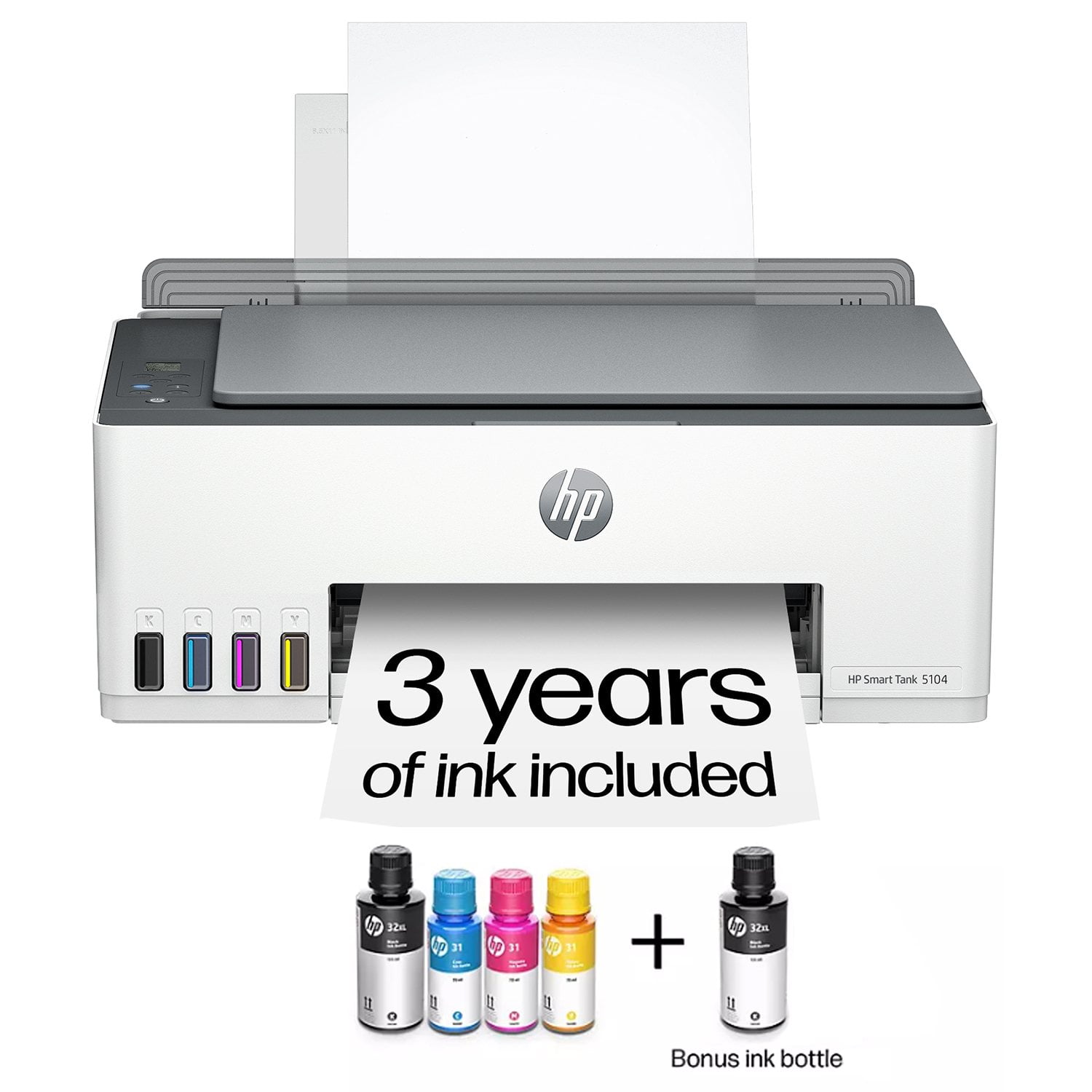
HP Smart Tank 5104 Wireless All-in-One Inkjet Printer w/Bonus Black Ink Bottle
3.9 out of 5 stars
stars
964 ratings489 reviews
  1. 5 stars52% (501)
  2. 4 stars18% (174)
  3. 3 stars9% (89)
  4. 2 stars6% (57)
  5. 1 star15% (143)
Sort by |
Showing 61-70 of 489 reviews
Sep 4, 2026
Reviewer name: Rick
4 out of 5 stars
4 out of 5 stars review

Verified Purchase

New printer

It was easy to install and set up. I love that I don't need to buy ink for about 2 years. I like the print jobs but it does take a few moments for it to start printing but that's ok with me. It has more pluses than minuses and this is my third HP printer and i love it so far.

Review from hp.com
Helpful?5ZUIW37FRAUB17067010453
Sep 4, 2026
Reviewer name: Anonymous
5 out of 5 stars
5 out of 5 stars review

Verified Purchase

Easy with great, clear instructions to set up my HP.

This was my first time owning an HP printer I've always used Epson but for lots of reasons I've decided to get an HP and I am very happy with it As I said in the title The instructions for setting up the HP were very clear and helpful and unusual I have found So I'm very happy with it

Review from hp.com
Helpful?5ZUIW37FRAUB17067010453
Sep 4, 2026
Reviewer name: Pizeve
5 out of 5 stars
5 out of 5 stars review

Verified Purchase

Only use the app and computer print button.

It's a printer, thought it dose make weird almost crunching nosies on start up probably just installed the printer head incorrectly. Not sure how to use the buttons on it besides the green check mark and red x. I'm sure it was in the manual but I just glazed over it.

Review from hp.com
Helpful?5ZUIW37FRAUB17067010453
Sep 4, 2026
Reviewer name: Mary Beth Raddatz
5 out of 5 stars
5 out of 5 stars review

Verified Purchase

Super quality color photos and ease of refilling ink tanks!

I use my printer 4 to 5 times a week for as much as 700 - 800 copies at a time. I also use it to print family color photos from my photo storage. I think the only thing that I have to get used to is it doesn't print as quickly as other printers I have had so I do need to wait longer for it to spit each copy out.

Review from hp.com
Helpful?5ZUIW37FRAUB17067010453
Sep 6, 2026
Reviewer name: Big M
5 out of 5 stars
5 out of 5 stars review

Verified Purchase

The BEST !

My daughter recommended this printer because she loves hers that she's had for 3 years. Great price point. The easiest ink system I've ever used. Print quality is great. I print from all my devices. Abosolutely no complaints at all. Setup was super easy and fast.

Review from hp.com
Helpful?5ZUIW37FRAUB17067010453
Sep 8, 2026
Reviewer name: Michelle
3 out of 5 stars
3 out of 5 stars review

Verified Purchase

Was great then stopped

It worked great when I first got it, then it stopped working so great. It doesn't connect to my Wi-Fi. I literally have to plug in my laptop to print anything, or I have to go through a secondary printing. App to print from my phone.It's supposed to tell me when I'm out of ink before.I'm out of ink when to order that app doesn't because it doesn't sink with my wifi noise, I'm also supposed to come up with up to 2 years of ink, I haven't even had it.6 months I've barely had it a month or a little over a month.Maybe , and I can't use it because it's already out of ink

Review from hp.com
Helpful?5ZUIW37FRAUB17067010453
Sep 8, 2026
Reviewer name: DS
1 out of 5 stars
1 out of 5 stars review

Verified Purchase

Not Heavy Duty

Positives: Easy setup. Love the app feature. Great convenience of supplies included Negatives: Easily disconnects with Wifi drops - takes a while to reconnect. Hard to print multiple pages in a timely manner. Printed papers come out damp. Does not print front/back.

Review from hp.com
Helpful?5ZUIW37FRAUB17067010453
Sep 7, 2026
Reviewer name: Nella Z
3 out of 5 stars
3 out of 5 stars review

Verified Purchase

Nice printer with easy to fill tanks

Two people share this printer at home. It doesn't get used even every day. It was easy to set up once I made the internet connection and downloaded the instructions. But, there is very little explanation of the symbols in the window or how to use the buttons. We are still learning every time we use the device. And another difficulty is the paper situation. Only a limited amount of paper can be used at one time. If the paper holder is too full, the machine does not work, giving only a ❌ and no explanation. One spends hours troubleshooting that simple thing the first time. And for some reason, the printer shoots out a blank page before printing every time. It seems to me that this clever idea of using the refillable tanks was not extended to the rest of the machine. There is obviously a bit of tweaking that needs to be done to the overall operation of the printer.

Review from hp.com
Helpful?5ZUIW37FRAUB17067010453
Sep 4, 2026
Reviewer name: Dr Tom
5 out of 5 stars
5 out of 5 stars review

Verified Purchase

Great printer

As usual With every HP printer I have purchased I am extremely pleased with the reliability and print quality of the printer and the smart tank 51 01 is just another in a long line of HP printers that I have owned and very pleased with . Business as usual

Review from hp.com
Helpful?5ZUIW37FRAUB17067010453
Sep 4, 2026
Reviewer name: NeverHP
1 out of 5 stars
1 out of 5 stars review

Verified Purchase

Don't buy this printer

When I set this printer up it took 2 hours to get the WIFI to connect. I had to use one of the options that printed out. It stay connected for an hour. I have never gotten it to connect to WIFI since that time. I spent four hours the other day just to get it to anything. I hard wired it to my laptop to see if that would work. I followed all the online instructions both HP and others. After I finally got the error cleared it was offline. I moved it to my desktop and got the same issues. At some point I was able to print a test page. It split up on 2 different sheets of paper. The printer is still in on offline status, but I was able to print the documents I needed after 4 hours. But the printer is taking up my one USB port. I do have a USB hub but the printer doesn't work from that. I bought this printer so I could print photos from my phone. So that's a fail. I will have to disconnect the printer to use my Hub, which I use constantly. Another fail. I have no idea if I will be able to print anything again once I disconnect it and re-connect it is still an offline status.

Review from hp.com
Helpful?5ZUIW37FRAUB17067010453