Skip to Main Content
Sam's Club
Sam's Club
All Departments
All Services
Customer reviews for Govee Smart TV Backlight 3S for 65''-75'' TVs for
Govee Smart TV Backlight 3S for 65''-75'' TVs
4.3 out of 5 stars
stars
1,260 ratings1,260 reviews
  1. 5 stars69% (869)
  2. 4 stars13% (161)
  3. 3 stars8% (98)
  4. 2 stars5% (60)
  5. 1 star6% (72)
Sort by |
Showing 351-360 of 1,260 reviews
Sep 3, 2024
Reviewer name: Justin B
5 out of 5 stars
5 out of 5 stars review

70"TV

So I have a 70"tv and was deciding to get the 55-65"or 75-85”. I went with the 55-65"after measuring the tv and knowing the 75-85"would be just slightly too long. So far no complaints. The corners don't have as much light but the colors seem to stay stay true for the shorter strands. I was having an issue where the lights came on automatically everyday but I was able to work around that. Great buy.

Review from govee.com
Helpful?300AFMRD1A8J17061603433
Sep 3, 2024
Reviewer name: Anonymous
5 out of 5 stars
5 out of 5 stars review

Great present for gamers!

I decided to gift this to my boyfriend because he loves playing games. He said the lights really elevate his gaming experience since the colors from the screen now extend off the screen. Really easy set up too! Definitely recommend to anyone who loves watching movies or playing games on their TV.

Review from govee.com
Helpful?300AFMRD1A8J17061603433
Jun 23, 2021
Reviewer name: Christopher
4 out of 5 stars
4 out of 5 stars review

Excellent for the price

I'm using these on a 60" TV. Installation was easy, and the LED adhesive backing holds very well. Adhesive clips are provided for the cables when they have to bend around in the corners.Calibration using the app was also relatively easy. Just place the foam squares on your TV (they are surprisingly sticky, so don't push too hard) and run the calibration process in the app. I find that during the calibration process it was best for me to move the calibration points slightly inside of where the orange foam targets show up. Depending on your content, you may want to move them even more inside (to avoid picking up the black bars as visual data). I chose to bottom-mount mine, and it works just fine.Colors are generally good and vibrant, although it seems some colors have a bit of shift from what I would expect (yellows are slightly more greenish, greens slightly more bluish, etc.) but it may very much depend on how saturated you have made the colors in your settings.It takes awhile to get used to, but I definitely feel that it enhances the experience.

Review from govee.com
Helpful?300AFMRD1A8J17061603433
Sep 3, 2024
Reviewer name: Customer
5 out of 5 stars
5 out of 5 stars review

just an observation

I ordered this product and I'm supposed to receive it today. I'm super excited and I'll update this after I use it but for now, I just wanted to encourage the other reviewers to re-read their reviews before they're posted. Some of the grammar and typographically errors made me think these posts were being typed my a 7 year old with special needs. Have a great day!!!

Review from govee.com
Helpful?300AFMRD1A8J17061603433
Sep 3, 2024
Reviewer name: David Dennett
5 out of 5 stars
5 out of 5 stars review

Modified camera mount for more accuracy on 98" LCD TV

I installed the T2 98 inch on my 98R754 TCL TV, and as some reviewers noted, the colors did not match the screen. After careful calibration, and then using several videos of colored balls moving around the perimeter of the screen, it became obvious that the camera was not picking up the colored balls on the entire lower 1/3rd of the TV. I requested if Govee's Sync Box HDMI would work, as I was going to replace the camera with the sync box. I was told it wont power the 98" light strip, but they generously offered a replacement. When the replacement arrived, I deleted the first device, and installed the replacement unit. There was no difference. Since this TV has a VA panel, and they are notorious for poor off angle (both horizontally and vertically) color and brightness, and considering the angle of the camera at only 5" in front of the TV, I bought a 10" L bracket, and mounted it to the wall 2" above the center of the TV. I then mounted the camera to the end of the L bracket, so the camera is 3" above the TV, and 10" from the screen. Viola. Calibrated it, and it now sees the entire screen well, the colors are much brighter, and the accuracy on the spinning color pinwheel video on YouTube is spot on. I could have mounted it on the bottom as well out 10" but I use the Govee glide lights on the walls at ceiling level which the camera would have seen reflecting off the TV screen. So for those who have TVs like mine with VA panels, extend the camera out 10" from the screen, recalibrate, and you should have a much better experience.

Review from govee.com
Helpful?300AFMRD1A8J17061603433
Sep 3, 2024
Reviewer name: Allen Thibodeaux
4 out of 5 stars
4 out of 5 stars review

Great experience

I've had the t2 system for 6 months. I've tied in many other devices to it. I dislike that the camera is unable to see both corners clearly at the same time (85 inch tv is barely within reach of the camera view.) I love the color accuracy and the speed. Scenes look amazing. Right now I have 3 ceiling lights and 2 "night lights" (the ones in the egg shape) tied in. It's absolutely breathtaking to anyone who has gotten to experience it. I highly recommend the product, but there ARE things to know! It is limited to 5 additional devices tied in. Not nearly enough for my plans. I'm still trying to decide what to do. We strongly prefer having the egg shaped night lights as accent lights around the room. Especially to our far peripheral. It's incredibly immersive. But we also enjoy the BR30 lights in the ceiling. The tv lights see each bulb as 1 device, each egg as 1 device. So right now we're stuck with 3 ceiling lights tied in and 2 eggs. Would LOVE to add in a neon bar as well as under couch lighting.

Review from govee.com
Helpful?300AFMRD1A8J17061603433
Sep 3, 2024
Reviewer name: David Brocato
5 out of 5 stars
5 out of 5 stars review

Phillip Hue Who?

I had purchased the outrageously over priced Phillip Hue Sync Box and light Strip. I got this T2 setup for 1/5 the price of the Hue and the colors are so much more vivid and accurate. Don't get me wrong it's not perfect and there is a slight lag. But I'll take this over the Hue any day as it doesn't even cover the bottom. Then it's limited to 6 areas so its doesn't offer totally addressable LED's like the T2. Install was a bit of work, but I found it fairly easy to calibrate. If you follow the instructions closely you won't have any problems. Just make sure you set your white balance correctly and you'll be amazed and the colors and accuracy by the two cameras in the T2 setup. By comparison this thing is so much better than the Phillip Hue Sync setup. Save yourself some money Go Govee!

Review from govee.com
Helpful?300AFMRD1A8J17061603433
Sep 3, 2024
Reviewer name: Anonymous
3 out of 5 stars
3 out of 5 stars review

Still has problems with white balance

No better than the T2 Pro. The problem isn't can't get white enough. But can't calibrate to near white any better than the T2 Pro. I have the original older T1 Govee backlight and camera white balance gets near white. Maybe it's the second TV that I've installed the T2 Pro and T3 Lite on? Full disclosure: the T2 is installed on a color calibrated TV. The second TV is not color calibrated. If that's the reason, disregard this review. I never tried the T2 Pro or the T3 Lite on the calibrated TV because of the larger size (not compatible with the 55" size of second TV that these later Govee models were ordered for).

Review from govee.com
Helpful?300AFMRD1A8J17061603433
Sep 3, 2024
Reviewer name: ScottK
5 out of 5 stars
5 out of 5 stars review

Govee Envisual TV Backlight T2

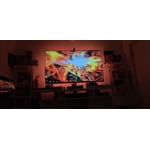
Just upgraded from the T1, this is far superior and once you get the settings right it shows color differences WAY better. Be sure to get the strip direction right, then close the blinds to darken the room a bit, then get the white Balance and Saturation adjusted. It's not perfect and there's some colors it just can't display like brown, which it shows either yellow-ish orange or red-ish, but it does a pretty good job of separating colors around the screen. This picture was before I adjusted the angle of the TV to be less tilted downward.

Review from govee.com
Helpful?300AFMRD1A8J17061603433
Aug 11, 2021
Reviewer name: Lonnie
5 out of 5 stars
5 out of 5 stars review

Immersion back ground t v lights

I am very impressed with the quality of the camera and lights it does tend to use more blues on the background but for the most part it is very accurate on color reproduction. I was hoping to be able to tie in the side lights to the system to get even better immersion for more lights and color but I am very happy with the kit and would highly recommend it to anyone looking for an inexpensive way to have a great experience

Review from govee.com
Helpful?300AFMRD1A8J17061603433