
 Customer reviews for SAMSUNG 50" Class U7900F Series 4K Crystal UHD Smart TV for
Member photos

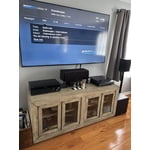



 +1322 images
This item is worth the purchase
[This review was collected as part of a promotion.] It has great pictures quality, amazing sound system. Good quality speakers, if you use it for a bedroom you don't need a surround set...I recommend getting this product. I want to upgrade my 50" nxt year.
Better than expected
[This review was collected as part of a promotion.] From the first moment I used it, I was delighted. The interface is very intuitive to navigate. The colors and image quality have surprised me. I'm a Samsung fan, and this TV is part of my ecosystem, and I'm thrilled.
Wishful THINKING!!!!!
[This review was collected as part of a promotion.] From the sound to the picture, down to the quality innovation, Samsung is number one in business!!! From the beginning of my morning until my work boots fall off at the end of the day, I look forward to watching my Samsung entertainment.... thanks y'all.
Outstanding features I give the tv 5 stars ✨
[This review was collected as part of a promotion.] I have 3 samsung phones and 2 samsung tv's including this one. I love this tv from the quality of the tv to the features of the tv. I am totally happy and pleased with the tv I would give the tv 5 STARS ✨. I also was impressed with the security on the tv. I would recommend samsung products to everyone from there tv's and phones to all their products they have top quality products and a name that you can trust and they stand by their products. I love the picture of the tv the style and look of the tv and love all of the features of the tv. I love the color of the picture and the resolution of the picture and how easy it is to stream all your cable and internet settings. I will continue to buy samsung products now and into the future. Thank You Sincerely OTTO G KENDZIOR.
Great picture tough to customize
[This review was collected as part of a promotion.] The TV has a great picture and was easy to get out of the box and running. It came with limited apps and adding apps has been impossible. It came with Netflix and Prime. We cannot add Apple TV, Peacock, Paramount etc. very frustrating.
Hi Island connection, Thank you for sharing your experience. Please know that you can customize your Home screen by installing, removing or adding your favorite apps to the Home screen. Apple TV, Peacock, Paramount are all available for download in our built-in app store. Here's how to access them: Searching for & Installing Apps 1. From the Home screen, press left on the remote’s directional pad. 2. Navigate to and select Search. 3. Using the search bar, enter the content or app you’d like to find. 4. Navigate to and select the app you’d like to install, then select Install. Note: Previously installed apps can be accessed on the Settings screen. Adding & Managing Apps on Home Screen 1. Go to App Settings (these can be found at the bottom of the Apps screen) and select the app you want to move. The following options will be available: a. Add to Home: Move the app to your desired location on the Home screen. b. Delete: Delete app. c. Lock/Unlock: Lock the app with a PIN so only you can use it. When the app is selected again, you will be prompted to enter the PIN to unlock it. d. Reinstall: Reinstall the app. e. View Details: View the app’s information and details. If you need more help with app management, please don’t hesitate to reach Samsung Support at 1-800-SAMSUNG (8AM – 12AM EST, 7 days a week). You’ll also find LiveChat, manuals, software, and warranty details under the ‘Support’ section of our website. ~ Samsung Advisor
Samsung 55"
[This review was collected as part of a promotion.] I am totally satisfied with the brightness, quality sound,color clarity! I had recently bought a roku 50" with three years warranty that after one year the screen went completely black lines and they wouldn't honor the warranty! After all the excuses, I decided to purchase my Samsung 55" couldn't have made a better decision I am ecstatic about the choice!
network issues and lag on two tvs
Replaced two TCL smart tvs with these and I was disappointed to say the least. There is hardly and storage space on there (less than 2gb free space with just the default apps). But thats not what bothered me. The real issue is the network connectivity error I get every other time I start the tv. It's infuriating and happens all the time. It must be an issue with this model because it happens on both my tvs, not just one. It takes several restarts and/or network configurations in settings before it starts workingn again. I never had connectivity issues with my old TCLs and no other device in my home has network connection issues. To add to this, the button lag is super slow, and the home screen interface isnt very convient to get to your streaming apps easily. I was expecting more from Samung but after these go I probably wont stick with their brand.
Hi Cristian, Thank you for your feedback. Please ensure you are running the latest Firmware Update 1132. To do so, go to Settings> Support> Software Update. If this firmware version is not yet available on your TV, you can download the update on a USB drive and manually update your TV: 1. On Samsung's website (upper right corner), go to: Support > Manual & Software > Find your TV model, and click on the Firmware – Upgrade File. 2. When the file has finished downloading, locate it and then unzip it. There is normally one folder inside but there may be multiple files. 3. Copy or move all of the files that were included in the zip file to a USB flash drive, but do not place them inside any other folders. If you place the software folders inside a folder on the USB flash drive, the TV or monitor will not find them. 4. Connect the USB drive containing the software upgrade into a USB port on your device. 5. Using your device's remote, navigate to and select Settings, then select All Settings, and then select Support. Select Software Update, select Update Now, and then select Yes if prompted. If you need additional support, Samsung is here to help. Please call us at 1-800-SAMSUNG, available daily from 8AM - 12AM EST. You can also chat with a LiveChat agent by clicking the ‘Support’ link on our website. ~ Samsung Advisor
Great price, disappointing viewing
[This review was collected as part of a promotion.] It’s a large screen TV at a great price. My primary quarrel is with watching dark shows (so many are these days) during the daytime in a well lit room. It proves nearly impossible to see any detail. It’s unfortunate and what that means is I can only watch my primary shows during the evening. TV is a serious hobby and I go to sleep fairly early so it’s upsetting to be confined to evenings only which provides only 1-2 of quality watch time. Unfortunately there is not enough adjustment within the TV’s picture capabilities to combat this though I’ve optimized settings as much as possible. I also had an issue with weird red lines appearing onscreen occasionally. I had to unplug the TV to make them go away. This issue seems to have resolved after 3-4 months.
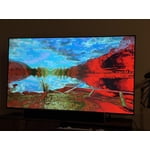
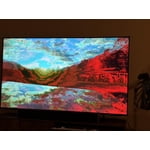
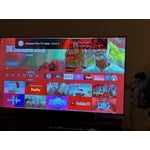
Hi Bought the tshirt, We’re sorry to hear you’re not fully satisfied with the picture quality on your Samsung U7900F TV. If the image appears too dark, we suggest disabling certain energy-saving features, which can automatically adjust brightness and affect how the screen looks. Go to: Settings > All Settings > General & Privacy > Power and Energy Saving, then turn off Brightness Optimization, Energy Saving Solution, Motion Lighting, and/or Contrast Enhancer. You can also adjust the Picture Mode to better suit your environment: Settings > All Settings > Picture > Picture Mode • Standard – Default mode for general viewing • Dynamic – Brighter and clearer, ideal for well-lit rooms • Movie – Best for dark room viewing • Eco – Energy-saving mode • Filmmaker Mode – Preserves content as intended by creators To fine-tune brightness, go to: Home > left directional key > Settings > All Settings > Picture > Expert Settings, then adjust the Brightness level (0–50) to your preference. Lastly, please make sure your TV is running the latest firmware: Home > Home > left directional key > Settings > Support > Software Update > Update Now. I hope these suggestions help. If you have any other questions, feel free to call us at 1-800-SAMSUNG between 8AM – 9PM EST Mon – Fri, 8AM – 6PM Sat – Sun, any day of the week. You can also reach our LiveChat team by selecting the ‘Support’ link on our website. ~ Samsung Advisor
Samsung has the best of everything
[This review was collected as part of a promotion.] I have always had Samsung TV's since as long as I can remember. They are the highest quality, best picture and sound, have the best accessories and are just overall the top tier of electronic products. Love my new TV and Samsung. The security features are some of the best in the business. Thank you Samsung for all your amazing products.
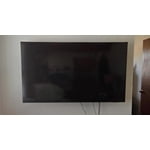
Awesome Samsung U7900F Crystal UHD TV (2025)
[This review was collected as part of a promotion.] This Samsung U7900F Crystal UHD TV (2025) is an awesome TV. It is full of smart features, rich vibrant colors and the design is very good. It is the right size for my office and goes well with the decor and I'm able to watch my favorite shows whilst working. All of my appliances are Samsung and this TV will fit right into my Smart Things ecosystem. The experience of setting it up was a breeze and the setup walks you right thru everything and within a few minutes you're watching this brilliant TV. I am very pleased with this SamsungU7900F Crystal UHD TV (2025) and excited about upgrading my old Samsung TV to this 2025 model with Smart Features.