Skip to Main Content
Sam's Club
Sam's Club
Customer reviews for SAMSUNG 50" Class U7900F Series 4K Crystal UHD Smart TV for
SAMSUNG 50" Class U7900F Series 4K Crystal UHD Smart TV
4.6 out of 5 stars
stars2,162 ratings2,098 reviews
  1. 5 stars77% (1,658)
  2. 4 stars14% (312)
  3. 3 stars5% (98)
  4. 2 stars2% (36)
  5. 1 star3% (58)

Member photos

  • +836 images
Sort by |
Showing 21-30 of 2,098 reviews
May 21, 2026
Brian
1 out of 5 stars review

Terrible

[This review was collected as part of a promotion.] Have not been able to connect to internet at all with tv. Not wireless anyway. Doesn't find any networks. Already hung it up. Wish I never bought it. Feels cheap. Picture isn't great. Volume constantly creeps up too.

Review from Samsung US
Helpful?5C20ZRAZZ46Q16498555478
reply from Samsung Advisor

Hi Brian, Thank you for sharing your experience with Wi-Fi connectivity. If your TV is having trouble connecting to the network, the following steps may help resolve the issue: Signal & Setup Tips: 1. Check TV-to-router distance – Your TV should be within 50 feet of the modem or access point for reliable signal strength. 2. Minimize interference – Turn off nearby wireless devices and make sure there are no physical barriers (stone walls, fireplaces, appliances) between the TV and router. Power Cycle Devices: 3. Restart both your TV and router – Unplug both devices for at least 30 seconds, then plug them back in and allow them to reboot fully. Connection Type: 4. Evaluate your connection method – o If using Wi-Fi, move your router closer to the TV and eliminate any obstructions. o For a more stable connection, we strongly recommend using a wired Ethernet cable. o If already using Ethernet, verify the cable is working by testing it with another device. Run Built-In Diagnostic Tools: 5. Network Test: Settings > Support > Device Care > Self Diagnosis > Smart Hub Connection Test 6. Wi-Fi Check: Settings > Support > Device Care > Self Diagnosis > Wi-Fi Last Resort: 7. Perform a Factory Reset (if issues persist): Settings > All Settings > General & Privacy > Reset > Factory Data Reset. Note that this will return all settings to their original defaults. If these steps don’t resolve the issue, please reach out to Samsung Support at 1-800-SAMSUNG, available from 8AM – 9PM EST Mon – Fri, 8AM – 6PM Sat – Sun. You can also visit the Samsung website and click on ‘Support’ for: • Live Chat • Manuals, Software, & Warranty Info ~ Samsung Advisor

May 20, 2026
Go Go Samsung television
5 out of 5 stars review

The greatest television investment

[This review was collected as part of a promotion.] I love my Samsung 55 inch TV I love Samsung TV I enjoy all the apps this is the best investment I ever made in television in my life I will only purchase Samsung and Google TV I love you Samsung thank you for your product keep going keep going and I'm looking for a job at cyber security at this moment I couldn't afford cable so I enjoyed this visit take care and keep up the good work kudos to you I can't believe I slept on this investment I will never pay for a cable again hey hallelujah

Review from Samsung US
Helpful?5C20ZRAZZ46Q16498555478
May 20, 2026
Edie
4 out of 5 stars review

Almost good

[This review was collected as part of a promotion.] I hate my tv. Only because I can't get regular stations, and trying to find the channel scanner is awful. It has great picture etc. But I want my regular stations, not just Netflix, Hulu, stations I don't watch..

Review from Samsung US
Helpful?5C20ZRAZZ46Q16498555478
May 20, 2026
Robo
1 out of 5 stars review

Poor research on my part

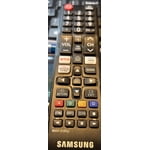
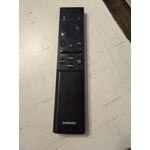
[This review was collected as part of a promotion.] I should have purchased something else because the remote is beyond clunky and the home screen is so cluttered with unusable apps, I just don't get it. Picture and resolution are fine. Sound does not match the lip movement on most channels especially older movies but on my tablet sound is not a problem. Just look at the remote, 50% of it is blank from the YouTube button down to Samsung logo... nothing. There's no fast forward or backwards, you piggy back 3 or 4 functions on a button, and if there are online directions, how would I know about them. Sorry to be critical but you asked. I don't expect you to post this because it is what you want customers to know. I'm stuck with it, though.

Review from Samsung US
Helpful?5C20ZRAZZ46Q16498555478
reply from Samsung Advisor

Hi Robo, We greatly appreciate your feedback. Please know it will be shared with our internal teams. If you're experiencing lip sync issues: • For external speakers (like a soundbar or receiver), try adjusting: Settings > Sound > Expert Settings > Digital Output Audio Delay. Also set Digital Audio Output Format to Pass-Through to reduce processing delays. • If you're using the TV’s internal speakers, a software update may help improve sync: Settings > Support > Software Update > Update Now If the delay continues across all sources, feel free to reach out to Samsung Support at 1-800-SAMSUNG, available daily from 8AM – 9PM EST Mon – Fri, 8AM – 6PM Sat – Sun. You can also visit the Samsung website and click on ‘Support’ for: • Live Chat • Manuals, Software, & Warranty Info ~ Samsung Advisor

May 11, 2026
Reggie
5 out of 5 stars review

Always a Samsung fan

[This review was collected as part of a promotion.] Absolutely love this TV. I've always been a huge Samsung fan and this TV is no exception. The picture is super sharp, the colors look great, and movies and shows look amazing in 4K. Even the sound quality surprised me way more than I expected from a TV speaker. Everything just feels smooth and easy to use. Honestly have zero complaints so far, definitely a 5-star TV in my opinion.

Review from Samsung US
Helpful?5C20ZRAZZ46Q16498555478
May 20, 2026
HazelHoney
5 out of 5 stars review

Great size and features!

[This review was collected as part of a promotion.] we absolutely love our 75 inch Samsung TV. It has made our home even more fun, loving and relaxing by being able to cuddle up as a family and watch our new TV as we were at a movie theater. I definitely would recommend a 75 inch TV if you have the money and space for it and the good news is, it was actually pretty affordable to my surprise. I definitely thought it would cost more but it didn't. I am a very satisfied customer. The brightness The contrast and the resolution are all in great shape as well and of course you're able to change setting to your liking, but we are in love

Review from Samsung US
Helpful?5C20ZRAZZ46Q16498555478
May 27, 2026
Frustrated Gpa
1 out of 5 stars review

Frustrated with set up

[This review was collected as part of a promotion.] picture good - sound good. Gave this 1 star because set-up was very frustrating! 1st prob was could not set up without creating a Samsung account, Did not want to do that but required. Followed all on screen instructions which were wrong. Nothing worked until used QR. Once into set up process, most instructions were wrong of incomplete. On-line instructions for getting to items in settings were wrong - one step left out. Only got to settings by accident. Spent 1 to 1 1/2 hours each day over a one week period until I got what I wanted. Final frustration was TV lost the internet connection. It did not save the PW for my router - had to reenter. Took several tries - kept timing out cause I could not enter PW fast enough - 1st time I've ever been required to enter a PW quickly while setting up anything. Bottom line - I have not and will not recommend this TV to a friend - or anyone else for that matter. Done with Samsung if product has to be set up

Review from Samsung US
Helpful?5C20ZRAZZ46Q16498555478
reply from Samsung Advisor

Hi Frustrated Gpa, We are very sorry to hear about the issues you experienced while setting up your TV. Please know we appreciate all of your patience, and we are here for you if you have issues in the future. Reach out by calling 1-800-SAMSUNG from 8AM – 9PM EST Mon – Fri, 8AM – 6PM Sat – Sun, any day of the week. You can also chat with us online by visiting the ‘Support’ section of our website. ~ Samsung Advisor

May 21, 2026
Samsung
5 out of 5 stars review

Love the feature

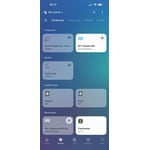
[This review was collected as part of a promotion.] I love Samsung I am particularly fond of Samsung products, as they offer seamless connectivity through their dedicated app, enabling me to conveniently control and monitor my technological devices. products I can connect to the app to control and monitor my tech products

Review from Samsung US
Helpful?5C20ZRAZZ46Q16498555478
Feb 24, 2026
Tavares
5 out of 5 stars review

Great features , clean and clear picture static fr

[This review was collected as part of a promotion.] I think the colors and resolution of this tv is perfect for any and all events. The streaming was clear and believe it or not the sound was as good downstairs as it was upstairs.it definitely gave a solid sense of security, in the sense that I can host company, with this new and beautiful TV

Review from Samsung US
Helpful?5C20ZRAZZ46Q16498555478
Jun 1, 2026
Etherealcam
4 out of 5 stars review

70 inch Crystal Clear TV Review

[This review was collected as part of a promotion.] the product is great very clear on the screen the audio is crisp and the colors is vibrant I would change would be the controller I would give it a voice like how you would have it with an Alexa or a fire stick I would give it a voice command button so that you can have the TV go to what you need to apply and click on it the buttons on the remote and then another thing is I think I would also change and add a button on the remote to switch HDMI it's a little Annoying going to the menu but then that the TV is good

Review from Samsung US
Helpful?5C20ZRAZZ46Q16498555478