Skip to Main Content
Sam's Club
Sam's Club
All Departments
All Services
Customer reviews for SAMSUNG 55" Class U7900F Series 4K Crystal UHD Smart TV for
SAMSUNG 55" Class U7900F Series 4K Crystal UHD Smart TV
4.5 out of 5 stars
stars
3,864 ratings3,764 reviews
  1. 5 stars74% (2,846)
  2. 4 stars15% (582)
  3. 3 stars6% (229)
  4. 2 stars2% (90)
  5. 1 star3% (117)

Member photos

  • +1481 images
Sort by |
Showing 2,311-2,320 of 3,764 reviews
Aug 7, 2026
Reviewer name: Kimmi
5 out of 5 stars
5 out of 5 stars review

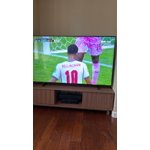
My new Samsung Crystal 65" tv
The picture is great, clear color, and sound is great.

Review from Samsung US
Helpful?3X98WOQFG1UG16471557124
Aug 20, 2026
Reviewer name: AplusF
1 out of 5 stars
1 out of 5 stars review

Terrible picture quality

Bought a 85 inch and a 75 inch at the same time. I mainly watch sports and the quality is awful

Review from Samsung US
Helpful?3X98WOQFG1UG16471557124
reply from Samsung Specialist

We appreciate your feedback on the picture quality of Samsung’s U7900F TV. If the image doesn’t quite match your preferences, there are several adjustments you can make to better suit your viewing environment and content type. First, please ensure your TV is running the latest firmware, as updates may include important picture quality enhancements. Go to: Home > Top directional button > Settings > Support > Software Update > Update Now To explore picture mode options, navigate to: Home > Top directional button > Settings > All Settings > Picture > Picture Mode. Options include: • Standard – Ideal for general viewing • Dynamic – Brighter and more vibrant for well-lit spaces • Eco – Optimized for energy efficiency • Movie – Best for viewing in low light • Filmmaker Mode – Preserves the content creator’s intent and disables motion smoothing for supported content You can further customize your image by going to: Settings > All Settings > Picture > Expert Settings, where you can adjust Brightness, Contrast, Color Tone, Sharpness, Contrast Enhancer and more. If you’d like help finding the best picture settings for your preferences, please don’t hesitate to contact Samsung Support at 1-800-SAMSUNG (8AM – 9PM EST Mon – Fri, 8AM – 6PM Sat – Sun). You can also LiveChat with an agent or explore additional resources on our website by clicking the ‘Support’ link. ~ Samsung Specialist

Aug 6, 2026
Reviewer name: Andrew
5 out of 5 stars
5 out of 5 stars review

Great features.

Great picture, easy to set up. Love Samsung TV. Great price.

Review from Samsung US
Helpful?3X98WOQFG1UG16471557124
Aug 5, 2026
Reviewer name: Living Room
1 out of 5 stars
1 out of 5 stars review

Horrible tv

Worst TV ever, screen quality very poor and very slow processor. Waste of money.

Review from Samsung US
Helpful?3X98WOQFG1UG16471557124
reply from Samsung Advisor

Hi Living Room, Thank you for your feedback on the Samsung U7900F TV. If the picture appears unclear, dull, or lacks definition, there are several settings you can adjust to improve clarity and overall image quality. Go to: Settings > All Settings > Picture > Expert Settings, and review these key settings: Picture Clarity Settings: While originally intended for motion handling, these can also impact overall clarity • Off: Disables motion enhancements • Auto: Automatically adjusts based on content • Custom: Lets you fine-tune: o Judder Reduction – Helps smooth out uneven motion o LED Clear Motion – Boosts sharpness in fast-moving content o Noise Reduction – Reduces distortion and enhances detail in lower-resolution sources Core Picture Settings • Brightness – Controls overall screen brightness • Contrast – Enhances the difference between bright and dark areas • Sharpness – Adjusts edge definition; closer to 20 increases detail • Color – Enhances depth and intensity of colors And don’t forget to check for the latest firmware, which may improve performance: Settings > Support > Software Update > Update Now These adjustments can make a noticeable difference in overall clarity. If you need further help tailoring the settings to your preferences or environment, please contact Samsung Support at 1-800-SAMSUNG (8AM – 9PM EST Mon – Fri, 8AM – 6PM Sat – Sun). LiveChat is also available via the ‘Support’ link on our website. ~ Samsung Advisor

Aug 6, 2026
Reviewer name: Go Rays
4 out of 5 stars
4 out of 5 stars review

Nice pic

not a user friendly remote to hard to get channels you want

Review from Samsung US
Helpful?3X98WOQFG1UG16471557124
Aug 20, 2026
Reviewer name: Khromo 007
1 out of 5 stars
1 out of 5 stars review

Annoying TV

All I can tell you this TV is going back to the store when I purchased it keep shutting off

Review from Samsung US
Helpful?3X98WOQFG1UG16471557124
reply from Samsung Specialist

Thank you for your review. If there’s anything we can assist with, please don’t hesitate to call us at 1-800-SAMSUNG (8AM – 9PM EST Mon – Fri, 8AM – 6PM Sat – Sun), or reach us via text anytime. You can also visit ‘Support’ on our website for: • Live Chat • Manuals, Software, & Warranty Info ~ Samsung Specialist

Aug 20, 2026
Reviewer name: Bnc421
5 out of 5 stars
5 out of 5 stars review

Couldn’t ask for better
Amazing TV perfect picture Great sound Awesome Apps and capabilities Affordable

Review from Samsung US
Helpful?3X98WOQFG1UG16471557124
Aug 21, 2026
Reviewer name: Terri
5 out of 5 stars
5 out of 5 stars review

Nice TV

Nice picture and intuitive operation making the transition to a new.TV easy and stress free.

Review from Samsung US
Helpful?3X98WOQFG1UG16471557124
Aug 19, 2026
Reviewer name: NathanO
5 out of 5 stars
5 out of 5 stars review

Solid TV

Good tv, solid, great picture reliable works great with Samsung accessories

Review from Samsung US
Helpful?3X98WOQFG1UG16471557124
Aug 20, 2026
Reviewer name: Davis1010
4 out of 5 stars
4 out of 5 stars review

Non-existent out put speaker option

the HDMI features could be updated to more friendly use

Review from Samsung US
Helpful?3X98WOQFG1UG16471557124