Skip to Main Content
Sam's Club
Sam's Club
All Departments
All Services
Customer reviews for SAMSUNG 55" Class U7900F Series 4K Crystal UHD Smart TV for
SAMSUNG 55" Class U7900F Series 4K Crystal UHD Smart TV
4.5 out of 5 stars
stars
3,864 ratings3,764 reviews
  1. 5 stars74% (2,846)
  2. 4 stars15% (582)
  3. 3 stars6% (229)
  4. 2 stars2% (90)
  5. 1 star3% (117)

Member photos

  • +1481 images
Sort by |
Showing 2,301-2,310 of 3,764 reviews
Nov 1, 2025
Reviewer name: CACTUS
5 out of 5 stars
5 out of 5 stars review

By far the best TV I've ever owned!
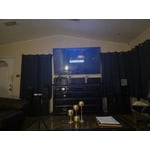
[This review was collected as part of a promotion.] You never know what you're missing till you get something better. You can see the beads of sweat on an actor's face. The colors are so much more bright and vivid than my old TV. Wish I had done this two years ago!

Review from Samsung US
Helpful?3X98WOQFG1UG16471557124
Oct 20, 2025
Reviewer name: ConstantCaptions
3 out of 5 stars
3 out of 5 stars review

Permanent captions

[This review was collected as part of a promotion.] I'm a longtime diehard Samsung fan so I was happy to be gifted this TV however from day one, there are captions/subtitles for every show. Annoying! I haven't them switched off in the controls. I checked online and some recommended unplugging then plugging back in after a few minutes. No joy so this television is NEVER watched.

Review from Samsung US
Helpful?3X98WOQFG1UG16471557124
reply from Samsung Advisor

Hi ConstantCaptions, Thank you for sharing your experience with us. Please ensure captions have been disabled on any connected devices and streaming apps or cable boxes. If you continue to have issues, please ensure are up to date with the latest Firmware. Go to Settings > Support > Software Update > Update Now. If the issue persists, a factory reset may help: Home > left directional key > Settings > All Settings > General & Privacy > Factory Data Reset. If you continue to experience issues, please don’t hesitate to contact Samsung Customer Support at 1-800-SAMSUNG, available 8AM – 12AM EST, 7 days a week. LiveChat agents and additional resources are also available through the ‘Support’ link on our Samsung website. ~ Samsung Advisor

Oct 13, 2025
Reviewer name: DABD72
5 out of 5 stars
5 out of 5 stars review

Great 75" Smart TV

[This review was collected as part of a promotion.] I love my new Samsung 75" Smart TV. It was easy to set up, and I no longer need so many HDMI cords like my old big screen TV. It is a real plug-and-play setup with apps already installed. I no longer have to use my Apple TV device—the apps are all available. I would definitely recommend this version of Samsung TV. It looks good hanging on my wall like a piece of great art!

Review from Samsung US
Helpful?3X98WOQFG1UG16471557124
Oct 8, 2025
Reviewer name: Azitokbl
3 out of 5 stars
3 out of 5 stars review

Still Figuring It Out

[This review was collected as part of a promotion.] So far, I'm in the fence about this TV. The picture is amazing, but the functions are confusing and, at times, inconvenient. I don't like how downloading an app doesn't automatically bring it to the home page. I don't like how, on the remote, the left volume button has so many functions, so trying to mute the TV will bring up an avatar doing sign language. I don't like how I need to but a soundbar to utilize Bixby. The volume isn't that great either. I do, however, like that it's a Samaung TV and I'm able to watch Roku TV. As mentioned, picture is beautiful. I really feel like I need too many spent gadgets to fully appreciate what this TV is capable of, so I'll hold on to it until I unlock it's full potential. Overall, I'd buy again... so far.

Review from Samsung US
Helpful?3X98WOQFG1UG16471557124
reply from Samsung Advisor

Hi Azitokbl, We appreciate your feedback and have a few tips that may improve your experience. First, to customize your Home Screen: 1. Go to App Settings (these can be found at the bottom of the Apps screen) and select the app you want to move. The following options will be available: a. Add to Home: Move the app to your desired location on the Home screen. b. Delete: Delete app (applicable for manually installed apps only) Next, to disable the accessibility feature you mentioned go to Menu > Settings > All Settings > General & Privacy > Accessibility. Finally, please know you do not need a soundbar to utilize Bixby. You can access Bixby via the Samsung SmartThings app. If you need additional support, Samsung is here to help. Please call us at 1-800-SAMSUNG, available daily from 8AM - 12AM EST. You can also chat with a LiveChat agent by clicking the ‘Support’ link on our website for: • Live Chat • Manuals, Software, & Warranty Info • Creating a Service ticket ~ Samsung Advisor

Nov 5, 2025
Reviewer name: Cliente
3 out of 5 stars
3 out of 5 stars review

El prodcuto puede mejorar

[This review was collected as part of a promotion.] Good afternoon. Before receiving this product, I had the U8000 model. The difference is remarkable in terms of image quality, the way the menu is presented in general, and the configuration. The change is very noticeable. To be honest, I don't like this 7900 product very much; I prefer the version I had. It's more user-friendly and has better quality. After turning it on, I somehow felt I should upgrade to something better because I feel it doesn't meet my expectations.

Review from Samsung US
Helpful?3X98WOQFG1UG16471557124
reply from Samsung Advisor

Hi Cliente, Thank you for sharing your experience on the U7900 TV's image and User Interface. If the image doesn’t quite match your preferences, there are several adjustments you can make to better suit your viewing environment and content type. First, please ensure your TV is running the latest firmware, as updates may include important picture quality enhancements. Go to: Home > Left directional button > Settings > Support > Software Update > Update Now To explore picture mode options, navigate to: Home > Left directional button > Settings > All Settings > Picture > Picture Mode. Options include: • Standard – Ideal for general viewing • Dynamic – Brighter and more vibrant for well-lit spaces • Eco – Optimized for energy efficiency • Movie – Best for viewing in low light • Filmmaker Mode – Preserves the content creator’s intent and disables motion smoothing for supported content You can further customize your image by going to: Settings > All Settings > Picture > Expert Settings, where you can adjust Brightness, Contrast, Color Tone, Sharpness, Contrast Enhancer and more. If you’d like help finding the best picture settings for your preferences, please don’t hesitate to contact Samsung Support at 1-800-SAMSUNG, available 8AM – 12AM EST, 7 days a week. You can also LiveChat with an agent or explore additional resources on our website by clicking the ‘Support’ link. ~ Samsung Advisor

Dec 5, 2025
Reviewer name: PilloJ
4 out of 5 stars
4 out of 5 stars review

Samsung 50 inch crystal series 4k tv

[This review was collected as part of a promotion.] This TV is primarily a high-value 4K streaming and general-use television. It offers vibrant color and an excellent smart platform (Tizen) at a budget price. Not 120 hz but great and clear image and sound.

Review from Samsung US
Helpful?3X98WOQFG1UG16471557124
Dec 20, 2025
Reviewer name: SamsungLove
5 out of 5 stars
5 out of 5 stars review

Love This TV

[This review was collected as part of a promotion.] As a consumer, I have had a long standing love for Samsung products. Every phone and television for the past 10 years or so, has been a Samsung product. The quality offered never ceases to amaze me. The picture clarity, crisp clear sound, and software support are fantastic.

Review from Samsung US
Helpful?3X98WOQFG1UG16471557124
Dec 5, 2025
Reviewer name: LoveSamsungproducts
5 out of 5 stars
5 out of 5 stars review

Motion based sound is impressive

[This review was collected as part of a promotion.] It really is an experience that speaks for itself, no detailed description is adequate enough to fully grasp the whole experience. You just gotta get one for yourself and set it up you literally can hear the different directions each sounds is coming from as if you were right there where the filming was happening.

Review from Samsung US
Helpful?3X98WOQFG1UG16471557124
Dec 26, 2025
Reviewer name: Mike
4 out of 5 stars
4 out of 5 stars review

Good and Great but.........

The 85" Crystal UHD U7900F 4K Smart TV 2025 is good but with the following problems, first, the remote control, it is very hard and sometimes you have to come very closer to the TV for the volume to work. The remote is a problem. Sometimes the remote jumps faster than you press it, I do not know why. Secondly, the TV has no good volume. The highest volume of 100 does not go beyond my sitting room. You need to connect it to a kind of extra speakers for it to sound as loud as you want it sound

Review from Samsung US
Helpful?3X98WOQFG1UG16471557124
Aug 7, 2026
Reviewer name: Kimmi
5 out of 5 stars
5 out of 5 stars review

My new Samsung Crystal 65" tv
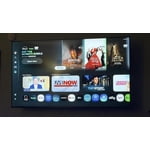
The picture is great, clear color, and sound is great.

Review from Samsung US
Helpful?3X98WOQFG1UG16471557124