
Skip to Main Content
Sam's Club
Sam's Club
All Departments
All Services
Customer reviews for SAMSUNG 55" Class U7900F Series 4K Crystal UHD Smart TV for
SAMSUNG 55" Class U7900F Series 4K Crystal UHD Smart TV
4.5 out of 5 stars
stars
3,866 ratings3,766 reviews
  1. 5 stars74% (2,847)
  2. 4 stars15% (583)
  3. 3 stars6% (229)
  4. 2 stars2% (90)
  5. 1 star3% (117)

Member photos

  • +1481 images
Sort by |
Showing 1,531-1,540 of 3,766 reviews
Jun 5, 2026
Reviewer name: Vlad
5 out of 5 stars
5 out of 5 stars review

Great TV, great price
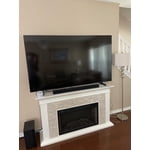
[This review was collected as part of a promotion.] This 75 inch samsung TV is awesome. The remote Is improvered new design and legs under the TV are very stable. I love it and highly recommend it to anyone.

Review from Samsung US
Helpful?3X98WOQFG1UG16471557124
May 21, 2026
Reviewer name: Chica
5 out of 5 stars
5 out of 5 stars review

Love the view

[This review was collected as part of a promotion.] very good movies very good love stories very good vibrancy very good security very good view very good clarity

Review from Samsung US
Helpful?3X98WOQFG1UG16471557124
Jul 5, 2026
Reviewer name: Poofb
3 out of 5 stars
3 out of 5 stars review

You asked

[This review was collected as part of a promotion.] Honestly for sports quality seems low. Picture distorted and doesn't look HR. Cant seem to pin common apps like Fubo and always have to go to recent searches to pull them up.

Review from Samsung US
Helpful?3X98WOQFG1UG16471557124
reply from Samsung Advisor

Hi Poofb, Thank you for sharing your experience with us. To add downloaded apps to your U7900F, go to App Settings (these can be found at the bottom of the Apps screen) and select the app you want to move. The following options will be available: a. Add to Home: Move the app to your desired location on the Home screen. b. Delete: Delete app. c. Lock/Unlock: Lock the app with a PIN so only you can use it. When the app is selected again, you will be prompted to enter the PIN to unlock it. d. Reinstall: Reinstall the app. e. View Details: View the app’s information and details. If your picture appears blurry or unnatural during high-speed scenes, there are several settings you can adjust to improve motion clarity. Go to: Home > left directional key > Settings > All Settings > Picture > Expert Settings, and review these key settings: Picture Clarity Settings • Off: Disables all motion enhancement • Auto: Automatically adjusts motion clarity based on content • Custom: Enables manual control of: o Judder Reduction: Smooths motion in film-based content o LED Clear Motion: Increases sharpness during fast movement o Noise Reduction: Helps reduce distortion in lower-quality sources Additional Picture Controls • Brightness – Adjust overall image brightness • Contrast – Controls the difference between light and dark areas • Sharpness – Enhances the definition of object edges • Color – Adjusts color intensity for more natural or vivid tones We hope these settings help improve your viewing experience, especially with fast-moving content. If you'd like further assistance, feel free to reach out to Samsung Support at 1-800-SAMSUNG, (8AM – 9PM EST Mon – Fri, 8AM – 6PM Sat – Sun), or reach us via text anytime. You can also visit ‘Support’ on our website for: • Live Chat • Manuals, Software, & Warranty Info ~ Samsung Advisor

Jul 5, 2026
Reviewer name: Jack
2 out of 5 stars
2 out of 5 stars review

Poor picture quality

[This review was collected as part of a promotion.] Picture quality not as good as my 20 year old Sharp. Poor color contrast, brightness, and resolution.

Review from Samsung US
Helpful?3X98WOQFG1UG16471557124
reply from Samsung Advisor

Hi Jack, We appreciate your feedback on the picture quality of Samsung’s U7900FD TV. If the image doesn’t quite match your preferences, there are several adjustments you can make to better suit your viewing environment and content type. First, please ensure your TV is running the latest firmware, as updates may include important picture quality enhancements. Go to: Home > Left directional button > Settings > Support > Software Update > Update Now To explore picture mode options, navigate to: Home > Left directional button > Settings > All Settings > Picture > Picture Mode. Options include: • Standard – Ideal for general viewing • Dynamic – Brighter and more vibrant for well-lit spaces • Eco – Optimized for energy efficiency • Movie – Best for viewing in low light • Filmmaker Mode – Preserves the content creator’s intent and disables motion smoothing for supported content You can further customize your image by going to: Settings > All Settings > Picture > Expert Settings, where you can adjust Brightness, Contrast, Color Tone, Sharpness, Contrast Enhancer and more. If you’d like help finding the best picture settings for your preferences, please don’t hesitate to contact Samsung Support at 1-800-SAMSUNG, available 8AM – 9PM EST Mon – Fri, 8AM – 6PM Sat – Sun. You can also LiveChat with an agent or explore additional resources on our website by clicking the ‘Support’ link. ~ Samsung Advisor

Jul 5, 2026
Reviewer name: Nene
5 out of 5 stars
5 out of 5 stars review

The TV That Looks Expensive (But Actually Isn't)
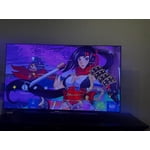
[This review was collected as part of a promotion.] To put it simply, the Samsung U7900FD is basically the TV you buy when you want a massive, modern 65-inch screen without completely wiping out your bank account.

Review from Samsung US
Helpful?3X98WOQFG1UG16471557124
May 20, 2026
Reviewer name: Bernie
5 out of 5 stars
5 out of 5 stars review

Great bang for the buck$. Exceeded expectations!

[This review was collected as part of a promotion.] Exceeded my expectations. I liked what I saw and the value before I bought it so much that I bought two.

Review from Samsung US
Helpful?3X98WOQFG1UG16471557124
Jul 5, 2026
Reviewer name: Charlieb505
5 out of 5 stars
5 out of 5 stars review

Awesome picture!
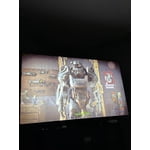
[This review was collected as part of a promotion.] The TV is an amazing TV with bright colors and the contrast is amazing The 4K resolution is very good as wellI really like the buttery smoothness when I'm playing my Xbox series X on it.

Review from Samsung US
Helpful?3X98WOQFG1UG16471557124
Jun 21, 2026
Reviewer name: Thomas
5 out of 5 stars
5 out of 5 stars review

Best of the Best

[This review was collected as part of a promotion.] This is a very good TV. It has the best picture quality and sound. I would not have any other brand. Samsung is the Best of the Best.

Review from Samsung US
Helpful?3X98WOQFG1UG16471557124
Jun 1, 2026
Reviewer name: Silver Bullet
5 out of 5 stars
5 out of 5 stars review

Great features, resolution could be better.

[This review was collected as part of a promotion.] Good product for the price. Resolution could be better. Main menu could have more features to customize. Brightness is good.

Review from Samsung US
Helpful?3X98WOQFG1UG16471557124
Jun 21, 2026
Reviewer name: Melikebeer2
5 out of 5 stars
5 out of 5 stars review

Awesome TV from Samsung!

[This review was collected as part of a promotion.] Love this TV! It has everything you need, great resolution, crystal clear images, good audio. Plus enough HDMI/USB plus to keep you happy! Thanks Samsung!

Review from Samsung US
Helpful?3X98WOQFG1UG16471557124









