Skip to Main Content
Sam's Club
Sam's Club
All Departments
All Services
Customer reviews for SAMSUNG 58” Class U7900F Series 4K Crystal UHD Smart TV for
SAMSUNG 58” Class U7900F Series 4K Crystal UHD Smart TV
4.5 out of 5 stars
stars
3,734 ratings3,676 reviews
  1. 5 stars74% (2,747)
  2. 4 stars15% (572)
  3. 3 stars6% (219)
  4. 2 stars2% (88)
  5. 1 star3% (108)

Member photos

  • +1445 images
Sort by |
Showing 2,301-2,310 of 3,676 reviews
Nov 5, 2025
Reviewer name: Cliente
3 out of 5 stars
3 out of 5 stars review

El prodcuto puede mejorar

[This review was collected as part of a promotion.] Good afternoon. Before receiving this product, I had the U8000 model. The difference is remarkable in terms of image quality, the way the menu is presented in general, and the configuration. The change is very noticeable. To be honest, I don't like this 7900 product very much; I prefer the version I had. It's more user-friendly and has better quality. After turning it on, I somehow felt I should upgrade to something better because I feel it doesn't meet my expectations.

Review from Samsung US
Helpful?18J4E5E7OZVG16422722568
reply from Samsung Advisor

Hi Cliente, Thank you for sharing your experience on the U7900 TV's image and User Interface. If the image doesn’t quite match your preferences, there are several adjustments you can make to better suit your viewing environment and content type. First, please ensure your TV is running the latest firmware, as updates may include important picture quality enhancements. Go to: Home > Left directional button > Settings > Support > Software Update > Update Now To explore picture mode options, navigate to: Home > Left directional button > Settings > All Settings > Picture > Picture Mode. Options include: • Standard – Ideal for general viewing • Dynamic – Brighter and more vibrant for well-lit spaces • Eco – Optimized for energy efficiency • Movie – Best for viewing in low light • Filmmaker Mode – Preserves the content creator’s intent and disables motion smoothing for supported content You can further customize your image by going to: Settings > All Settings > Picture > Expert Settings, where you can adjust Brightness, Contrast, Color Tone, Sharpness, Contrast Enhancer and more. If you’d like help finding the best picture settings for your preferences, please don’t hesitate to contact Samsung Support at 1-800-SAMSUNG, available 8AM – 12AM EST, 7 days a week. You can also LiveChat with an agent or explore additional resources on our website by clicking the ‘Support’ link. ~ Samsung Advisor

Oct 22, 2025
Reviewer name: 3417norb
5 out of 5 stars
5 out of 5 stars review

58" Crystal UHD

[This review was collected as part of a promotion.] The 58" Crystal has a very clear picture, this is a high quality TV for the price, we were very impressed with the quality of the picture also the sound is magnificent, we are considering to replace another TV with another 58 Crystal UHD

Review from Samsung US
Helpful?18J4E5E7OZVG16422722568
Oct 17, 2025
Reviewer name: BJ1979
5 out of 5 stars
5 out of 5 stars review

This is one the best products I've bought
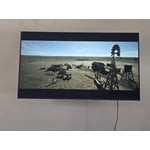
[This review was collected as part of a promotion.] I love how easy it is to stream movies for the family and the Samsung 50" is so clear and easy to use. I can go from watching my shows. To letting the kids click right over to play there games in one simple click this is one the best TV I've ever owned and recommend it to anyone that loves to stream movies or play games all the way to been able to connect with my business partners and have meeting all in the comfort of my own home. I give the tv a 10 star rating.

Review from Samsung US
Helpful?18J4E5E7OZVG16422722568
Dec 3, 2025
Reviewer name: Yougetwhatyoupayfor
3 out of 5 stars
3 out of 5 stars review

Need more hdmi ports

[This review was collected as part of a promotion.] It doesn't have the connection for optical to conect your soround system and only has 2 port for HDMI that was unexpected but has the option to connect your sound bar via Bluetooth but when you turn off the TV the bar stays on in search for Bluetooth device to conect. Bummer

Review from Samsung US
Helpful?18J4E5E7OZVG16422722568
reply from Samsung Advisor

Hi Yougetwhatyoupayfor, We appreciate your feedback regarding the available inputs on the U7900F TV. Please know your feedback is important to us and will be shared with our internal teams. If you ever have questions or need support, we’re here to help. Call us at 1-800-SAMSUNG, available from 8AM - 12AM EST, seven days a week. You can also connect with a LiveChat agent by clicking the ‘Support’ link on our website. ~ Samsung Advisor

Oct 2, 2025
Reviewer name: William
5 out of 5 stars
5 out of 5 stars review

“Samsung 75″ U7900FD: Big-Screen Crystal UHD for L

[This review was collected as part of a promotion.] If you want a large 4K display for general TV viewing, streaming, sports, or casual movie watching without paying premium prices, the Samsung 75″ U7900FD is a compelling option. It delivers excellent value and performance for everyday use, though serious HDR lovers or users in very bright rooms might want to consider stepping up to higher-end models with better contrast and peak brightness. Would you like a shorter “consumer review” version or a comparison against competitors in the same price class?

Review from Samsung US
Helpful?18J4E5E7OZVG16422722568
Dec 5, 2025
Reviewer name: DarkNite
5 out of 5 stars
5 out of 5 stars review

Color and clarity.
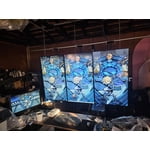
[This review was collected as part of a promotion.] I mainly use the 3 Samsung TV as a computer monitors. It mount portrait 3 50in. Started with TU690T got other brands twice because it was cheaper. But ended returning it the minute it was side by side with Samsung. Black looks blacks and most other have some sort of grain at an angle. Samsung is clear no matter the angle. So I ended with 3 50in TU690, TU700, and U7900.

Review from Samsung US
Helpful?18J4E5E7OZVG16422722568
Nov 13, 2025
Reviewer name: Love2Shop
4 out of 5 stars
4 out of 5 stars review

Its decent

[This review was collected as part of a promotion.] Its an alright tv. It makes a weird noise every now and then even though its brand new. He remote isnt that great and theres not too many hdmi ports. Other than that just decent with okay picture and sound

Review from Samsung US
Helpful?18J4E5E7OZVG16422722568
Sep 10, 2025
Reviewer name: TjVerner
5 out of 5 stars
5 out of 5 stars review

Great features and pictures
[This review was collected as part of a promotion.] I use my Samsung YV to watch over the air television, internet surfing, virtual doctor's visits, for watching movies/TV shows, listening to music and playing games with the Samsung game app and also with my PS3. Graphics, sound and color saturation is excellent. There are so many features that I have yet to crack the surface. Everyday, I'm learning something new. It sometimes seems as if I'm actually in the picture. I love my television and believe that this is one of the best television purchases I've ever made. The value is great,as well. I broke my ankle, leg and elbow, at the same time, all on the same side. I'm homebound so I decided to purchase a new television for my bedroom. I'd like to thank Samsung, for it has helped pass the time with wonderful entertainment and a great distraction learning what my television is capable of. I learn something new everyday. If you're researching and considering purchasing a new television, you can't go wrong, with Samsung.

Review from Samsung US
Helpful?18J4E5E7OZVG16422722568
Sep 22, 2025
Reviewer name: Giddle
3 out of 5 stars
3 out of 5 stars review

Jury is still out

[This review was collected as part of a promotion.] 1500 Character Maximum I have had the television for almost 1 month and debating whether to call and report a problem. Periodically, when I put on the television, the screen flickers. Have to shut off the television and restart it. Also, sometimes when I first put on the television, there is no sound / volume. Similarly, I have to shut down and restart it. Lastly, sometimes picture freezes and then reverts to Home Screen.

Review from Samsung US
Helpful?18J4E5E7OZVG16422722568
reply from Samsung Advisor

Hi Giddle, Thank you for reaching out to us. Please try the steps below to resolve the flickering and sound issues you mentioned. If you're noticing flickering or unexpected changes in screen brightness, we recommend disabling the following energy-saving features: Settings > General & Privacy > Power and Energy Saving • Brightness Optimization • Motion Lighting • Energy Saving Solution You may also want to turn off Contrast Enhancer, which can cause brightness shifts during certain scenes: Settings > Picture > Expert Settings > Contrast Enhancer Lastly, make sure your TV is running the latest firmware: Settings > Support > Software Update > Update Now. Regarding sound issues: if you're not hearing sound from your TV, please try the following: • Check your volume and mute settings, and confirm external speakers are powered on. • If using HDMI ARC/eARC, make sure you’re using a certified HDMI cable and go to: Settings > All Settings > Sound > Expert Settings > HDMI eARC Mode = Auto. Also enable Anynet+ (HDMI-CEC) under External Device Manager. • For Optical, be sure the external audio device is on before connecting, and set Sound Output = Optical. • For Bluetooth, try unpairing and reconnecting: Settings > Sound > Sound Output > Bluetooth Speaker List • For Wi-Fi speakers, use: Sound Output > Wi-Fi Speaker Surround Setup and make sure both devices are on the same network. You can also try running a Sound Test: Settings > Support > Device Care > Self Diagnosis > Sound Test If your issue continues, we’re happy to help at 1-800-SAMSUNG, 8AM – 12AM EST, 7 days a week. Our LiveChat agents are also available by clicking the ‘Support’ link at Samsung.com. ~ Samsung Advisor

Dec 27, 2025
Reviewer name: Jumbo1
4 out of 5 stars
4 out of 5 stars review

85" Crystal UHD

[This review was collected as part of a promotion.] Great TV so far, the colors and sound quality is exceptional. My only issues are that i am not a fan of the main screen, kinda hard to navigate i feel like there's too much going on. The older version with the apps on the bottom was better. Also the remote is small and hard to hold because of my big hands. No major complaints

Review from Samsung US
Helpful?18J4E5E7OZVG16422722568