Skip to Main Content
Sam's Club
Sam's Club
All Departments
All Services
Customer reviews for SAMSUNG 58” Class U7900F Series 4K Crystal UHD Smart TV for
SAMSUNG 58” Class U7900F Series 4K Crystal UHD Smart TV
4.5 out of 5 stars
stars
3,758 ratings3,700 reviews
  1. 5 stars74% (2,766)
  2. 4 stars15% (576)
  3. 3 stars6% (219)
  4. 2 stars2% (89)
  5. 1 star3% (108)

Member photos

  • +1455 images
Sort by |
Showing 1,061-1,070 of 3,700 reviews
Feb 5, 2026
Reviewer name: SNS1963
3 out of 5 stars
3 out of 5 stars review

Decent TV - but wish I had gone with the next up

[This review was collected as part of a promotion.] The TV is ok for a exercise room. It is nice, thin and the pic quality is bright with goo resolution. However, Ia a bit disappointed in the response time of switching between connections. It takes 5 to 7 seconds to switch from the TV to the HDMI connection and it often goes back to the TV for no reason at all.

Review from Samsung US
Helpful?18J4E5E7OZVG16422722568
reply from Samsung Advisor

Hi SNS1963, Thank you for your feedback on response time. For optimal performance, please ensure your U7900F TV is running the latest firmware. You can check this by going to: Home > left directional key > Settings > Support > Software Update To further optimize performance, try running Device Care, which checks memory, clears unused cached data, and closes background apps: Home > left directional key > Settings > Support > Device Care > Start Device Care If issues continue, please reach Samsung Support at 1-800-SAMSUNG, available 8AM – 12AM EST, 7 days a week. LiveChat is also available via the ‘Support’ link on our website. ~ Samsung Advisor

Jan 15, 2026
Reviewer name: Pablo
1 out of 5 stars
1 out of 5 stars review

Not so great.

This product is not what I expected.Expectation is very low,color is not what it was advertised to be.The TV has a skipping problem while surfing for apps. My Vizio 65 inch that is 6 year old p3rfroms better in color etc .I will say that Samsung tech service is great, anytime I call the go of their was to assist. Product I. Question is the 65 in U7900F series

Review from Samsung US
Helpful?18J4E5E7OZVG16422722568
reply from Samsung Advisor

Hi Pablo, Thank you for sharing your experience. Buffering during streaming is typically related to internet speed or signal strength. This can happen when your connection isn’t able to deliver data quickly enough for smooth playback. We recommend the following steps to help improve streaming performance: 1. Use a 5GHz Wi-Fi connection, if available 2. Try a wired LAN connection for more stability 3. Reposition your router to minimize obstacles between it and the TV 4. Make sure your TV is running the latest firmware (Settings > Support > Software Update) 5. Run Device Care to optimize performance: Home > left directional key > Settings > Support > Device Care > Start Device Care If buffering continues, you may want to contact your internet service provider to check your current speed or explore upgrade options. To explore picture mode options, navigate to: Home > Left directional button > Settings > All Settings > Picture > Picture Mode. Options include: • Standard – Ideal for general viewing • Dynamic – Brighter and more vibrant for well-lit spaces • Eco – Optimized for energy efficiency • Movie – Best for viewing in low light • Filmmaker Mode – Preserves the content creator’s intent and disables motion smoothing for supported content You can further customize your image by going to: Settings > All Settings > Picture > Expert Settings, where you can adjust Brightness, Contrast, Color Tone, Sharpness, Contrast Enhancer and more. If you’d like help fine-tuning your display or exploring these settings, please call Samsung Customer Support at 1-800-SAMSUNG, available 8AM – 12AM EST, 7 days a week, or visit the ‘Support’ section on our website to LiveChat with an agent. ~Samsung Advisor

Feb 17, 2026
Reviewer name: TooL8Gabe
5 out of 5 stars
5 out of 5 stars review

Samsung always WORKS!

[This review was collected as part of a promotion.] This is hands down the most amazing tv I've ever owned. I'm a Samsung Superfan so the integration between my desktop, laptop, tablet and Z fold 7 are outstanding! DEX works like a charm on this 70" beauty! Thank you for making products that just ALWAYS WORK Samsung!

Review from Samsung US
Helpful?18J4E5E7OZVG16422722568
Apr 27, 2026
Reviewer name: EvRon
5 out of 5 stars
5 out of 5 stars review

"Crystal" the name speaks for itself!
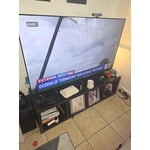
[This review was collected as part of a promotion.] I’ve been using my Samsung Crystal TV for a while now, and it continues to impress me every day. The contrast is one of the first things that stood out — dark scenes look deep and detailed, while bright moments stay clear and vibrant. It makes movies and shows feel more immersive than I expected. The overall picture quality is sharp and colorful, and the TV handles fast‑moving scenes smoothly. I also appreciate the built‑in security features, which give me confidence when using apps and streaming services. It feels good knowing the TV is designed to protect my information in the background while I enjoy my content. The interface is quick, the setup was simple, and the design looks great in my space. My experience with this TV has been consistently positive, and it’s become one of my favorite parts of my home setup.

Review from Samsung US
Helpful?18J4E5E7OZVG16422722568
Feb 12, 2026
Reviewer name: Southern Hospitality
5 out of 5 stars
5 out of 5 stars review

Wishful THINKING!!!!!

[This review was collected as part of a promotion.] From the sound to the picture, down to the quality innovation, Samsung is number one in business!!! From the beginning of my morning until my work boots fall off at the end of the day, I look forward to watching my Samsung entertainment.... thanks y'all.

Review from Samsung US
Helpful?18J4E5E7OZVG16422722568
Feb 17, 2026
Reviewer name: Anonymous
5 out of 5 stars
5 out of 5 stars review

Just what the Doctor ordered

[This review was collected as part of a promotion.] The TV is surprisingly light for its size. It was easy to hang and fit our space perfectly. Its brightness, resolution, and features were exactly what we wanted and needed. So glad we bought a Samsung, excellent choice, and we as a family love how well it plays movies, tv, and the sound for oem speakers is excellent and clear. We love the security of the online features. Overall, the vibrant picture is what we love the most. Thank you Samsung for a great TV.

Review from Samsung US
Helpful?18J4E5E7OZVG16422722568
Feb 20, 2026
Reviewer name: Lovemy55inch
4 out of 5 stars
4 out of 5 stars review

Great deal!

[This review was collected as part of a promotion.] Got a great deal on my 55” tv. Has great color and clear picture. Speakers could be better,but still very happy with my tv. Was wanting a large flat screen tv for years. It’s a crystal UHD Samsung and it’s been a good tv. It also streams 2700 free channels.

Review from Samsung US
Helpful?18J4E5E7OZVG16422722568
Jan 16, 2026
Reviewer name: Ginat
2 out of 5 stars
2 out of 5 stars review

Horrible remote

Bought this TV. It came with no user manual. The remote is horrible. They took away most of the functions. Can't figure out how to use it. Can't put in a specific channel, no previous channel button. Trying to find a user manual here. Not too easy. We are using a remote from another Samsung TV. Only way we can make it work. Very hard to navigate once you are in.

Review from Samsung US
Helpful?18J4E5E7OZVG16422722568
reply from Samsung Specialist

Hi Ginat, We appreciate you sharing your experience. To help you get the most from your TV and remote functions, you can download the full e-Manual and more by visiting Samsung’s website then navigating to: Support > Manual & Software > TVs & Home Theater. From there, you can search for and select your U7900F TV model to view or download the available guides. The e-Manual & Remote Control Guide are also conveniently built into your TV: Settings > Support > Tips and User Guides. For additional guidance, your TV also includes Accessibility features designed to assist with navigation and remote use. • Learn Menu Screen provides audio guidance for on-screen menus by announcing the name and function of each item as you scroll – without making any changes. This is especially helpful for users who are visually impaired or new to Smart TV menus. Enable via: Settings > All Settings > General & Privacy > Accessibility > Learn Menu Screen. To exit, press the Return key twice. • Learn TV Remote helps users become familiar with the layout and function of each button on the Samsung remote. Pressing a button (other than Power) will prompt the TV to announce its name and purpose, again without affecting TV operation. Enable via: Settings > All Settings > General & Privacy > Accessibility > Learn TV Remote. To exit, press the Return key twice. If you’d like more assistance with these features, please reach Samsung Support at 1-800-SAMSUNG, available 8AM – 12AM EST, 7 days a week. LiveChat agents are also available through the ‘Support’ link on our website. ~ Samsung Specialist

Feb 13, 2026
Reviewer name: Deity666
4 out of 5 stars
4 out of 5 stars review

Great tv but it doesnt have pip
[This review was collected as part of a promotion.] The tv is amazing but it lacks the key feature the pip that thought that all modern Samsung TVs come with little somebody surprised it didn't the home screen could be a litle better but all and all its a good tv

Review from Samsung US
Helpful?18J4E5E7OZVG16422722568
Mar 23, 2026
Reviewer name: Rsmithclan
5 out of 5 stars
5 out of 5 stars review

Great choice

[This review was collected as part of a promotion.] We have enjoyed our Samsung TV's (we actually have several). The fact that we keep buying them should tell you how we feel. We also have have a Samsung surround sound set of speakers, which enhance our viewing experience even more. Astheticly, it looks great, especially when running the screen saver (I use works of art). All in all, it is a beautiful addition to our rooms. Great looks, great picture, all the apps I need, great privacy setting options keeps my information secure, and ease of streaming choices make it a great choice!

Review from Samsung US
Helpful?18J4E5E7OZVG16422722568