Skip to Main Content
Sam's Club
Sam's Club
All Departments
All Services
Customer reviews for SAMSUNG 85" Class U8000F Series 4K Crystal UHD Smart TV for
SAMSUNG 85" Class U8000F Series 4K Crystal UHD Smart TV
4.5 out of 5 stars
stars
3,692 ratings3,660 reviews
  1. 5 stars71% (2,615)
  2. 4 stars16% (573)
  3. 3 stars7% (241)
  4. 2 stars3% (126)
  5. 1 star4% (137)

Member photos

  • +1177 images
Sort by |
Showing 801-810 of 3,660 reviews
May 23, 2026
Reviewer name: Pettyville
5 out of 5 stars
5 out of 5 stars review

Literally feels like a movie theater

[This review was collected as part of a promotion.] "Upgraded to this monster and love it. The aesthetics are really sleek and it doesn't look bulky on the wall at all. Image resolution is perfect, everything looks sharp and the picture has awesome vibrancy and pop to the colors. Brightness is solid even with the lights on. Plus the tizen interface is simple enough for the kids to use without complaining. Great buy."

Review from Samsung US
Helpful?3CTS2O15ZY1416007408101
Jun 5, 2026
Reviewer name: All Samsung
4 out of 5 stars
4 out of 5 stars review

TV is GREAT. Remote is HORRIBLE
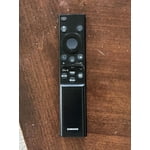
[This review was collected as part of a promotion.] This is my 6th or 7th Samsung TV and we have been happy with them all. But the remote on this newest one is terrible, hard to use and doesn't always respond. Nor does it seem to have a speak function.

Review from Samsung US
Helpful?3CTS2O15ZY1416007408101
Apr 20, 2026
Reviewer name: Woodyultra
5 out of 5 stars
5 out of 5 stars review

No surprises with Samsung televisions

[This review was collected as part of a promotion.] very happy with the product very happy with the products everything works as very happy with the product everything works as it should user friendly have several Samsung televisions and please with everything about them

Review from Samsung US
Helpful?3CTS2O15ZY1416007408101
Jul 20, 2026
Reviewer name: OldSachseComputerGuy
3 out of 5 stars
3 out of 5 stars review

Poor Viewing Angle HDTV

[This review was collected as part of a promotion.] This HDTV was purchased to replace a failed Visio unit from 2012. The Visio had a better picture viewing angle and had a pedestal mount that worked well on our chest of drawers. We returned the Samsung and purchased a superior LG model that has better picture quality, better viewing angle, boots faster and has a more usable remote control.

Review from Samsung US
Helpful?3CTS2O15ZY1416007408101
Jun 5, 2026
Reviewer name: TheBoz
4 out of 5 stars
4 out of 5 stars review

I have to reboot the tv

[This review was collected as part of a promotion.] There are times when I have to reboot the tv (unplug from power for 15 seconds) because youtube tv won't load at all. This does not happen on other tv's in the home, only this Samsung. Otherwise, the picture and sound is great.

Review from Samsung US
Helpful?3CTS2O15ZY1416007408101
Jun 1, 2026
Reviewer name: Jen2789
5 out of 5 stars
5 out of 5 stars review

I love Samsung TVs in general.

[This review was collected as part of a promotion.] If im being completely honest I think Samsung has some of the best TVs I love the color, the contrast, the resolution. Everything looks so clear and crisp. If I were to buy another TV it would definitely be another Samsung.

Review from Samsung US
Helpful?3CTS2O15ZY1416007408101
May 5, 2026
Reviewer name: Debsings2
4 out of 5 stars
4 out of 5 stars review

Good TV for the money.

[This review was collected as part of a promotion.] We wanted a a lower profile smart TV that was still big enough to give us a good viewing experience. This set fills that need. It has great color and contrast. The picture is really sharp. The preloaded apps were adequate, but could have offered more, most notably YouTubeTV. The remote is user friendly, only lacking a voice control option.

Review from Samsung US
Helpful?3CTS2O15ZY1416007408101
May 11, 2026
Reviewer name: Anonymous
4 out of 5 stars
4 out of 5 stars review

I like how accessible settings are to get to.

[This review was collected as part of a promotion.] Our tv is very user friendly, has a great picture and sound is decent quality. I like that you can customize multiple set settings for each user and time/lighting of the day. My only complaint is the remote no longer has the number buttons, the buttons make pins more discrete when typing infront of children.

Review from Samsung US
Helpful?3CTS2O15ZY1416007408101
Jun 5, 2026
Reviewer name: Shane
5 out of 5 stars
5 out of 5 stars review

Very hard to operate

[This review was collected as part of a promotion.] This TV is really hard to operate We are 71 years old we're not as tech savvy as needed to be apparently although I've had many other brands of big TVs like this I was able to operate them without a problem

Review from Samsung US
Helpful?3CTS2O15ZY1416007408101
Dec 29, 2025
Reviewer name: Dnslink
2 out of 5 stars
2 out of 5 stars review

Poor Bluetooth Connectivity-intermittent Known Iss
I purchased this model of Samsung TV a week and a half ago and finally tried to connect my Bluetooth earbuds and spent hours trying to figure out why they had intermittent connectivity. It seems after doing some research online this model is known to have poor performance with Bluetooth devices and there does not seem to be a fix unless you want to purchase an external receiver. I've purchased Samsung TVs for the last 20 years with no issues and it's sad to say they advertise Bluetooth connectivity when I'm sure they're aware of the quality issues and the number of reported cases. I'll be returning the TV and purchasing potentially another brand.

Review from Samsung US
Helpful?3CTS2O15ZY1416007408101
reply from Samsung Advisor

Hi Dnslink, We appreciate you sharing your experience connecting Bluetooth audio devices to your U8000f TV. To pair a Bluetooth device, go to: Settings > All Settings > Sound > Sound Output > Bluetooth Speaker List – If your device isn’t found, move it closer to the TV and select Scan. – Once paired, your TV will automatically detect the device when it’s powered on and prompt you to connect. You can also refer to the Connection Guide for help: Home > left directional key > Connected Devices > Connection Guide > Audio Device > Bluetooth Please also make sure both your TV and the Bluetooth device are running the latest firmware: Settings > Support > Software Update For more help, please contact Samsung Support at 1-800-SAMSUNG, 8AM – 12AM EST, 7 days a week. LiveChat agents are also available on our website under ‘Support’. ~Samsung Advisor